
WhatsApp Smart Retry Logic
Improves message delivery with WhatsApp Smart Retry Logic
Overview
WhatsApp Smart Retry improves message delivery by automatically re-attempting failed WhatsApp sends when the failure is temporary. Instead of asking users to set retry windows or technical configurations, Smart Retry uses an AI-driven engine in the CPaaS platform to decide the retry timing and frequency.
This feature is best suited for evergreen, promotional, and engagement campaigns where delayed delivery is still acceptable.
Important Points to Remember
- WhatsApp marketing or promotional templates must be approved and active.
- Campaign or Journey must use the WhatsApp channel.
- Retry logic should not be enabled for time-bound or flash sale campaigns, as retries may extend delivery windows.
- Transactional templates are not supported.
- Retries don’t add any extra cost to the campaign.
- Backend configuration allows retries to be enabled, overriding this behavior across Campaigns and Journeys.
Feature Applicability
Smart Retry is designed for specific WhatsApp use cases where delayed delivery is acceptable. Refer to the table below to understand the supported templates and their corresponding configurations.
| Supported Use Case | Details |
|---|---|
| Campaign Messages | Works for WhatsApp campaigns that use marketing or promotional templates. |
| Journey Nodes | Can be enabled inside the WhatsApp Node in Journeys. |
| Transactional Templates | Not supported, as these messages must be delivered immediately and should not be retried. |
| Time-Bound Campaigns | Not recommended because retries can extend delivery beyond your planned campaign window. |
| Templates with TTL (Time-to-Live) | Not recommended. In rare cases (<4%), retries may exceed template TTL limits. |
Steps to Enable Smart Retry
You can enable Smart Retry from both Campaigns and Journeys using the same toggle.
Campaign
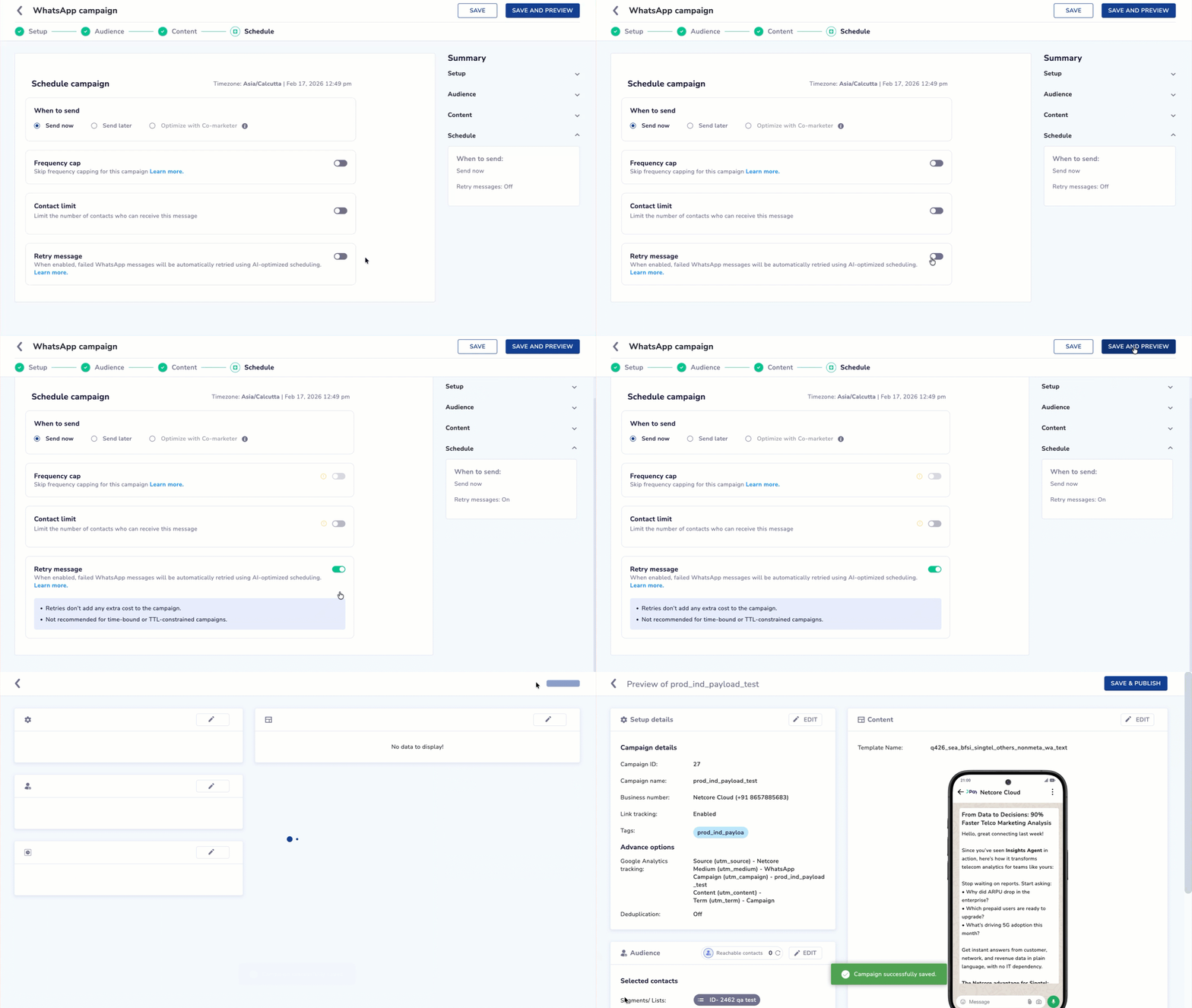
Enable Smart Retry from Campaigns
- Create a new campaign and navigate to Schedule.
- Enable the Retry message toggle, save, and then launch your campaign or publish/update your journey.
Journey
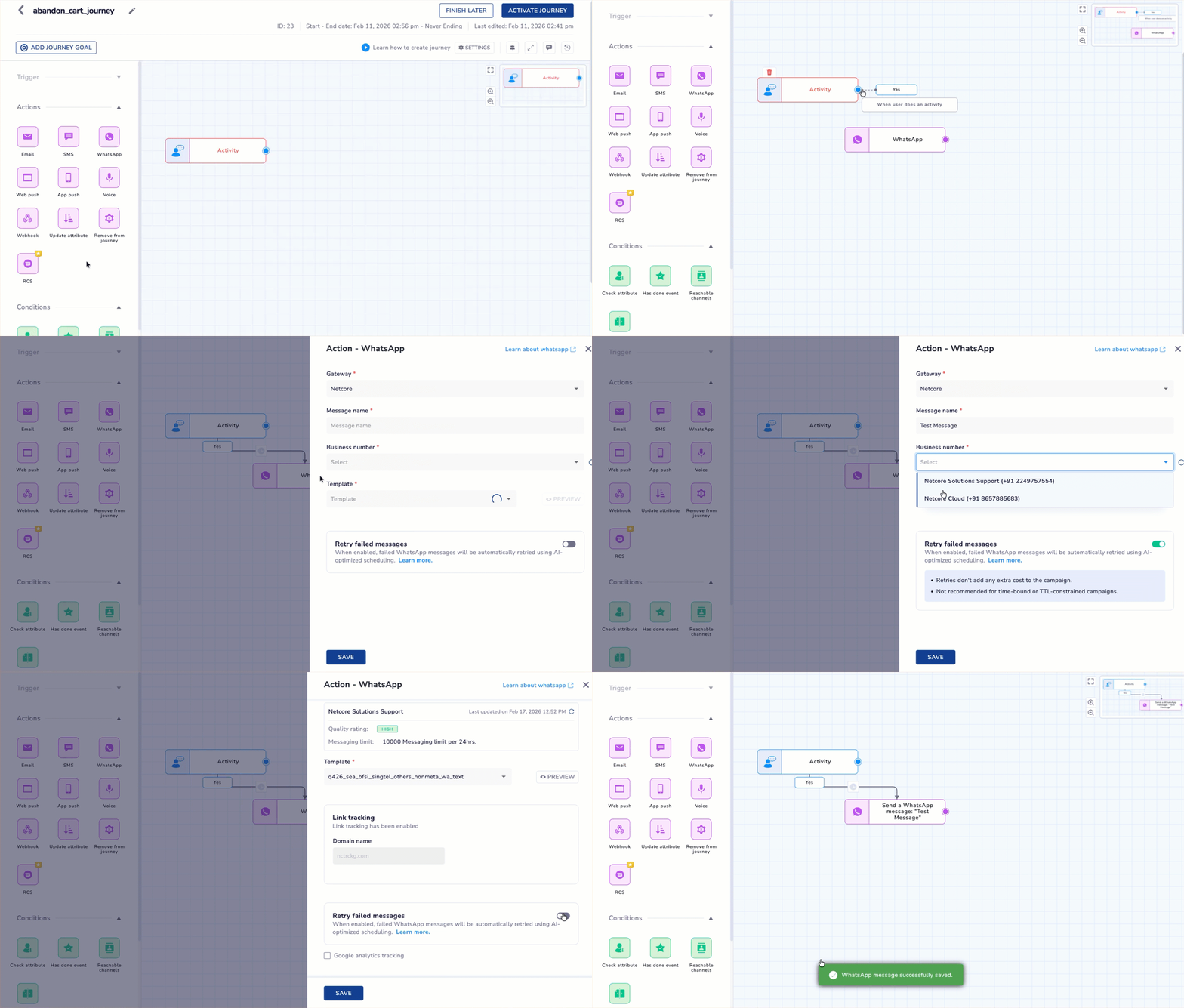
Enable Smart Retry from Journeys
- Navigate to Journey Builder and select a WhatsApp Node.
- Enable the Retry message toggle, save, and then publish/update your journey.
Use Case: With Smart Retry vs Without Smart Retry
| Scenario | What Happens With Smart Retry | What Happens Without Smart Retry |
|---|---|---|
| The promotional message fails due to the Meta frequency cap. | The system automatically retries after 12 hours, then 24 hours, and finally 48 hours, updating the final status. | The message fails once and is never retried. |
| The template is paused by Meta. | The system retries automatically, recovering deliveries impacted by Meta experiment groups. User is part of an experiment. | The failure stays final, and no retry happens. |
Updated about 1 month ago