
Segment on Segment
Include or exclude segments on top of existing segments.
Overview
Marketers often need to create refined user groups to target the most relevant audience for their campaigns. With Segment Inclusion & Exclusion, you can now:
- Include or exclude existing segments while creating a new one
- Create a new segment based on existing ones and add further logic
- Exclude specific users from a segment based on user-level conditions
These enhancements make the segmentation process faster, more flexible, and campaign-ready, saving you time while improving targeting accuracy.
Key benefits
- With segment-level exclusion now available, you can create a new segment, exclude any specific segment from it, and then simply use this refined segment when setting up campaigns across these channels.
- Previously, customers could not modify special segments generated through Funnels, Cohorts, or RFM. With this enhancement, they can now use any special segment as a base when creating a new segment and easily layer additional conditions on top of it.
- With this enhancement, marketers can finally avoid over-targeting, repetitive messaging, and irrelevant communication. This unlocks cleaner and controlled audience delivery.
Best Practices
- Use naming conventions when saving segments such as,
VIP_Sale_Q3_2025.- Validate exclusions by checking the preview and overlap.
- Use existing segments instead of building from scratch.
- Always review channel reachability to align campaigns with user preferences.
Create Segment on Segment
There are two ways to create a segment within a segment.
From Segments
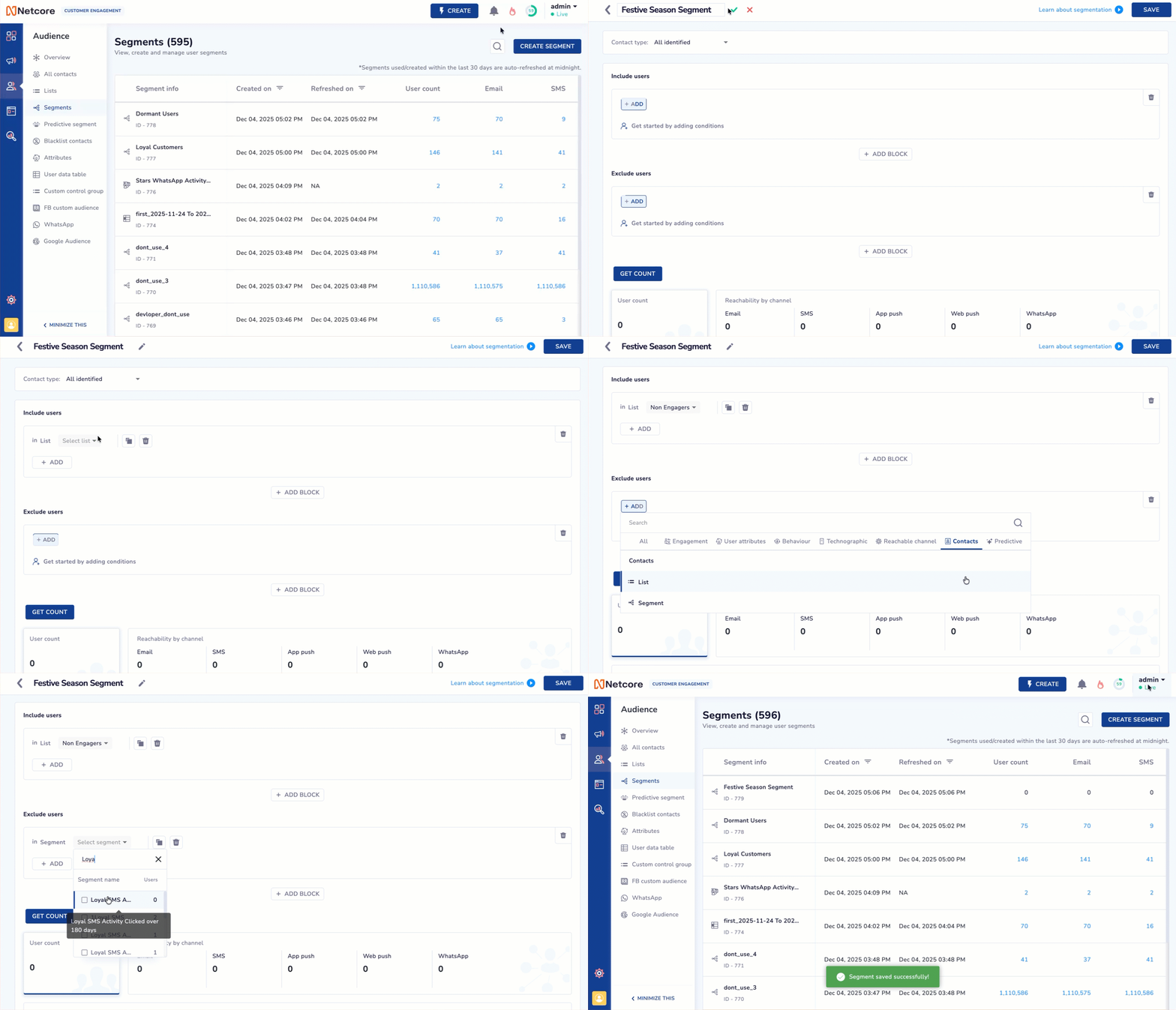
Create Segment On Segment
You can include or exclude segments from the Segments module. Here’s how:
- Navigate to Audience > Segments > CREATE SEGMENT.
- Click the + ADD button under the Include users section and select Contacts.
OR
Click the + ADD button under the Exclude users section and select Contacts. - Select the List or Segment from which you wish to include users. You can also select your preferred lists/segments or Select all.
Each of these sections provides the option to:
- Add or exclude existing segments.
- Define additional rules using attribute filters or behaviors.
- View real-time counts and sample users.
- After building the segment, name and categorize it to save, or directly create a campaign or journey.
From Campaigns
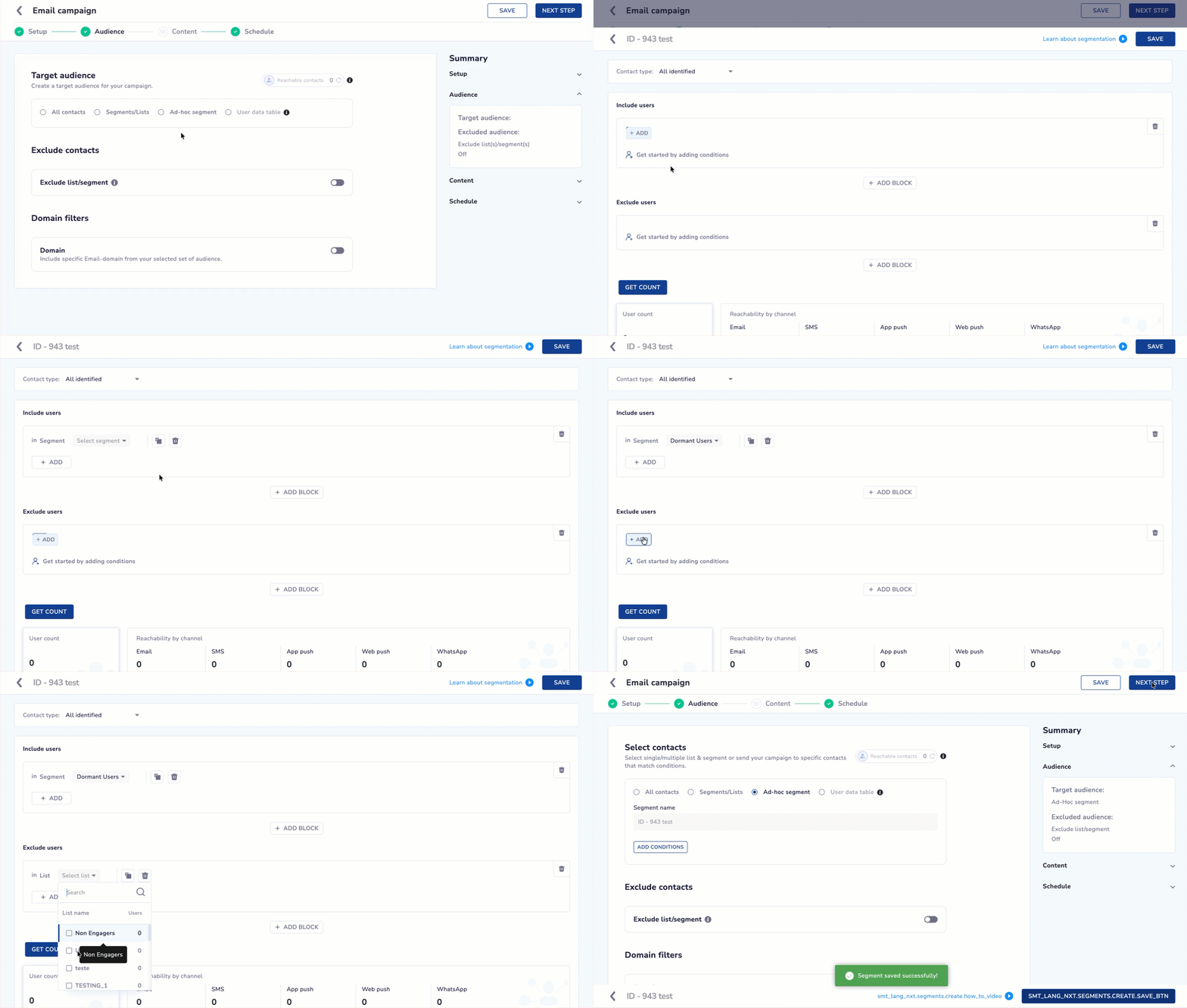
Create Segment from Campaigns Section
You can include or exclude segments from Campaigns. Here’s how:
- Navigate to Enagage > Campaigns.
- In the Audience section, select Ad-hoc Segment under Select Contacts, then click EDIT CONDITIONS to open the segment builder.
- Click + ADD under Include users or Exclude users > Contacts > List/Segment.
- Select your preferred list or segment from the dropdown, and click SAVE. Your segment-on-segment setup will now apply to this campaign.
Business Scenarios
Using Segments from Analytics (Funnel, RFM)
Segments created from Funnel, RFM, or other Analytics components are not editable.
With Segment on Segment:
- You can use these non-editable Analytics segments as inputs.
- You can add more conditions on top of them (e.g., behaviors, attributes, exclusions).
- This helps in creating actionable campaign-ready segments from analytical insights.
Example: Start with an RFM: High Value segment → Add rule: Visited Pricing Page in last 14 days → Create a final segment for a high-intent upsell campaign.
**Combining Pre-built and Analytics Segments
Marketing teams often maintain pre-built strategic segments, such as Loyal Customers, Active Browsers.
You can now combine these with analytical ones for deeper targeting.
Example:
Include segment “Recent Buyers (Funnel)” AND “Web Engaged” → Exclude “Low Reachability”.
Scaling Condition LogicIf your use case requires many filtering conditions:
- Use up to 3 blocks per feature (Include / Exclude).
- Each block supports 5 default conditions.
- For advanced scenarios (e.g., enterprise-level segmentation), your team can request more condition slots.
Refer to the given table to know the most common use-cases.
| Use Case | Goal | Example |
|---|---|---|
| 1. Include Existing Segments | Combine several pre-made segments into a new one for a specific campaign. | Include High Spenders and Loyal Customers into a new segment for a VIP Sale Campaign. |
| 2. Exclude Existing Segments | Avoid targeting users already in another campaign or users who should not receive communication. | Exclude users in the Churned Users segment from a new upsell campaign. |
| 3. Create a New Segment Based on Existing Ones | Start with a known segment and apply extra rules. | Start from Web Visitors segment, then filter for users who viewed the pricing page in the last 7 days. |
| 4. Exclude Specific Users with Logic | Filter out specific user types using custom rules. | Exclude users who unsubscribed OR bounced in last 30 days, AND who made no purchases in 6 months. |
Industry-Wise Refined Segmentation Use Cases
Refer to the given table to learn about the industry-specific use-cases.
| Industry | Base Segment | Refined Segment | Business Outcome |
|---|---|---|---|
| E-Commerce | Added to Cart in last 7 days | Added high-value items + engaged with 2+ product pages | Improves premium basket conversion with targeted nudges. |
| Winter Category Shoppers | Winter shoppers who also purchased in last 30 days | Boosts upsell through relevant bundles and seasonal collections. | |
| Dormant Users – 90 Days Inactive | Dormant users with historically high AOV | Optimizes reactivation spend on high-value users. | |
| BFSI (Banking, Financial Services & Insurance) | Savings Account Customers | Salary credit present + high digital engagement | Enhances credit card cross-sell conversions. |
| Policies Expiring in Next 30 Days | Users with past claims or family add-ons | Raises renewal likelihood by prioritizing high-retention profiles. | |
| Customers with Eligible CIBIL Score | Stable salary deposits + regular app visits | Drives quality loan applications with lower risk. | |
| Travel & Hospitality | 2+ trips in last 6 months | Frequent travelers searching international destinations | Enables premium package upsell and loyalty upgrades. |
| Flight/Holiday Package Searchers | Users who dropped off at payment + prior booking history | Boosts booking recovery via personalized reminders. | |
| Users Searching for Travel This Month | Metro-city users with high notification engagement | Maximizes conversions on time-sensitive travel deals. | |
| Telecom | Prepaid users with expiring plans | High ARPU customers with low data usage | Supports retention of premium users with contextual offers. |
| Existing broadband customers | Users with high data consumption or buffering issues | Identifies upgrade-ready customers to grow ARPU. | |
| Low activity in last 30 days | Users with past complaints or service tickets | Enables early intervention for churn prevention. | |
| Retail (Fashion, Beauty, Electronics) | Loyal customers (High RFM score) | High RFM customers inactive for 45+ days | Re-engages VIP shoppers with exclusives or early access. |
| Skincare buyers | Buyers with preference for organic/clean-label products | Improves adoption of new launches with precise targeting. | |
| In-store visitors last 30 days | Visitors who engaged with product recommendations online | Enhances offline-to-online conversions and attribution. | |
| OTT / Media / Entertainment | Users watching action content | Viewers with high binge-watching duration | Increases engagement through personalized content recommendations. |
| Users with expiring subscriptions | Users who watched 10+ hours last month | Strengthens retention by focusing on high-usage viewers. | |
| EdTech | Users enrolled in basic plan | High quiz scorers or high completion-rate learners | Boosts premium course upgrades. |
| Learners with low activity | Users who asked doubts or attended one live class | Improves student retention by re-engaging motivated learners. |
Segment Nesting
Segment nesting lets you create complex user segments by combining existing segments. This helps you target users more precisely.
Key Benefits
- Reuse segments: No need to rebuild the same criteria. Use existing segments as building blocks.
- Target specific groups: Combine different user behaviors and properties for advanced targeting.
- Simplify updates: Update the base segment, and all nested segments update automatically.
How Segment Nesting Works
-
Create your standard user segments, such as "Opened App Last 30 Days" or "Purchased Product A."
-
Create a new segment and include one or more existing segments as conditions. You can add more filters if needed.
-
Combine segments with AND (users must meet all criteria) or OR (users must meet any criteria).
-
You can nest segments within other nested segments, creating multi-level segment logic.
For example:
- Base Segment A: Opened App Last 30 Days
- Base Segment B: Purchased Product A
- Nested Segment: Users in A AND B
This nested segment targets users who opened the app in the last 30 days and purchased Product A.
Updated 19 days ago