
Campaign Insight Agent
Learn how to use the Campaign Insight Agent to learn about performance, audiences, channels, and revenue in plain language.
Overview
The Campaign Insight Agent is an AI marketing analyst built into Netcore CE. Instead of opening report after report, you ask a question in plain language and get a clear answer in seconds, backed by your own campaign data.
Ask about performance, audience behaviour, engagement, conversions, and revenue across channels. The agent reads your campaign data, explains what happened and why, and recommends what to do next. It can also be shaped to your brand and remember how your team likes to work, so the answers fit you rather than a generic template.
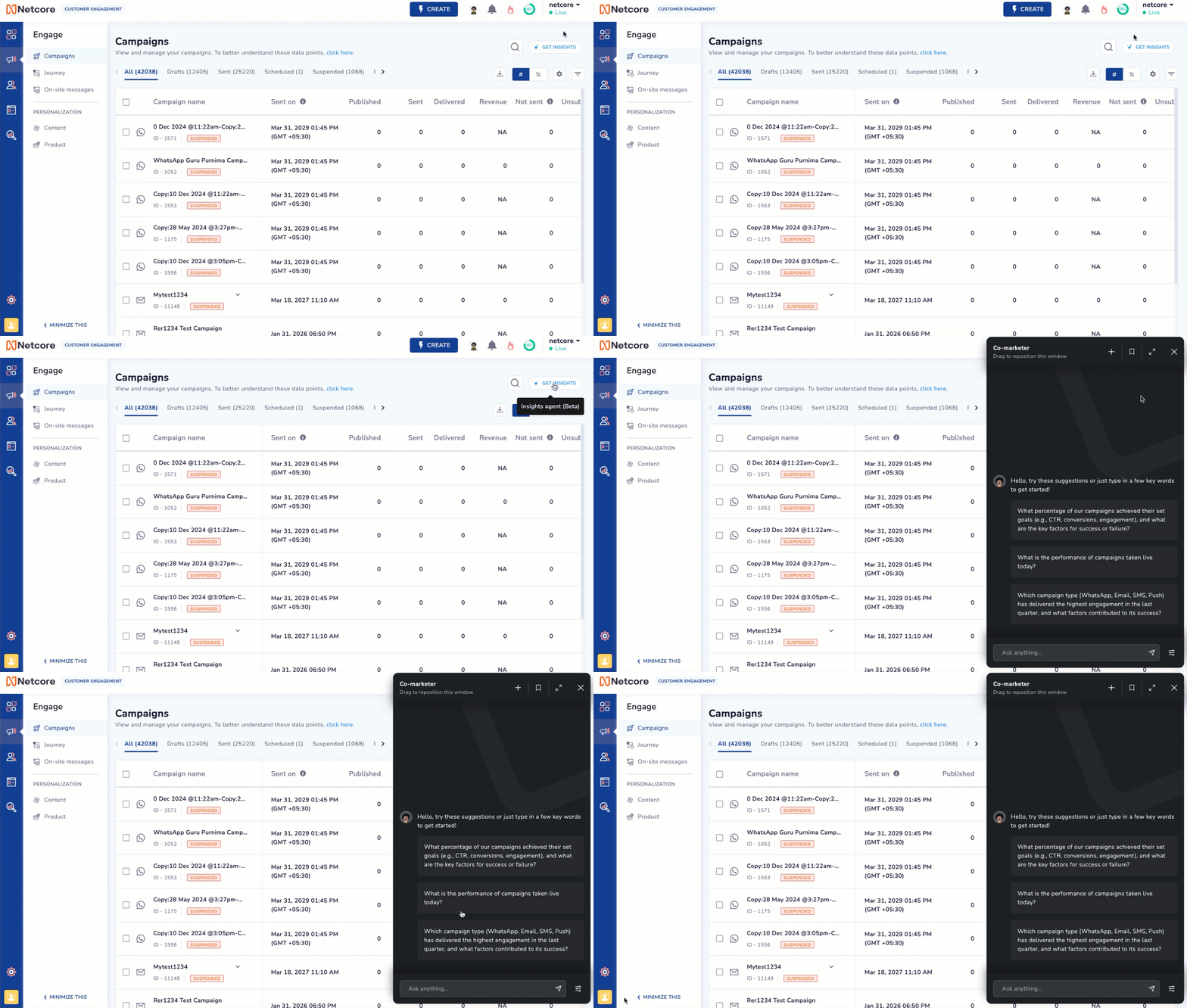
Get Insights Button
How to ActivateTo use this feature, contact your Netcore account manager. Once it is enabled:
- A Get Insights option appears on the Campaign listing page when you log in to your Netcore CE dashboard.
- No additional setup is required. Refer Enable Campaign Insight Agent for the activation steps.
Key Capabilities
| Capability | Description |
|---|---|
| Campaign Performance Analysis |
|
| Root-Cause Analysis |
|
| Audience Insights |
|
| Trend Detection |
|
| Cross-Channel Insights |
|
| Content Insights |
|
| Send-Time Optimization (STO) Analysis |
|
| Recommendations & Optimization Opportunities |
|
| Brand-Aware Insights |
|
| Personalization & Memory |
|
| Visual & Comprehensive Reporting |
|
| Planning of Content Calender |
|
Why Use Campaign Insight Agent
Modern teams run campaigns across many channels, and the data is all there, but turning it into decisions usually means building custom reports, hopping between dashboards, comparing months by hand, digging for root causes, and waiting on an analyst. The Campaign Insight Agent removes those steps.
In plain language, no reports to build.
Your own data, read and explained in seconds.
On clear next steps and recommendations.
What that means for you:
- Faster decisions. Less time building reports and analysing data by hand.
- Self-service analytics. Marketers answer their own questions without waiting on an analyst.
- Better performance. Spot opportunities and optimizations earlier.
- More visibility. A complete view of campaign and audience performance across channels.
- Actionable output. Move from reporting metrics to understanding business impact and next steps.
Prompts to Get Started
These prompts cover common use cases and are a good way to get comfortable with the agent. Tap copy, paste into the agent, and go.
What were the top 3 best and worst performing campaigns?Can you do a month-on-month analysis of the best-performing campaigns?Can you help me do an in-depth analysis of the subject lines?Point out the best-performing STO campaign and give me a comparative analysis of all STO campaigns from the last 30 days.Can you recommend ways to segment customer data for better revenue?Identify open-rate and click-rate improvement patterns across campaigns over the past 3 months.Give recommendations to improve the engagement score for the worst-performing campaign in the last 30 days.
Important Points to Remember
- Analysis is supported across Email, SMS, App Push, Web Push, WhatsApp, and RCS.
- Only included segment IDs are considered. Excluded segment IDs are not used in analysis. Similarly, only included list IDs are analysed.
- For Email, the agent analyses subject lines. WhatsApp, RCS, and SMS subject lines are not included.
- RCS message content is not analysed. If a CTA is recorded as zero, it means no CTA was detected. Multiple CTAs are not tracked.
Note: If no CTA is added, CTR will not be detected. The model gives less weight to campaigns where the CTA is absent or engagement was very low.
- Key metrics tracked for campaign performance: Open Rate, Click Rate, Conversions, Revenue, and Unsubscribe Rate.
- A broad prompt such as "Give me campaign data for the last 3 months" returns the first 5 campaigns by default. For more, follow up with a specific prompt, for example "Show insights for the top 10 campaigns" or "Provide data for the top 30 campaigns."
- Netcore Recommends: Be specific in your first request. Name the number of campaigns you want (top 10, 15, or 30) to avoid incomplete results and extra follow-ups.
How Campaign Insight Agent Works
When you enter a prompt, the agent interprets your intent, retrieves the relevant data, finds the patterns, and returns an answer you can act on.
- Understand the question. It identifies the metrics, campaigns, audiences, and time periods you are asking about.
- Analyse relevant data. It evaluates campaign performance, engagement metrics, audience behaviour, and historical trends. Where configured, it also applies your brand profile and saved preferences.
- Generate insights. AI models identify patterns, anomalies, relationships, and performance drivers.
- Deliver actionable answers. Results are presented in plain language with supporting metrics, observations, and recommendations.
To explain why a campaign performed the way it did, the agent considers many signals simultaneously. These fall into three groups:
- Content and tone: content category, message tone, use of emojis, punctuation, alphanumeric characters, subject-line length, character count, and word count.
- Timing: day of the week, hour of the day, and day type (weekday or weekend).
- Targeting: whether the message is personalized, and the campaign type.
One of these signals, content category, is worth a closer look, because it shapes how the agent groups and compares your campaigns.
Content Categories
The agent reads the words in your message and sorts each campaign into a content category. This lets it compare like with like, for example, one set of discount campaigns against another, instead of comparing a sale blast to a how-to guide. The categories and the keywords that trigger them are:
- Promotion of New Arrivals: keywords such as New Arrival, Fresh, Introducing, Breaking, and First Look.
- Promotion of Recommended Products: keywords such as Top Picks, Recommended, Must-Have, Trending, and Just For You.
- Discounted Promotions: keywords such as Sale, Discount, Flash Sale, Exclusive Offer, Price Drop, and Special Price.
- Content Engagement: keywords such as Guide, Tips, How To, Discover, Learn, and Insights.
Known Limitations
A few conditions help you interpret results accurately:
- For recently launched campaigns, insights are available after twenty-four hours.
- Engagement and conversion data, updates for up to 30 days after a campaign. On day 30th, the data becomes static.
Recent campaigns may show lower CTR and Open Rate, which can skew insights. - Customer data uses a rolling one-year window. For example, if today is June 26, 2026, insights use data from June 26, 2025, to June 25, 2026.
Responsible AI and Transparency
The Campaign Insight Agent is built to support decisions, not replace them. It generates insights from your available campaign data, shows the supporting metrics behind its recommendations, and uses explainable reasoning where applicable. Review generated insights alongside your organisational goals and business context before acting on strategic decisions.
Data privacy and isolation. Each customer's data, brand profile, and saved preferences are isolated to their own account and used only to answer that account's questions.
Updated 25 days ago