
Analyze Your Journey Node
Move from guesswork to data-backed optimization with Node Wise Analysis.
Overview
Node-wise analysis helps you identify and optimise performance issues within a journey by providing actionable recommendations mapped directly to specific nodes.
Instead of reviewing journey performance as a whole, this feature highlights exact problem areas and guides you to them instantly.
Key Benefits
- Identify underperforming nodes using industry benchmarks.
- Understand structural issues in your journey flow.
- Get best practice recommendations based on similar use cases.
- Quickly locate problem areas using click-to-highlight functionality.
Important Notes
Read-Only Feature: Recommendations do not automatically change your journey.
No Auto-Fix: You must manually implement the suggested improvements.
No Conversational Input: This is a static analysis. No chat or follow-up queries supported
Types of Recommendations
Node Wise Analysis provides three types of insights. Refer to the given table to know more.
| Recommendation | Description | Example |
|---|---|---|
| Path-Level Optimization (Structure) | Focuses on the overall journey flow and sequencing. | Too many reminders in a short time span may increase unsubscribe rates. |
| Node-Level Optimization (Performance) | Analyzes individual nodes and compares them with benchmark performance. | An email node with low conversions may be better replaced with another channel. |
| General Best Practices | Provides overall journey improvement suggestions. | Adding wait time between messages to avoid user fatigue. |
View Node-wise Analysis
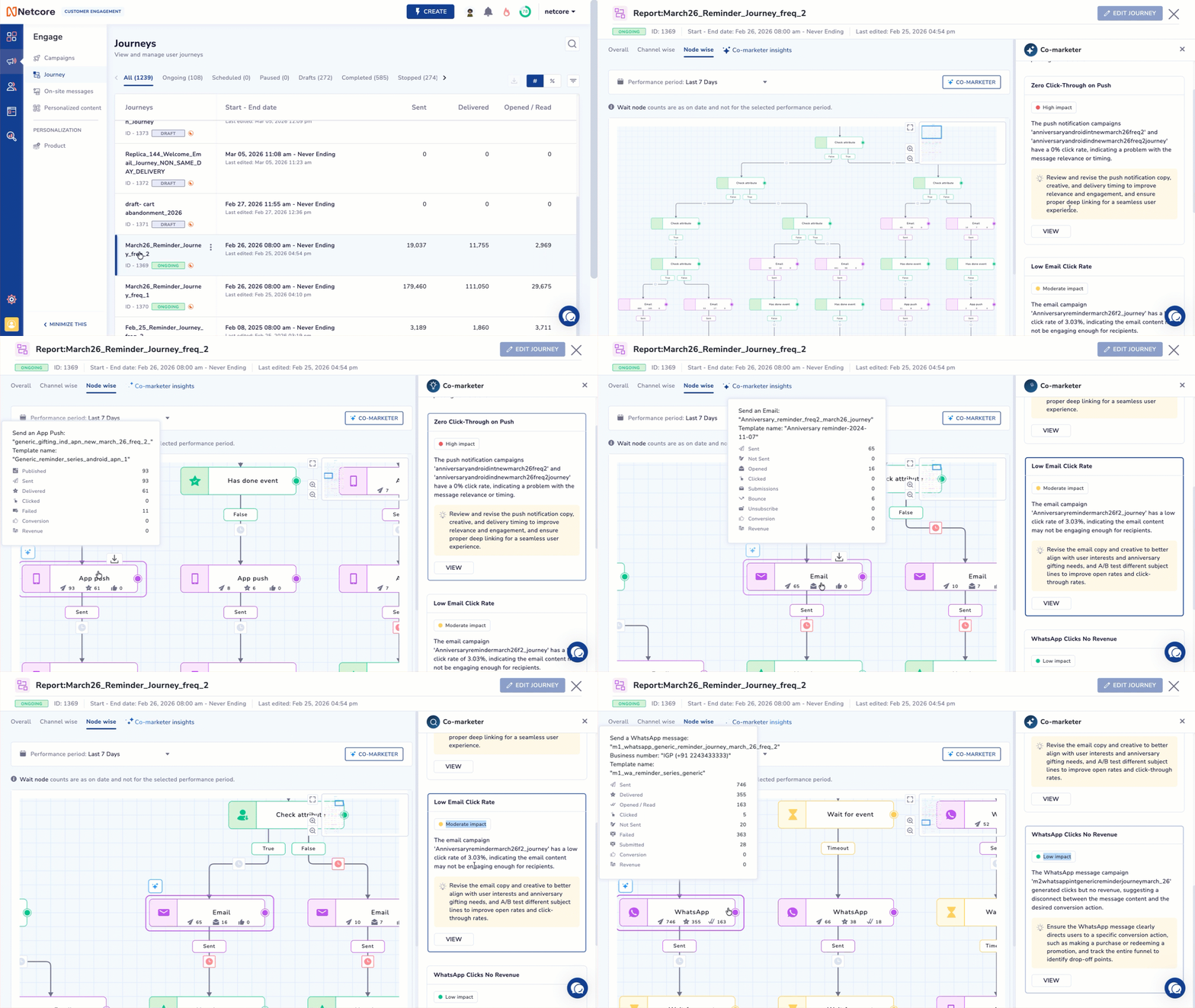
View Node-wise Analysis
Follow the steps given below to view node-wise analysis and recommendations.
- Log in to the Netcore CE dashboard and click Engage > Journey.
- Click on the journey you want to view analysis for. The Journey report screen apears.
- Click the Node-wise tab. If insights are available, the analysis panel opens automatically on the right side of the screen.
- Recommendations are numbered (1, 2, 3...) and clearly described with actionable guidance.
- Click on any recommendation. The system will:
- Automatically zoom and pan to the relevant node.
- Highlight the node temporarily for easy identification.
- Review the node and manually apply any needed changes.
- Use recommendations as guidance for optimization.
Recommendation Prioritization
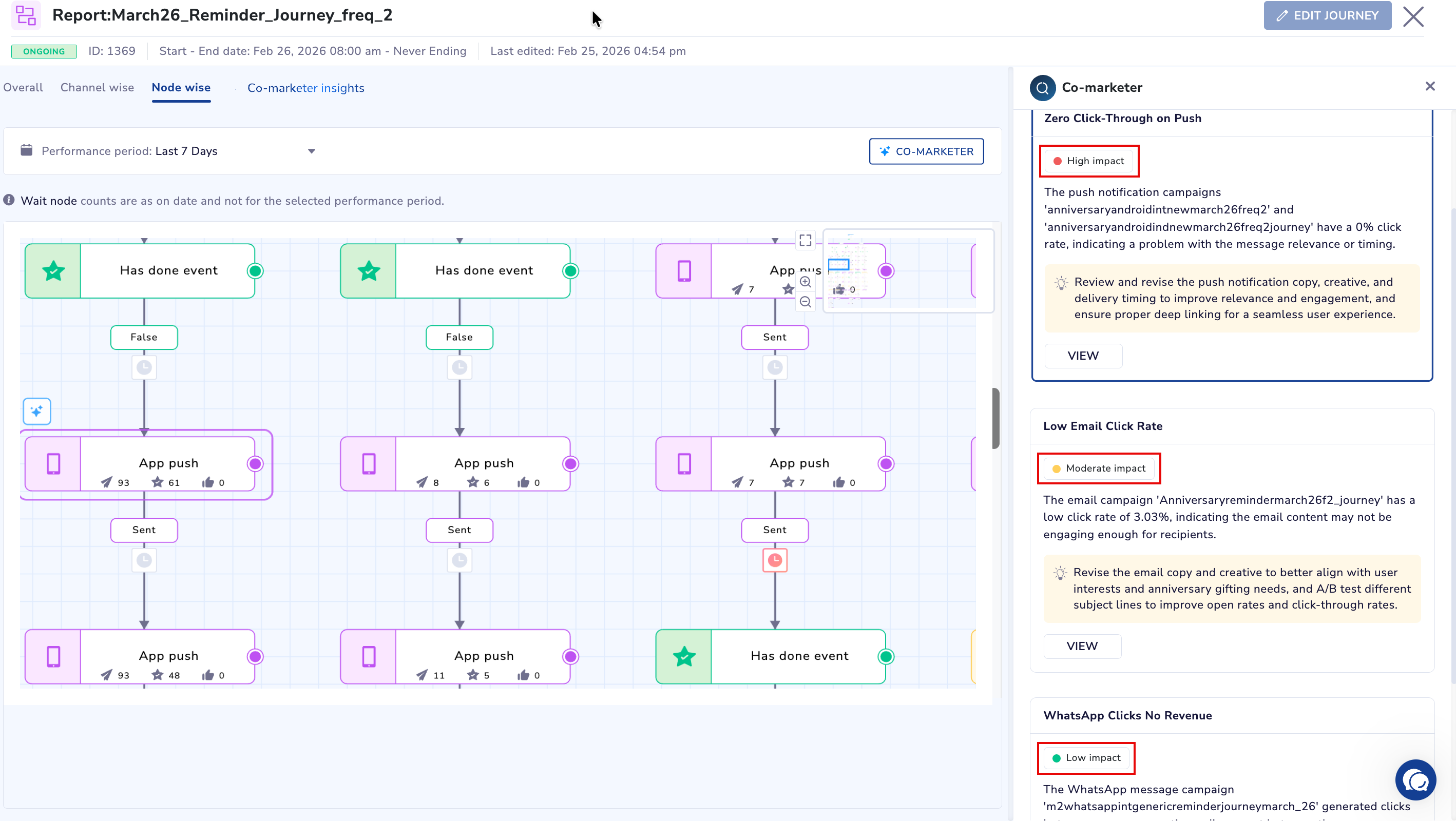
View recommendations based on their potential impact on journey performance
All recommendations in Node Wise Analysis are grouped based on their potential impact on journey performance. The Impact Levels are:
- High Impact: Recommendations that can significantly improve key metrics such as conversions, engagement, or drop-offs. These should be prioritized first.
- Moderate Impact: Suggestions that can enhance performance but may not drastically change outcomes. Ideal for secondary optimization.
- Low Impact: Minor improvements or best practices that help refine the journey but have limited immediate impact.
Important points to remember
Recommendations are always displayed in the following order:
- High Impact
- Moderate Impact
- Low Impact
It is possible that an analysis may not include all three impact levels.
For example, a journey might only have High and Moderate impact recommendations, or only High impact ones.Even in such cases, the ordering logic remains consistent.
Updated about 2 months ago