
PII Tokenisation in Netcore CE
PII Tokenisation is a security setup for organisations that cannot share raw customer contact data with a third-party platform.
Overview
Enterprise clients in banking, healthcare, and fintech operate under strict data laws such as GDPR, DPDP, and HIPAA. Their legal teams prohibit storing raw emails or phone numbers in any external SaaS system. Without a solution, these clients cannot use Netcore's email and push channels.
PII Tokenisation solves this. It replaces raw PII values with non-sensitive tokens before they ever enter Netcore. Netcore stores only the token. The actual email address or phone number remains within the client's own infrastructure. At the moment a message needs to go out, Netcore fetches the real value, sends the message, and immediately discards it.
Who This Is For
- Banks and financial institutions with RBI or DPDP compliance requirements
- Healthcare organisations bound by HIPAA
- Any enterprise client whose legal team prohibits storing raw PII with a third-party vendor or Netcore partners.
What You Can Do With It
-
Send personalised Email, App Push, and SMS campaigns without Netcore holding any raw contact data
-
Run complex journeys and segmentation using tokens and behavioural data
-
Get full campaign analytics without exposing any PII in reports
Note: WhatsApp and RCS channel support is on the roadmap and not available in the current release.
How It Works: The Three Components
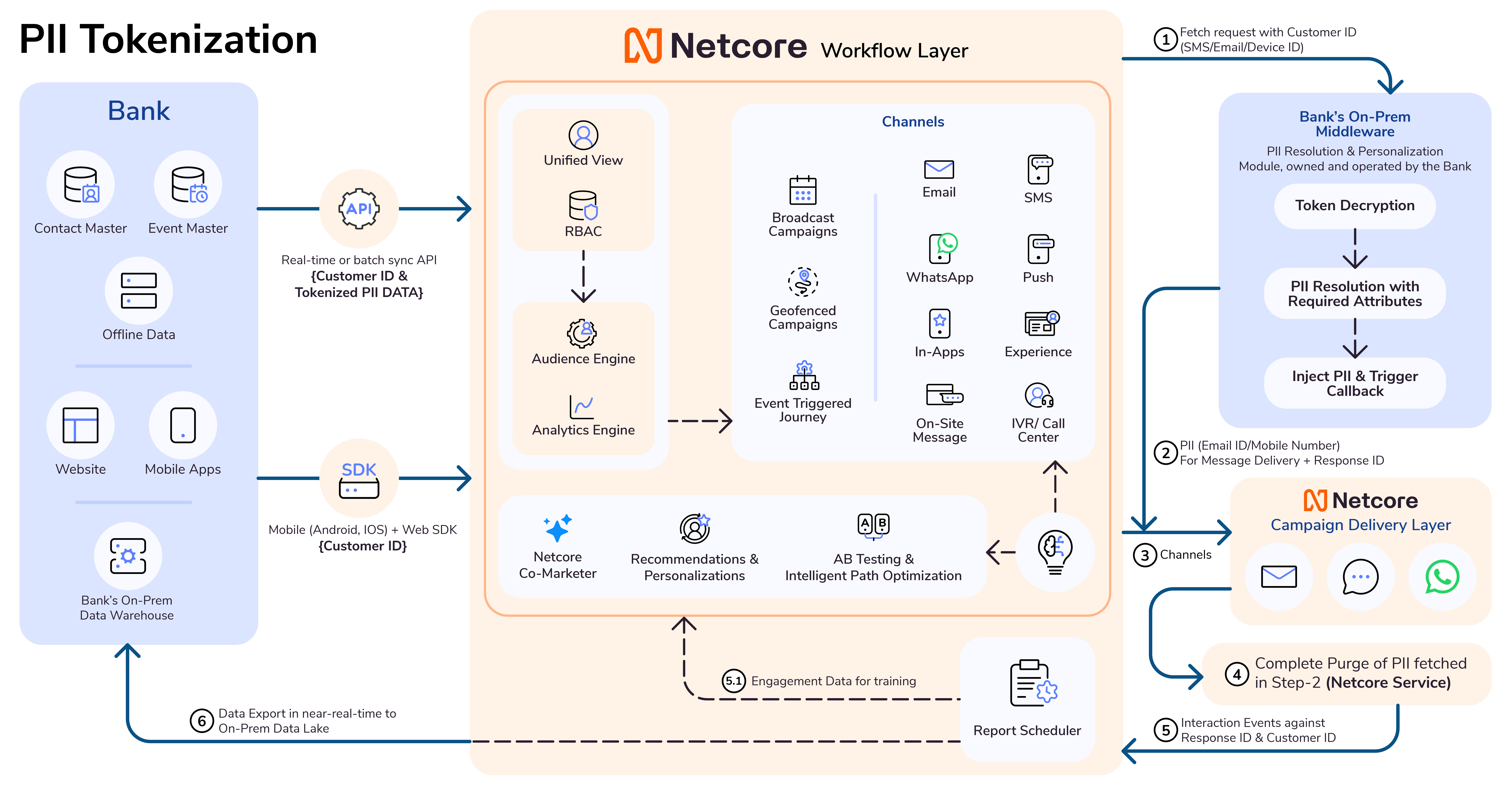
PII Tokenisation is not a single feature. It is an architecture made up of three components. Each component has a distinct owner.
| Component | What It Does | Owner |
|---|---|---|
| Tokenisation Service | Converts raw PII into a token | Client or client's vendor |
| Token Vault | Stores the token-to-PII mapping securely. Set up as an on-premise installation. | Client or client's vendor |
| Detokenisation API | Returns raw PII to Netcore at send time | Client or client's vendor |
Netcore does not own or operate any of these three components. Netcore only stores the tokens and calls the Detokenisation API when it needs to send a message.
Tokenisation Service
This service takes a raw value such as an email address and converts it into a unique, random token. For example, [email protected] becomes tok_a7f2b39c. The client runs this service before pushing any profile data to Netcore.
Token Vault
The Vault is an isolated, secure database set up on the client's own infrastructure (on-premise). It stores the only copy of the token-to-PII mapping. Netcore never has read or write access to the Vault.
Detokenisation API
When Netcore is ready to send a message, it sends the stored token to this API. The API looks up the Vault and returns the raw PII. Netcore uses it to send the message, then discards it immediately. The API must be available at send time. If it is down, messages cannot go out.
Prerequisites
Before you can use PII Tokenisation, the following must be in place:
- A Tokenisation Service that can convert raw PII to tokens and support both single and batch requests
- A Token Vault set up with Hardware Security Module (HSM) level protection, hosted on-premise within the client's infrastructure
- A Detokenisation API secured with OAuth 2.0, accessible by Netcore at send time
- A Customer ID, a unique non-sensitive identifier used to link profiles across your system and Netcore
- OAuth 2.0 access token generation from Keycloak configured on your side
End-to-End Data Flow
There are three stages in a PII Tokenisation setup: ingestion, campaign execution, and reporting.
sequenceDiagram
    participant C as Client System
    participant V as Token Vault
    participant N as Netcore CE
    participant CH as Channel (Email/SMS/Push)

    Note over C,V: Stage 1: Data Ingestion
    C->>V: Send raw PII (email/phone)
    V-->>C: Return token (tok_a7f2b39c)
    C->>N: Push token + non-PII attributes
    N-->>N: Store token-based user profile

    Note over N,CH: Stage 2: Campaign Execution (JiT Send)
    N->>N: Campaign triggers for user
    N->>N: Check frequency capping & segment eligibility
    N->>V: Call Detokenisation API with token
    V-->>N: Return raw PII
    N->>CH: Send message
    N-->>N: Discard raw PII from memory

    Note over N,C: Stage 3: Engagement & Reporting
    CH-->>N: Engagement recorded (open/click)
    N-->>N: Store against Response ID only
    N->>C: Sync aggregate metrics
Stage 1: Data Ingestion and Tokenisation
This is how a user profile is entered into Netcore without raw PII.
- A user signs up or is captured in the client's system. The client holds the raw email or phone number.
- The client's Tokenisation Service sends the raw PII to the Vault. The Vault stores it securely and returns a token.
- The client's primary database now holds only the token, not the raw value.
- The client pushes the token and non-sensitive profile attributes to Netcore. Netcore creates a user profile using the token instead of an email or phone number.
At this point, Netcore has no idea what the actual email address is. It only knows the token.
Stage 2: Campaign Execution (Just-in-Time Send)
When a campaign triggers for a user, Netcore uses a Just-in-Time (JiT) process to fetch the raw PII and immediately discard it.
-
The campaign or journey triggers for a user.
-
Netcore checks frequency capping and segment eligibility using the stored token.
-
Netcore calls the Detokenisation API with the token.
-
The Detokenisation API queries the Vault and returns the raw email or phone number.
-
Netcore sends the message via the selected channel (Email, SMS, or App Push).
-
The raw PII is immediately deleted from execution memory. It is never written to any logs, reports, or databases.
Important: If the Detokenisation API is unavailable at send time, the message cannot go out. Plan for API uptime accordingly. See the FAQ section for details on how Netcore handles API failures.
Stage 3: Engagement and Reporting
After the message is sent, engagement is tracked without any PII.
- The user opens the email or clicks a link.
- The Campaign Engine records the interaction against a unique Response ID, not against the raw email or phone number.
- Aggregate engagement metrics (opens, clicks, conversions) are written to Reports.
- These metrics sync back to the client's primary database to update campaign performance records.
Your reports show full engagement data. No raw PII appears anywhere in the reporting layer.
Configuration
PII Tokenisation is enabled at the account level by the Netcore onboarding team. This is a backend configuration and cannot be self-configured. Your onboarding executive sets up the panel on your behalf. Once active, the account moves into a Tokenised State and cannot be reversed to plain-text storage.
Step 1: Enable PII Tokenisation
Contact your Netcore onboarding executive to enable PII Tokenisation on your account. The onboarding team handles all backend configuration and panel setup.
Step 2: Define Token Attributes
Once enabled, your onboarding executive will configure the data type for each PII field as Token in your account settings. Common token attributes include:
- Mobile number
- Custom identifiers such as National ID or Account Number
Any attribute marked as Token type will be resolved at send time using your Detokenisation API.
Step 3: Configure API Health Monitoring
Netcore monitors the health of your Detokenisation API in real time. The API can be in one of three states:
| State | What It Means |
|---|---|
| Active | The API is responding correctly. Campaigns run normally. |
| At Risk | One or more resolution failures have been detected. |
| Leading to Failure | 1,000 consecutive failures have occurred. The system will not resume normal operation until 100 consecutive successes are recorded. |
Step 4: Set Up Alerts
You can configure email addresses to receive real-time alerts when the API health changes state. Your onboarding executive sets these up in your account settings under API Monitoring.
NoteIf the API reaches the Leading to Failure state, campaigns are automatically paused. Netcore will not attempt sends until the API returns to Active.
Feature RestrictionsA Tokenised account has certain platform features disabled or limited. These restrictions exist because Netcore does not hold raw PII and cannot support functionality that depends on it.
General Restrictions
| Feature | Status in Tokenised Account | Reason |
|---|---|---|
| Segmentation on raw PII fields | Not supported | Netcore does not hold the raw values to filter on |
| Real-time reachability count | Disabled | Reachability requires stored contact data |
| Manual PII edits in user profile UI | Disabled | Prevents raw PII from being entered or viewed in the platform |
| Third-party audience sync (Facebook, Google, LinkedIn) | Restricted | These platforms require raw PII for audience matching |
| Search based on PII fields across modules | Not supported | Raw PII values are not stored in Netcore |
App Push Restrictions
| Feature | Status |
|---|---|
| App Push Amplification | Not supported |
| App Inbox | Not supported |
| Send Time Optimisation (STO) | Not supported |
Email Restrictions
| Feature | Status |
|---|---|
| Mailscore | Not supported |
| HEPF (Adaptive Email Delivery) | Not supported |
| Domain-wise filter and reporting | Not supported |
| Preview Plus (device rendering) | Not supported — dependency on third-party service requires raw PII |
Onsite Channels (Web Message, In-App, Content PZ)
| Feature | Status |
|---|---|
| PII field-based personalisation | Not supported |
Segmentation Behaviour
- Auto-suggest in segmentation will display token values, not raw PII.
- Segmentation conditions based on certain operators for PII fields will not function as expected.
Journeys Behaviour
- Auto-suggest in journey conditions will display token values, not raw PII.
- Has Done event and Check-If conditions are evaluated against token values, not actual PII values.
SMS
| Feature | Status |
|---|---|
| Link Tracking | Supported |
| Personalized link tracking | Not Supported |
Segmentation works normally for behavioural events, non-tokenised attributes, and aggregation-based conditions.
What Is Out of Scope
PII Tokenisation applies only to PII fields such as email, phone number, and custom identifiers you define.
It does not apply to:
- Behavioural event data (page visits, clicks, cart additions, purchases)
- Non-PII profile attributes (city, device type, segment membership)
- Campaign metadata (campaign name, send time, channel)
These are stored in Netcore as-is, regardless of whether the account is in a Tokenised State.
Performance and Security Considerations
Latency During Large Campaigns
Every detokenisation call adds processing time to a send. For a campaign of 1 million users, Netcore makes 1 million API calls to the Detokenisation API. Without optimisation, this can delay delivery.
Vault Security
The Vault contains the only mapping between tokens and raw PII. If the Vault is breached, all customer PII stored in it is exposed.
The Vault infrastructure must use a Hardware Security Module (HSM). An HSM is a dedicated physical device that manages encryption keys and controls access at the hardware level. It prevents unauthorised access even if someone gains physical entry to the server room.
Before going live, confirm with your Vault vendor that HSM is part of the setup.
API Reference Overview
PII Tokenisation relies on two Vault APIs and one authentication step.
Authentication
Before calling any Vault API, your system must obtain an OAuth 2.0 access token. The token is issued by a Keycloak authentication server. Include this access token in the header of every API request.
Every Vault API call must carry a valid, unexpired OAuth 2.0 token. If the token expires, your calls will be rejected.
Get Token API
Converts a raw PII value into a secure token. Supports both single-record and batch requests. Use batch mode when loading a large list of profiles at once.
Get Value API
Resolves a token back to the original raw PII value. Supports both single-record and batch requests. Netcore calls this API at send time. You can also call it directly for testing or reconciliation.
What Netcore Stores
| Data | Stored by Netcore |
|---|---|
| Raw email address | No |
| Raw phone number | No |
| Token (non-sensitive string) | Yes |
| Non-PII profile attributes | Yes |
| Behavioural event data | Yes |
| Engagement metrics (opens, clicks) | Yes, tracked against Response ID only |
| Token-to-PII mapping | No. This exists only in your Vault. |
Frequently Asked Questions
Q. What happens if the Detokenisation API is down?
A. Netcore uses an exponential backoff retry mechanism. If resolution fails after retries, the system logs a Not Sent event with the reason "Detokenisation API Failure." If 1,000 consecutive failures occur, the campaign is automatically terminated. It will not resume until 100 consecutive successful calls are recorded.
Q. Can personalisation tags like {{First_Name}} work in a Tokenised account?
A. Yes. Any attribute can be set as a Token type and resolved at send time. This includes attributes used in personalisation tags. You get full personalisation without any raw data stored in Netcore. Note that PII field-based personalisation for onsite channels (Web Message, In-App, Content PZ) is not supported.
Q. Is the data encrypted during the API call?
A. Yes. All API calls use standard TLS encryption in transit. Additionally, Netcore supports symmetric-key encryption for the API payload. This means the raw PII value is decrypted only at the exact moment the message is dispatched.
Q. Can I use a Tokenised account for journeys, not just one-off campaigns?
A. Yes. Journeys work in a Tokenised account. The JiT detokenisation runs each time a user reaches a send node in the journey. Note that Has Done event and Check-If conditions in journeys evaluate against token values, not actual PII values.
Q. What happens to engagement data if a user's token changes?
A. If a client updates a token for a user (for example, because a user changed their email), historical engagement data remains attached to the old token. New engagement data is recorded under the new token. Contact your Netcore account team if you need to reconcile historical records across token changes.
Q. Can I test the setup before going live?
A. Yes. You can use the Get Value API directly to confirm that tokens resolve correctly. Run a small test campaign with a known set of test profiles before launching to your full user base.
Updated 20 days ago