
Refreshed Netcore CE Experience
Introducing the navigation, faster creation pathways, and a new icon system across the Netcore CE dashboard.
Overview
The Netcore CE dashboard has a refreshed interface built to reduce clicks and visual clutter. This update changes navigation, how you create new items, and the platform's iconography but it does not change how any feature works. Your campaigns, journeys, segments, and reports are unchanged. However only the way you reach and create them has moved.
Important Point to RememberThis is an interface refresh. No existing campaigns, journeys, segments, or settings are changed, moved out of your account, or reset.
New Update
The refresh covers four areas of the CE dashboard.
| New Update | Description |
|---|---|
| Navigation | A slimmer, less cluttered primary navigation that gives more screen space to your work and makes common destinations quicker to scan. |
| Create Menu | A new + Create menu in the top navigation that gathers campaigns, journeys, segments, and more into one list you can open from anywhere. |
| Create New Module | A contextual Create New action inside modules, letting you start building right on the page you are already viewing, no navigating away. |
| Refreshed Icon System | A modernized, more consistent set of icons that makes features easier to recognize at a glance; visual only, with no change to how features work. |
Important Point to RememberPin the items you use most with the new pushpin control, so your day-to-day destinations stay one click away instead of buried in a menu.
Navigation
The primary navigation has been redesigned to be narrower and less cluttered, giving more of the screen to your actual work. Access to campaigns, journeys, reports, and dashboards remains, but the layout has been streamlined so common destinations are quicker to scan.
Create + Icon
A new + Create menu in the top navigation gathers all creation options — campaigns, journeys, segments, and more — into one organized list. Instead of navigating to each module to start something new, you open + Create from anywhere and pick what you want to build.
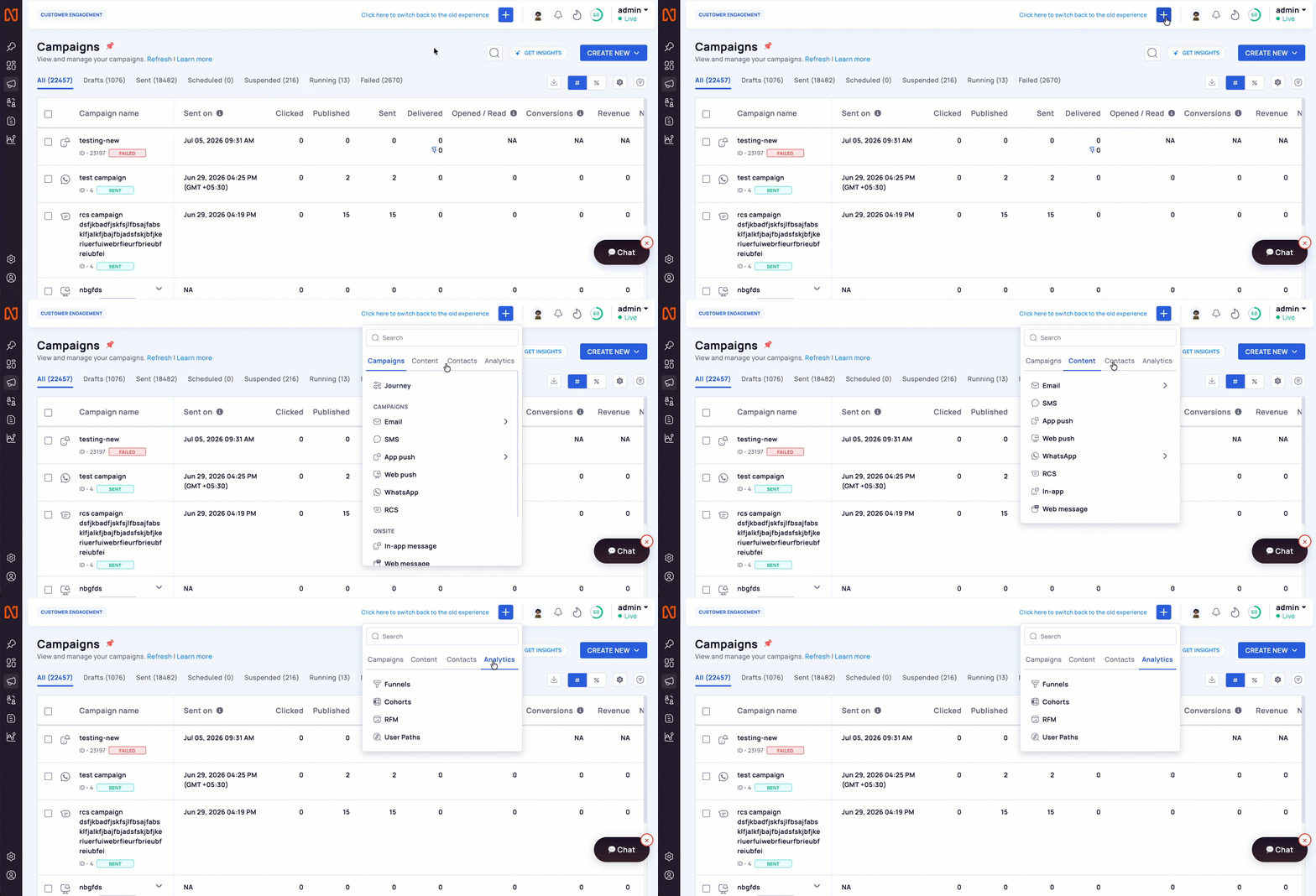
Use Create + Icon for Organised View
Create New Modules
When you are already working inside a module, a dedicated Create New action now appears on the relevant page. For example, while viewing your campaigns list you can start a new campaign without leaving the page. The same applies to segments and journeys.
Refreshed Icons
The platform's icons have been redesigned for a more modern, consistent look intended to make features easier to recognize at a glance. The icons are visual only — the features they represent are unchanged.
Create New
You now have two ways to start creating, depending on where you are.
Across Dashboard
- Select + Create in the top navigation.
- Choose the item you want to build, for example, a campaign, journey, or segment.
- You are taken into the standard creation flow for that item.
Inside Module
- Open the relevant module for example, Campaigns
- Select Create New on that page.
- You start building without navigating away from your current view.
Troubleshoot & Frequently Asked Questions
Did any of my campaigns, journeys, or segments change?
No. This update only changes the interface. Everything you built is exactly as you left it.
Do I need to do anything to get the new experience?
No. The refreshed dashboard is available automatically.
A feature I used looks different, is it gone?
The features are the same; only their icons and menu locations were refreshed. Use the + Create menu.
Can I switch back to the old navigation?
Yes, Just click on the Click here to switch back to the old experience top of the dashboard, you will be redirected back.
Updated 9 days ago