
Control Group
View and manage control groups used in journeys on the Netcore CE dashboard.
Overview
A control group is a holdout set of contacts that you deliberately exclude from receiving journey communications. By comparing the behavior of contacts in the control group against contacts who receive your messages, you can measure the incremental impact, or uplift, that a journey actually delivers. You create and manage all your control groups from Audience > Control group, and then apply them within your journeys.
Create a Control Group
- Navigate to Audience > Control group. The Control group screen displays all existing control groups.
- Click Create. The Create control group panel appears.
- Enter a Control group name.
- Enter a Description of up to 100 characters to record the purpose of the control group. This field is optional.
- Click Save & Add Contact to save the control group and proceed to add contacts.
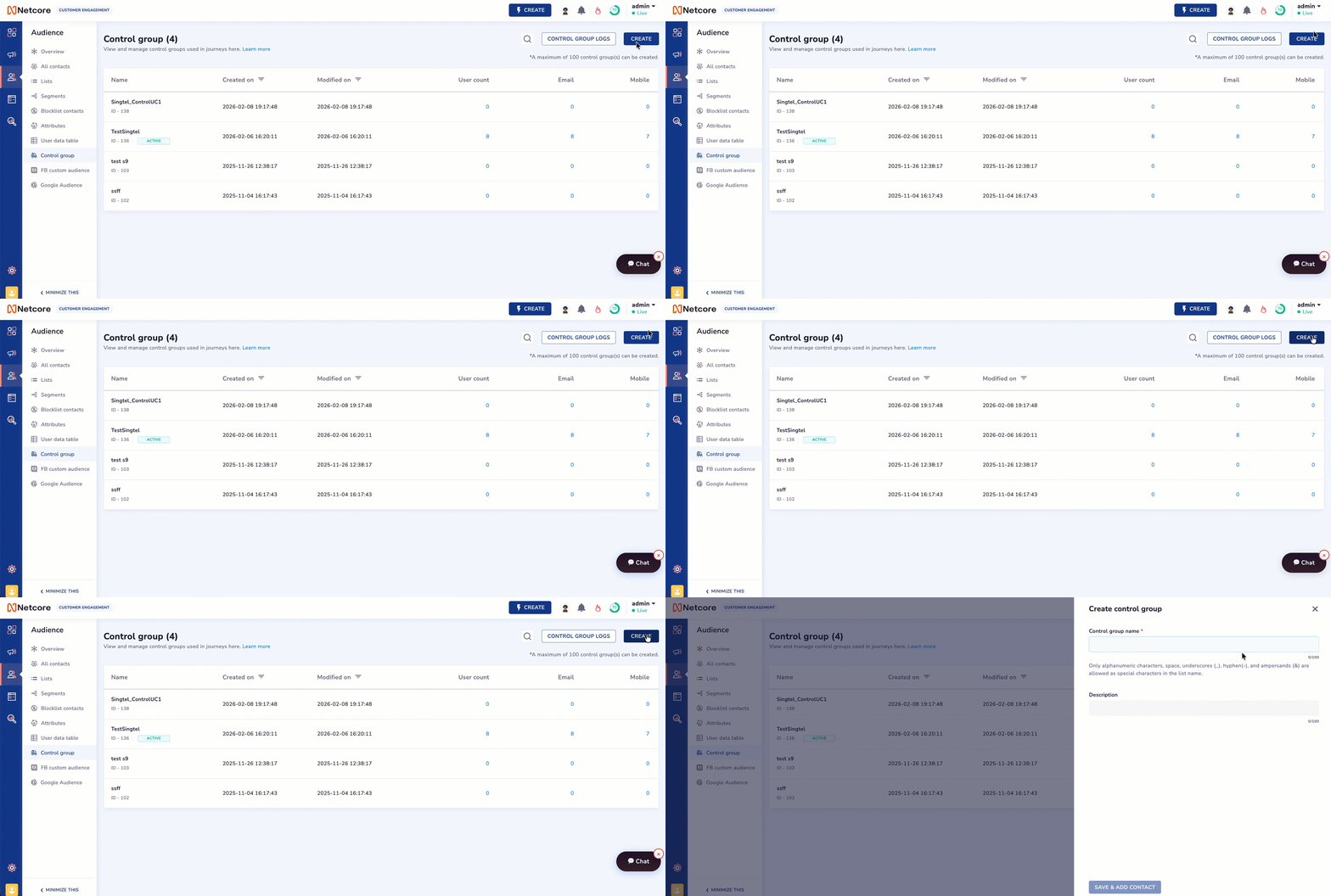
Create a control group
After you save, add the contacts you want to hold out from your journeys. You can add contacts immediately or choose to do this later. To edit a control in Journey click here.
Good to know
- You can create a maximum of 100 control groups.
- The control group name accepts only alphanumeric characters, spaces, and the special characters underscore (_), hyphen (-), and ampersand (&).
View and Manage Control Groups
The Control group screen lists every control group you have created, along with its details. Use the search icon to find a control group by name, and click Control group logs to review activity related to your control groups.
Refer to the table below to understand the columns available for each control group.
| Column | Description |
|---|---|
| Name | The name of the control group, along with its system-generated ID. |
| Created on | The date and time when the control group was created. |
| Modified on | The date and time when the control group was last updated. |
| User count | The total number of contacts currently included in the control group. |
| The count of contacts in the control group who have an email address on their profile. | |
| Mobile | The count of contacts in the control group who have a mobile number on their profile. |
Updated about 1 month ago