
App Push Node
Understand and Configure Journey App Push Action Nodes
The App Push action node enables you to send personalised push notifications to users on their mobile devices. As contacts progress through their journey, this node delivers targeted App Push Notifications (APNs) directly to their devices. This node allows you to:
- Select or create an App Push template.
- Edit an existing template directly from the journey canvas.
- Preview the notification before activating.
- Test the push notification before the journey goes live
To get started, create a new journey or edit an existing journey.
- On the Journey canvas, drag and drop the App Push action node onto the Journey canvas.
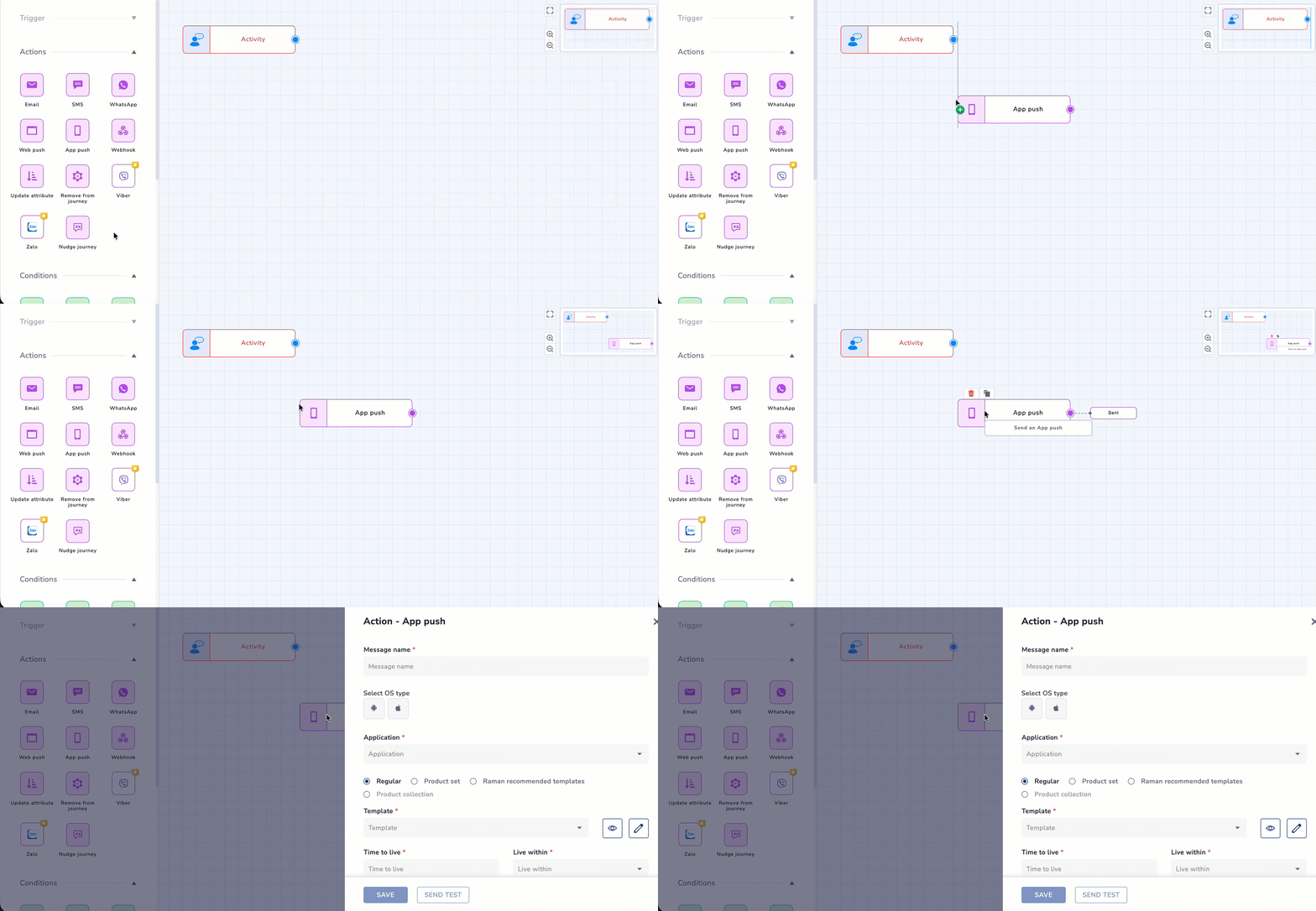
Adding App Push Node to the Journey Canvas
- Then click the App push node to set the conditions. The Action - App push screen appears. Refer to the table for the fields available here.
| Field | Description |
|---|---|
| Message name | Name used to identify the email message within the journey for the app push message. |
| Select OS Type | Select the target platform (Android or iOS). |
| Application | Select the app where you want users to land when they click the app push notification. |
| Template selection | Select from Regular, Product set, Raman-recommended templates, or Product collection. |
| Template | Select an existing APN template to use for the message or select Create new template to create APN template from Journey Node itself. |
| Preview | It opens a preview of the selected template. Template layout and content can be reviewed. You can also edit the template you are previewing directly in this flow. |
| Edit Template | It opens the template editor, allowing you to modify the template directly from the node configuration. Refer to the documentation here for editing your template. |
| Time to Live | Defines how long the push notification remains valid for delivery. If the notification cannot be delivered within this duration, it expires and is not sent. |
| Call to Action | Defines what happens when the user taps the push notification. In the screen, App home page is selected. |
| Personalize latest activity | Allows you to personalize the notification based on the user’s most recent activity. |
| Advanced customization (Custom key value) | Allows you to add custom key-value pairs for advanced push notification handling or app-side logic. |
| Google Analytics Tracking | Track your campaign performance to measure traffic and conversion. Refer here to learn more about Google Analytics Tracking . |
| Send copy of this notification to app inbox | When enabled, users can view the notification later from the app inbox, even if they miss the push notification. You get below options:
|
| Save | Use this to save the configuration of the App Push node. |
| Send Test | Click on SEND TEST to test the APN node templates with personalization. |
- Once done, click SAVE
NoteThe Send Test Message and Edit icons are only visible on the App Push journey node when the node has been configured with a template.
Edit an Existing Template
You can edit a selected App Push template directly from the journey node. There are two entry points:
- On the Action-App push tab, select the template from the drop-down. Select edit option as below:
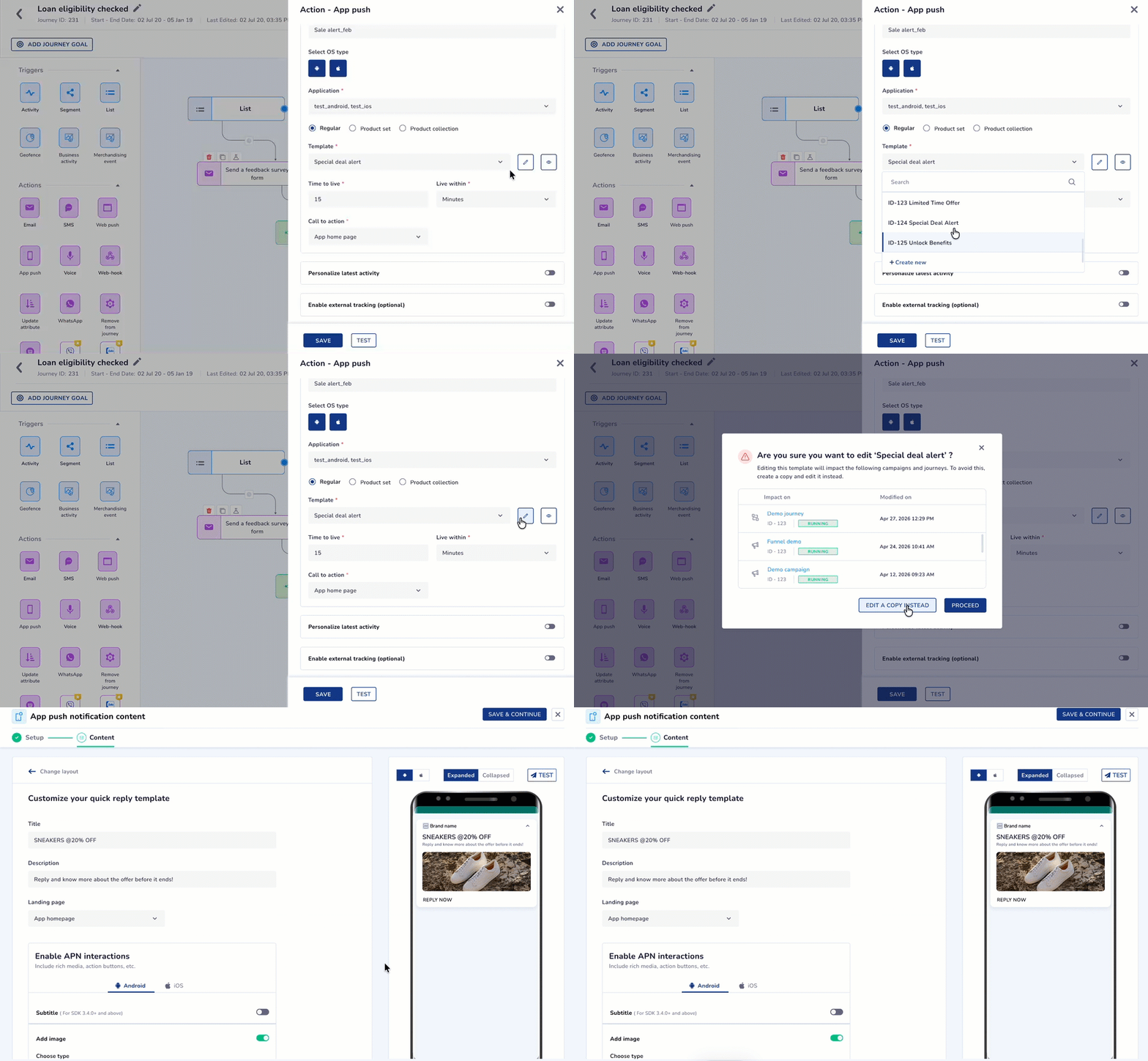
Edit Template from App Push Node
- Click the Preview icon, then select Edit from within the preview.
Good to Know
- When an APN template already in use in active journeys or campaigns is edited, the system displays an impact warning message.
- Any changes made to the template will impact existing journeys and campaigns where these templates are used.
Editing Options
| Action | System behavior |
|---|---|
| Edit a copy instead | Creates a copy of the App Push template and opens it in the editor. Changes apply only to the copied template and do not affect existing journeys or campaigns using the original template. The new App Push template is automatically selected for the current node. |
| Proceed | Opens the existing template in the editor. Any changes made will affect all journeys or campaigns that use this template. |
Create New Template from Journey
You can initiate App Push template creation directly from the journey node. To do so, follow the steps below:
- From the Template dropdown, select Create new. The App Push Content Gallery opens in a new browser tab. Click here to know more about APN Template creation.
- Create your template as required. Click SAVE & CLOSE, and return to the Journey Builder. Your created template will be auto-selected in the Select template section of the APN node.
Send Test Message
You can test your App Push notification templates directly from the journey node before activating the journey.
The Send Test option allows you to choose an identifier type, enter test recipients, and reuse recently used profiles. Test contacts can be configured from Account Configuration.
Click here to learn more about App Push Send Test from the journey node.
Frequently Asked Questions
Q. Can I use the same App Push template in multiple journey nodes?
A: Yes. The same template can be reused across different journey nodes and different journeys. However, any changes made to the template will reflect in all journeys and campaigns currently using it.
Q. What is the difference between Edit a Copy Instead and Proceed?
A: Edit a Copy Instead creates a new template from the existing one and applies your changes only to the copy, leaving all other journeys and campaigns unaffected. Proceed edits the original template and applies changes across all linked campaigns and journeys.
Q. Can I create a new App Push template directly from the journey canvas?
A: You can initiate creation from the journey node, but the template editor opens in a new browser tab. Inline creation within the canvas is not supported in the current phase.
Q. Does editing an App Push template from the journey affect other campaigns?
A: Only if you choose PROCEED in the Impact Pop-up. Choosing EDIT A COPY INSTEAD ensures existing campaigns and journeys remain unaffected.
Q. Why can't I see the Edit or Test icons on my App Push node?
A: The Edit and Test icons are only displayed when the App Push node has been configured with a template. Ensure a template has been selected before looking for these options
Updated about 1 month ago