
Duplicate Journeys Across Apps
Duplicate an existing journey within the same app or clone it into a different app under the same panel.
Overview
If you manage multiple apps from a single Netcore PX dashboard, replicating a journey across them used to mean rebuilding it manually in each app. That meant repeated configuration of nudges, segments, conversion goals, and experiments; slow and error-prone.
The Duplicate journeys across apps feature solves this in two ways:
- Duplicate: Clone a journey within the same app.
- Duplicate to other asset: Clone a journey from one app to another under the same panel, with automatic handling of app-specific dependencies (events, segments, goals, nudges).
Supported app typesWeb, Android, and iOS.
Who this is for
This feature is built for users who manage multiple apps under a single PX panel — typically marketing, growth, product, and CRM teams operating across web and mobile properties of the same business.
Common use cases
- Replicate a winning onboarding journey from your Android app to your iOS app.
- Roll out the same retention campaign across Web, Android, and iOS without rebuilding.
- Test the same experience in a staging app before promoting it to production.
Prerequisites
To duplicate a journey to a different app, ensure:
- The destination app exists under the same panel.
- The Netcore PX SDK has been successfully integrated into the destination app. Apps without successful SDK integration will not appear in the destination dropdown.
- You have permission to create journeys in the destination app.
Duplicate a journey
- Log in to the Netcore PX dashboard and navigate to Nudge journeys.
- Locate the journey you want to clone and open its actions menu. You will see two duplication options:
| Option | What it does |
|---|---|
| Duplicate to Same App | Clones the journey within the same app. Uses the refreshed UI. |
| Duplicate to a Different App | Opens a side drawer to clone the journey into a different app under the same panel. |
Duplicate to Same App
Selecting this option clones the journey in its current app. The cloned journey is named Copy_{original journey name} by default. All segments, nudges, goals, and experiments are copied as-is.
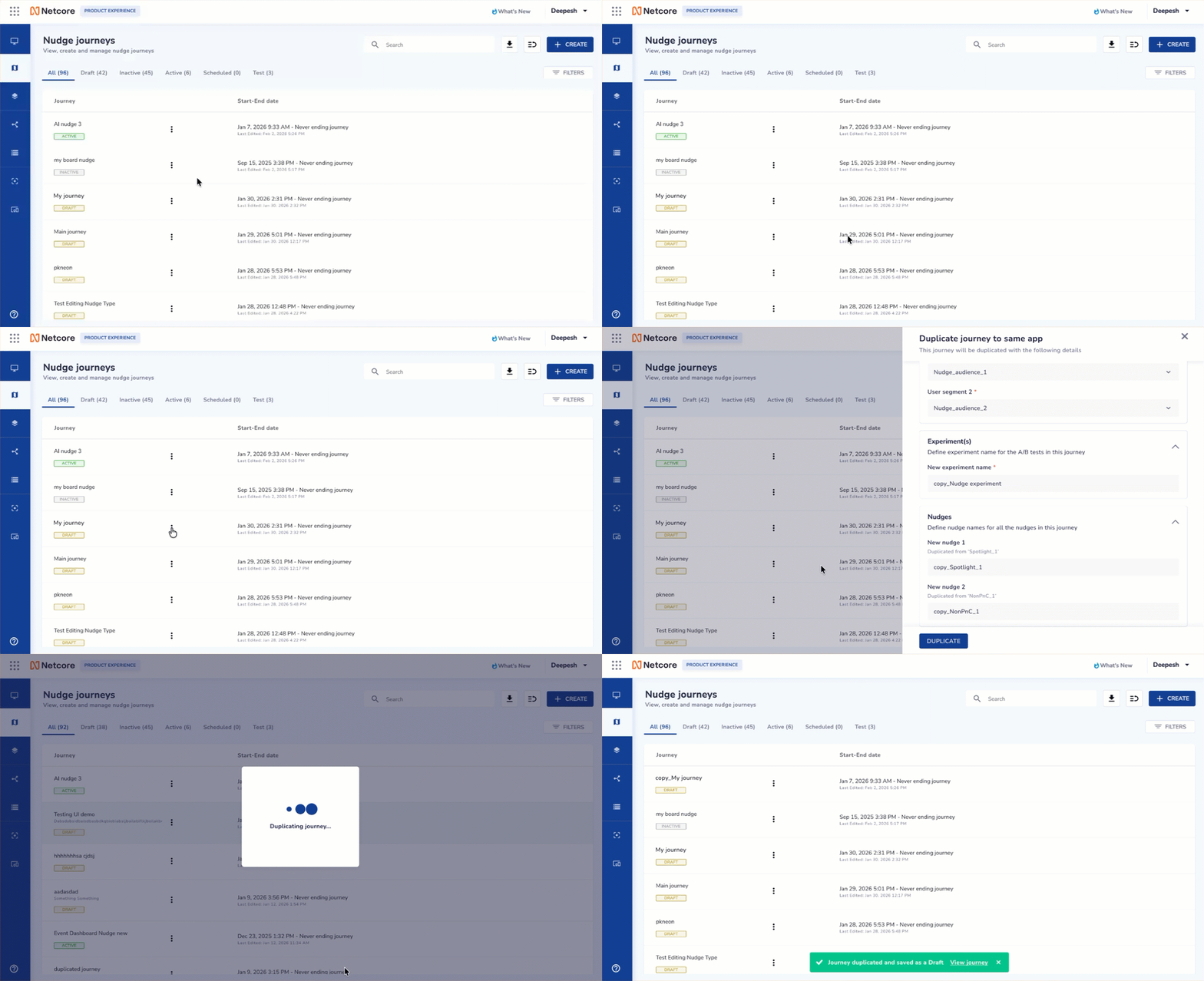
Duplicate a Nudge Journey to the Same App
Duplicate to a Different App
Selecting this option clones the journey in a different app. The cloned journey is named Copy_{original journey name} by default. All segments, nudges, goals, and experiments are copied as-is.
Refer to this document to set up a Nudge journey, create & customise, set goals and launch a journey.
Saving and publishing
- You can Save changes to a duplicated journey even if some nudges are still highlighted.
- However, Push to Test and Push to Production are blocked until:
- All highlighted nudges are fully configured, and
- All mandatory journey fields are completed, and
- No unresolved or blank configurations remain.
FAQs
Q. Can I duplicate a journey to an app on a different panel?
No. Cross-panel duplication is not supported.
Q. Can I duplicate more than one journey at a time?
No. Bulk duplication is out of scope for this release. Duplicate each journey individually.
Q. Why is the destination app I expected not in the dropdown?
The app likely doesn't have the Netcore PX SDK successfully integrated yet, or it is the current app you are duplicating from (the current app is always excluded).
Q. The source journey has a conversion goal, but the event doesn't exist in the destination app. Can I still duplicate?
Yes, but you must either turn the conversion-goal toggle OFF or pick a valid event from the destination app before the Duplicate CTA becomes active.
Q. Why is my duplicated PNC nudge highlighted even though everything looks fine?
PNC nudges are always highlighted by default after duplication because they require a fresh device pairing and screen capture in the destination app.
Q. Can I save a partially configured duplicated journey?
Yes. You can save changes even if some nudges are still highlighted. However, Push to Test and Push to Production remain blocked until all highlighted nudges and mandatory fields are resolved.
Q. What happens to the original journey when I duplicate it?
Nothing. Duplication only creates a copy in the destination (same or different app). The source journey is untouched.
Updated about 1 month ago