
Use Case: Recover Abandoned
Overview
Users often add products to their cart but drop off before completing the purchase. This results in lost revenue opportunities.
With Journeys, you can automatically detect such user behaviour and re-engage them with personalised, timely messages across channels to drive conversions.
Journeys enable event-based targeting, segmentation, and omnichannel engagement, ensuring users receive the right message at the right time.
Use Case Scenario
A user browses an e-commerce app, adds products to their cart, but leaves without completing the purchase. This journey targets such users and nudges them to complete the transaction through reminders and incentives.
In this use case:
- Users are identified based on inaction (no purchase after cart activity).
- Messages are sent across multiple channels.
- The journey adapts based on user behaviour.
Identified Journey FlowAdd to Cart > Wait > Check Purchase > Reminder > Wait > Offer > Exit
Create Recover Cart Abandon Journey
To get started, log in to your Netcore CE dashboard and click CREATE to start creating a new journey. Refer to the documentation here to learn more about journey creation.
- Configure the Recover Cart Abandon Journey by giving the following details:
| Section | Field Name | Description | Example Value |
|---|---|---|---|
| Journey Details | Journey Name | Name of the journey for identification | Reduce Shopping Cart Abandonment |
| Start Date | Date and time when the journey becomes active | 2026-04-09 10:55 | |
| End Date | Date and time when the journey ends | 2028-04-08 10:55 | |
| Tags | Labels to categorise and organise journeys | qaTest | |
| End Date Type | Option to customise or set a predefined end date | Customize | |
| Frequency Cap | Frequency Cap Toggle | Enable/disable journey-level frequency control | Disabled |
| Frequency Settings | Define limits on how often users receive communication | Configurable via account settings | |
| Do Not Disturb | DND Toggle | Enable/disable DND for the journey | Enabled |
| DND Time Window | Time range during which messages should not be sent | 05:00 PM – 06:00 PM | |
| Journey Goal | Goal Toggle | Enable tracking of journey performance and conversion | Enabled |
| Goal Conversion | The event used to measure success | For this particular use case, it is product_purchase | |
| Specify Parameters | Optional conditions to refine goal tracking | Optional | |
| Conversion Window | Timeframe within which conversion is counted | 1 Day | |
| Revenue Parameter | Parameter used to track revenue (if applicable) | To ensure revenue is calculated correctly, include the revenue parameter. Excluding it may lead to incomplete revenue calculations. | |
| Control Group | Control Group Toggle | Enable a control group to measure campaign effectiveness | Disabled |
| Product Collection | Product Collection Toggle | Enable product collection for dynamic recommendations | Enabled |
- Select a Trigger Activity that would be the entry criteria for this Journey.
- Activity Type: It could be either App or Web since we are targeting users on an e-commerce platform who have added products to their cart but have not finished purchasing
- Trigger Event: The trigger event would be Add to Cart
- Frequency: You can define how frequently a user can re-enter the journey when the trigger event occurs multiple times. This helps control repeated targeting and prevents over-engagement.
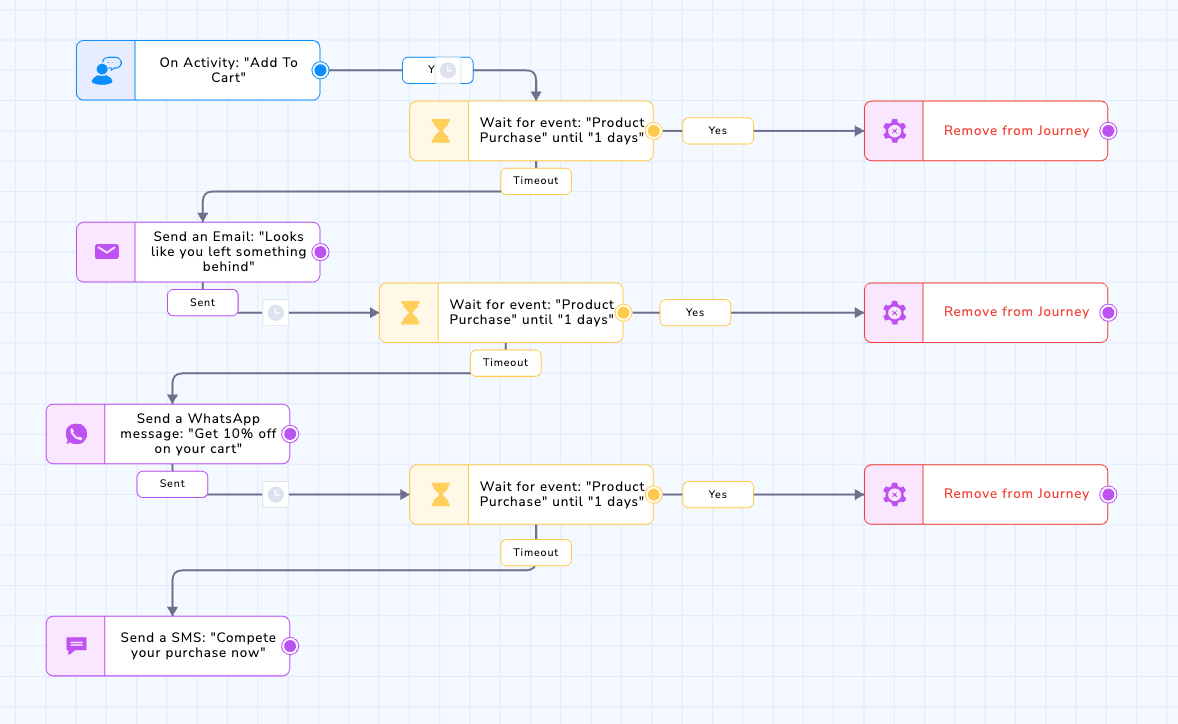
Journey Path for Recover Cart Abandon for an e-commerce
- Now start building the Journey Path. Add a Wait Node that waits for a specified time frame from when the user adds a product to the cart. This allows users to complete a purchase organically. For this use case, we are giving a one-day window.
If the user has not made the purchase within the wait node time frame set above, a reminder notification will be sent to complete the purchase.
- Select an Action node for this use case. Let's use a Email Action node. Refer here to learn more about the Action Nodes.
Fill in the details below for the Email Action node:
| Field Name | Description | Example Value |
|---|---|---|
| Message Name | Main message content or preview text shown in the email | Looks like you left something behind |
| Sender Name | Name displayed as the sender of the email | John |
| Sender Email | Email handle used to send the email (before the domain) | Prugg |
| Domain | Domain associated with the sender email | mailguard.co.in |
| Reply to Inbox | Email address where the user replies will be directed | MyInbox |
| Subject | Subject line of the email | Complete your purchase now. |
| Template | Predefined email template used for the campaign | Email Node Testing |
- Again, add a Wait Node to ensure that the user clicks on the email and completes the purchase. If the user does so, that user will be kicked out of the journey, and the journey will end here. Or add other action nodes for this journey.
- For this use case, we have used:
- An Email Action node: Sending a reminder for the unpurchased cart.
- A WhatsApp node: Offering 10% off on the order value.
- An SMS node: Giving free shipping to the order.
Journeys allow seamless omnichannel orchestration across touchpoints to improve engagement. Cart abandonment journeys help brands recover lost revenue through timely, personalized, and automated engagement, ensuring users are guided back to complete their purchase.
Updated about 1 month ago