
WhatsApp Failure Analytics
Understand why your WhatsApp campaign messages don't reach your audience.
Overview
WhatsApp Failure Analytics helps you understand why your WhatsApp campaign messages don't reach your audience. When a campaign shows a Not Sent or Undelivered count, you can now click that number to open a breakdown drawer. The drawer groups every failure by reason, shows the exact error code, and links you to Meta's official documentation for more context.
This feature removes the guesswork from campaign troubleshooting. You no longer need to raise a support ticket to find out why messages failed. You see the reason, the count, and the fix, all in one place.
Step-by-step guide
Follow the steps given below to view WhatsApp Failure Analytics.
- Navigate to Engage > Campaigns and open the listing table for any WhatsApp campaign.
- Locate the Not Sent or Undelivered column for that campaign.
- Click the count if the link is clickable.
- The breakdown drawer opens on the right side of the screen.
- The drawer header shows the WhatsApp channel icon and the campaign's status (Running, Paused, or Sent).
- Review the overview card. It shows the total count and labels it as either "Not Sent Count" or "Undelivered Count", depending on which column you clicked.
- Scroll through the accordion list. Each row represents a failure reason group, such as Recipient Issues or Delivery Policy.
- Click a reason group to expand it. Each expanded row shows the error code, the reason text, and how many messages hit that reason.
- Hover over the tooltip icon next to a row, if present, to read more detail about that specific reason.
- Close the drawer when you're done. You can close it safely at any point, even while data is still loading.
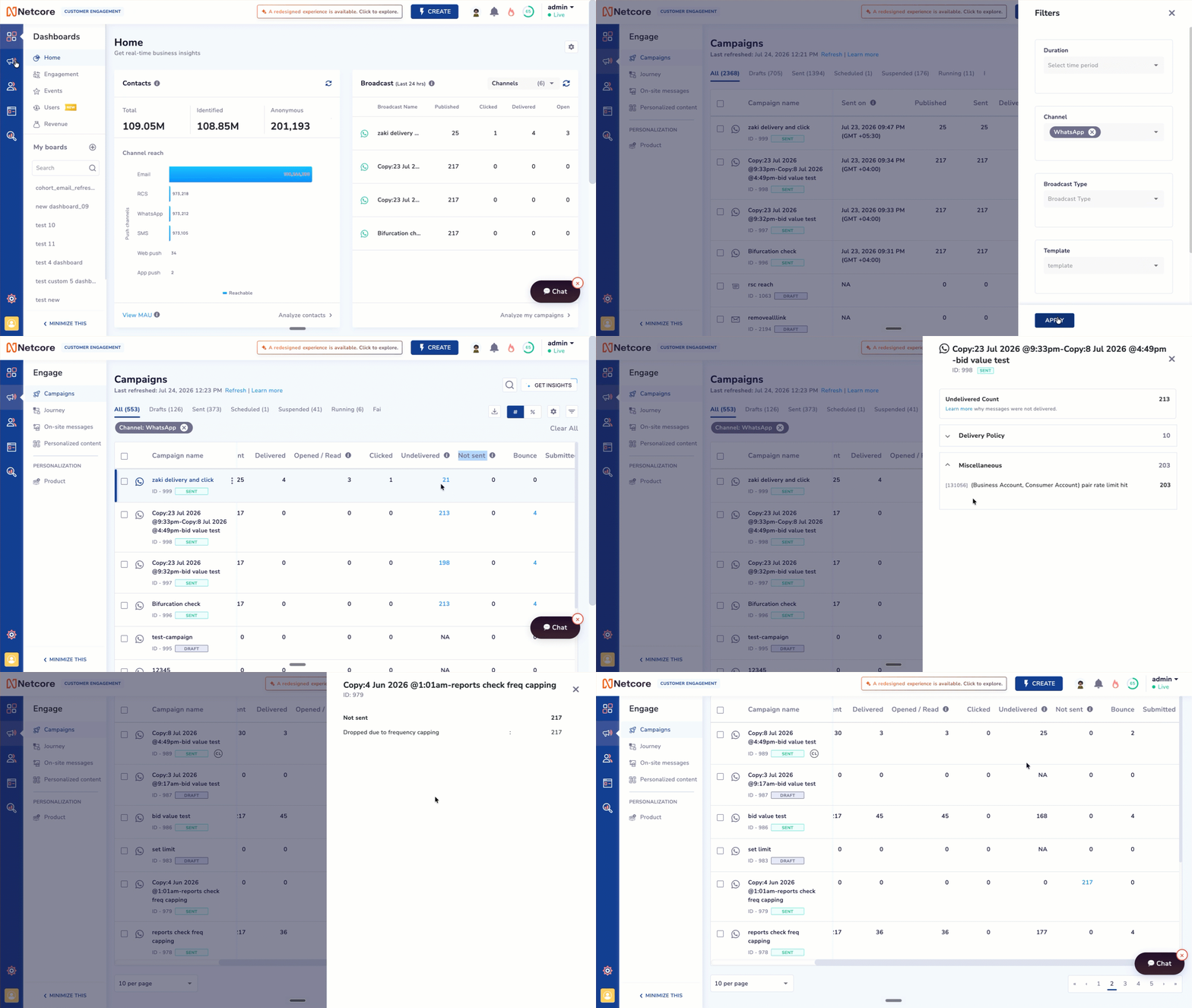
View the reasons for Undelivered & Not sent messages
Each expanded row includes:
- Error code: the numeric code Meta returns for that failure.
- Reason: a plain-language explanation of the failure.
- Count: how many messages in this campaign failed for this exact reason.
Some rows show a tooltip icon. Hover over it to see extra context that doesn't fit in the row.
There are two types of error categories:
- Undelivered
- Not Sent
Undelivered
Meta WhatsApp error code reference
Meta groups every WhatsApp Cloud API error into categories. Use this table as a quick reference. For the full, always-current list, always check Meta's documentation directly, since Meta updates codes and details over time.
Full reference: developers.facebook.com/documentation/business-messaging/whatsapp/support/error-codes
WhatsApp Error Codes Reference
Category 1: Recipient Issues
| Error code | Error label |
|---|---|
| 131026 | Message Undeliverable |
| 131021 | Recipient cannot be sender |
| 131050 | User stopped marketing messages |
| 131047 | Re-engagement message — 24hr window expired |
| 130472 | User part of marketing experiment |
Category 2: Delivery Policy
| Error code | Error label |
|---|---|
| 131049 | Meta chose not to deliver — ecosystem limit |
| 131063 | Marketing templates disabled for Cloud API |
Category 3: Media Errors
| Error code | Error label |
|---|---|
| 131052 | Media download error |
| 131053 | Media upload error |
Category 4: Server / System Errors
| Error code | Error label |
|---|---|
| 131000 | Something went wrong — unknown error |
| 131016 | Service unavailable |
| 2 | API Service — downtime / overloaded |
| 133004 | Server temporarily unavailable |
| 1 | API Unknown |
Category 5: Template Errors
| Error code | Error label |
|---|---|
| 132001 | Template does not exist |
| 132000 | Template parameter count mismatch |
| 132012 | Template parameter format mismatch |
| 132005 | Template hydrated text too long |
| 132015 | Template is paused — low quality |
| 132016 | Template is disabled |
| 132007 | Template format / content policy violated |
Category 6: Invalid Parameters
| Error code | Error label |
|---|---|
| 100 | Invalid parameter |
| 131009 | Parameter value is not valid |
| 131008 | Required parameter is missing |
| 131051 | Unsupported message type |
| 33 | Parameter value not valid — deleted phone |
Category 7: Account / Auth Issues
| Error code | Error label |
|---|---|
| 131005 | Access denied |
| 131042 | Business eligibility payment issue |
| 131037 | Display name not approved |
| 131057 | Account in maintenance mode |
| 131045 | Incorrect certificate |
| 134011 | WhatsApp Payments TOS not accepted |
Category 8: Registration Errors
| Error code | Error label |
|---|---|
| 133010 | Phone number not registered |
| 133006 | Phone number re-verification needed |
| 133000 | Incomplete deregistration |
| 133005 | Two-step verification PIN mismatch |
| 133008 | Too many PIN guesses |
| 133009 | PIN guessed too fast |
| 133015 | Recently deleted phone — wait 5 min |
Category 9: Flow Errors
| Error code | Error label |
|---|---|
| 132068 | Flow is blocked |
| 132069 | Flow is throttled |
Category 10: Miscellaneous
This category includes all failed-related errors that are not part of the mapped categories above.
Miscellaneous includes:
- Unmapped Meta errors.
- Remaining Meta “Other errors” received from provider/API responses.
- Netcore-generated/internal validation, processing, or campaign execution errors.
| Error code | Error label from Meta doc |
|---|---|
| 0 | AuthException |
| 3 | API Method |
| 10 | Permission Denied |
| 190 | Access token has expired |
| 200-299 | API Permission |
| 368 | Temporarily blocked for policies violations |
| 130497 | Business account is restricted from messaging users in this country. |
| 131031 | Account has been locked |
| 2388040 | Character limit exceeded |
| 2388047 | Message header format is incorrect |
| 2388072 | Message body format is incorrect |
| 2388073 | Message footer format is incorrect |
| 2388293 | Parameters words ratio exceeds limit |
| 2388299 | Leading or trailing parameters not allowed |
| 2388019 | Message Template Limit Exceeded |
| 2388012 | This phone number already exists in your list of phone numbers. |
| 2388091 | This phone number isn't eligible to receive/verify a registration code since it is not being migrated. |
| 2388093 | This phone number isn't eligible to receive/verify a registration code since it is not being migrated. |
| 2388103 | Phone number migration failed due to incomplete account setup, missing approvals, payment setup, ownership mismatch, or webhook configuration. |
| 2494100 | Account is in maintenance mode. |
| 200005 | Template insights unavailable |
| 200006 | Cannot disable template insights |
| 200007 | Template Insights not enabled |
| 2593079 | Template insights unavailable |
| 2593085 | Invalid WhatsApp Business Account for OBO Mobility |
| 2593107 | Synchronization Request limit exceeded |
| 2593108 | Synchronization Request made outside of allowed time window |
| 4 | API Too Many Calls |
| 80007 | Rate limit issues |
| 130429 | Rate limit hit |
| 131048 | Spam rate limit hit |
| 131056 | (Business Account, Consumer Account) pair rate limit hit |
| 133016 | Account register deregister rate limit exceeded |
| 131064 | Messaging limit reached due to template classification violations |
| 135000 | Generic user error |
Every code above links back to the same source. When you're not sure which category a code you see in the drawer falls under, use the Learn more link inside the drawer, or go directly to Meta's error code reference.
Not Sent
Messages in this category failed to deliver due to one of two reasons:
- Frequency Capping: The message was suppressed because the recipient reached their maximum communication limit.
- Invalid Number: The phone number is incorrect, inactive, or formatted poorly.
Updated 8 days ago