
Carousel
A custom HTML template for Carousel in-app messages. Copy the code, edit the code, and publish.
Carousel presents a sequence of slides, each with an image, a heading, a line of body copy, and its own call to action, and lets the user swipe or tap through them. It is best suited for campaigns such as multi-offer announcements, onboarding sequences, category teasers, and feature launches where you have several things to say and no good reason to pick just one. Unlike the other templates, it has no reward, no odds, and no code to copy.
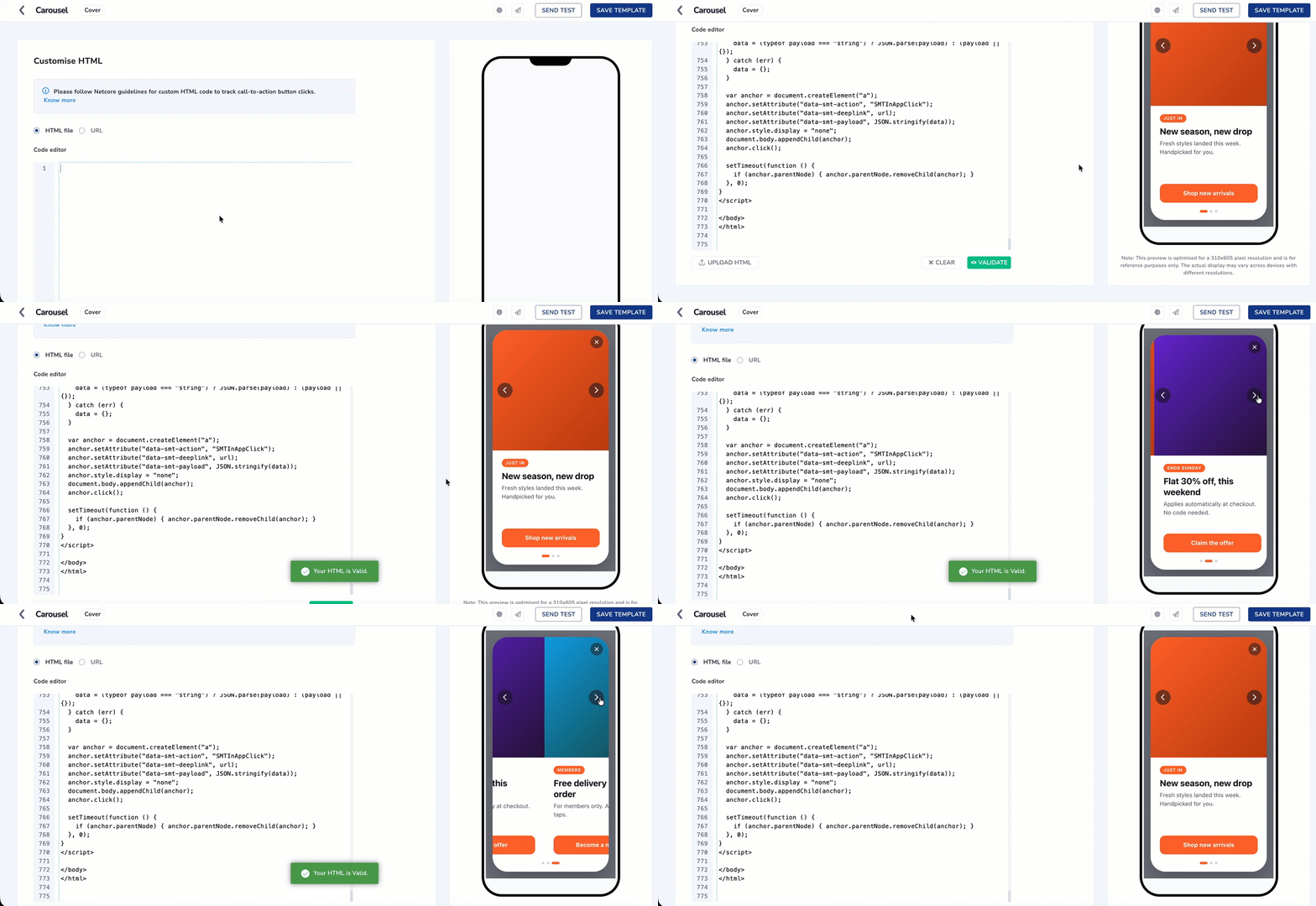
Configure Carousel using Custom HTML Code
This Is a Code Template, Not a Product Feature
- Carousel is not a widget you enable in the Netcore dashboard, and it will not appear in any menu. It is a block of HTML that you copy from this page and paste into the Code of HTML Editor
- Netcore does not host, version, or update this template on your behalf.
You are copying code out of this page and pasting it into a html code editor for campaign. Follow these steps in order.
-
Create an in-app template. See Custom HTML for the full template creation flow.
-
Copy the entire code block from the Sample HTML Code section on this page, from the first line to the last. Partial copies will not work.
-
Paste it into the Code Editor and select Validate.
-
Edit only the CONFIG block at the top of the code. This is where your slides, images, copy, and deeplinks go. See Editable and Non Editable Section in Custom HTML Code before you change anything.
-
Replace the placeholder images and deeplinks. Each slide ships with an inline placeholder gradient and
netcore://your-deeplink-here. Set everyimageto an absolute HTTPS URL and everyurlto a real deeplink registered in your app. -
Preview the message in the right pane, then schedule and publish.
Match the Form Factor to Your CampaignSet
formFactorto the same in-app format you chose when creating the campaign. A mismatch does not break the message, but the card will be sized for a format it is not in.
Sample HTML Code
<!DOCTYPE html>
<html lang="en">
<head>
<meta charset="UTF-8" />
<meta name="viewport" content="width=device-width, initial-scale=1.0, maximum-scale=1.0, user-scalable=no" />
<title>Netcore In-App Carousel</title>

<!-- ============================================================
     ZONE 1 - CONFIG
     Everything a marketer changes per campaign lives here.
     Nothing below this block should need editing.
     ============================================================ -->
<script>
var CONFIG = {

  /* ---------------------------------------------------------
     FORM FACTOR
     Set this to match the in-app format the campaign was
     created as in the Netcore dashboard.

     "cover"        320 x 580 card, 3-line body
     "interstitial" 320 x 480 card, 2-line body
     --------------------------------------------------------- */
  formFactor: "cover",

  /* ---------------------------------------------------------
     SLIDES
     2 to 6 recommended. Each slide can carry its own CTA;
     omit a slide's cta object to fall back to claimButton.
     image : absolute https CDN URL (replace the placeholders)
     badge : optional, omit the key to hide the pill
     --------------------------------------------------------- */
  slides: [
    {
      image: "data:image/svg+xml;charset=UTF-8,%3Csvg xmlns='http://www.w3.org/2000/svg' viewBox='0 0 640 640'%3E%3Cdefs%3E%3ClinearGradient id='a' x1='0' y1='0' x2='1' y2='1'%3E%3Cstop offset='0' stop-color='%23FF6A2C'/%3E%3Cstop offset='1' stop-color='%23C2410C'/%3E%3C/linearGradient%3E%3C/defs%3E%3Crect width='640' height='640' fill='url(%23a)'/%3E%3C/svg%3E",
      imageAlt: "New arrivals",
      badge: "Just in",
      headline: "New season, new drop",
      body: "Fresh styles landed this week. Handpicked for you.",
      cta: {
        label: "Shop new arrivals",
        url: "netcore://your-deeplink-here",
        payload: { slide: 1, source: "carousel", theme: "new_arrivals" }
      }
    },
    {
      image: "data:image/svg+xml;charset=UTF-8,%3Csvg xmlns='http://www.w3.org/2000/svg' viewBox='0 0 640 640'%3E%3Cdefs%3E%3ClinearGradient id='b' x1='0' y1='0' x2='1' y2='1'%3E%3Cstop offset='0' stop-color='%236D28D9'/%3E%3Cstop offset='1' stop-color='%232A0F3D'/%3E%3C/linearGradient%3E%3C/defs%3E%3Crect width='640' height='640' fill='url(%23b)'/%3E%3C/svg%3E",
      imageAlt: "Weekend offer",
      badge: "Ends Sunday",
      headline: "Flat 30% off, this weekend",
      body: "Applies automatically at checkout. No code needed.",
      cta: {
        label: "Claim the offer",
        url: "netcore://your-deeplink-here",
        payload: { slide: 2, source: "carousel", theme: "weekend_offer" }
      }
    },
    {
      image: "data:image/svg+xml;charset=UTF-8,%3Csvg xmlns='http://www.w3.org/2000/svg' viewBox='0 0 640 640'%3E%3Cdefs%3E%3ClinearGradient id='c' x1='0' y1='0' x2='1' y2='1'%3E%3Cstop offset='0' stop-color='%230EA5E9'/%3E%3Cstop offset='1' stop-color='%23134E4A'/%3E%3C/linearGradient%3E%3C/defs%3E%3Crect width='640' height='640' fill='url(%23c)'/%3E%3C/svg%3E",
      imageAlt: "Free delivery",
      badge: "Members",
      headline: "Free delivery on every order",
      body: "For members only. Activate in two taps.",
      cta: {
        label: "Become a member",
        url: "netcore://your-deeplink-here",
        payload: { slide: 3, source: "carousel", theme: "membership" }
      }
    }
  ],

  /* ---------------------------------------------------------
     GLOBAL CTA - used for any slide with no cta of its own.
     REPLACE url BEFORE THE CAMPAIGN SHIPS.
     --------------------------------------------------------- */
  claimButton: {
    label: "Shop now",
    url: "netcore://your-deeplink-here",
    payload: { source: "carousel", theme: "default" }
  },

  /* --------------------------------------------------------- */
  behaviour: {
    autoplay: true,           // auto-advance slides
    intervalMs: 4000,         // time on each slide
    loop: true,               // wrap from last back to first
    pauseOnInteract: true,    // stop autoplay once the user swipes or taps an arrow
    swipe: true,              // drag or swipe between slides
    slideMs: 420,             // transition duration
    closeOnBackdropTap: false // tap outside the card to dismiss
  },

  /* --------------------------------------------------------- */
  controls: {
    showArrows: true,
    showDots: true,
    showClose: true
  },

  /* ---------------------------------------------------------
     THEME
     --------------------------------------------------------- */
  theme: {
    surface: "#FFFFFF",
    headline: "#12121A",
    body: "#5B5B6B",
    accent: "#FF6A2C",         // CTA fill, active dot, badge fill
    accentText: "#FFFFFF",
    dotIdle: "#D9D9E3",
    arrowBg: "rgba(18,18,26,0.5)",
    arrowIcon: "#FFFFFF",
    closeBg: "rgba(18,18,26,0.45)",
    closeIcon: "#FFFFFF",
    backdrop: "rgba(9,12,26,0.55)",
    fontStack: "-apple-system, BlinkMacSystemFont, 'Segoe UI', Roboto, 'Helvetica Neue', Arial, sans-serif"
  }
};
</script>

<!-- ============================================================
     ZONE 2 - MANDATORY DEPENDENCIES
     Exact order, exact versions, exact integrity hash.
     Do not reorder, do not upgrade, do not guard the init call.
     ============================================================ -->
<script src="https://code.jquery.com/jquery-3.4.1.min.js"
  integrity="sha256-CSXorXvZcTkaix6Yvo6HppcZGetbYMGWSFlBw8HfCJo=" crossorigin="anonymous"></script>
<script src="https://cdnt.netcoresmartech.com/smartech-app-sdk/scripts/prod/smartech-app-sdk.js?v=1.0.1"></script>
<script>
  SmartechAppSDK.init();
</script>

<!-- ============================================================
     ZONE 3 - STYLES

     HEIGHT MODEL - read before editing any dimension.
     Overflow is made structurally impossible, not budgeted for:

         card   = FIXED height (--card-h)
         copy   = FIXED height (--copy-h), text line-clamped inside
         dots   = natural height
         media  = whatever is left, flexes to fill

     Because the two text-bearing blocks are fixed and the IMAGE
     is the flexible one, no length of headline or body copy can
     ever push the CTA out of the card. Longer copy just clamps;
     a shorter device just shrinks the image.

     Do NOT invert this by giving .smt-media a fixed height or an
     `aspect-ratio`. That was the original device bug: a 1:1 ratio
     on a 320 card forced 320px of media, the card hit its ceiling,
     and overflow:hidden ate the CTA while the dots rode up over it.
     A fixed media height merely moves the same bug behind a budget
     that holds for the sample copy and breaks on real copy.
     ============================================================ -->
<style>
  * { box-sizing: border-box; -webkit-tap-highlight-color: transparent; }

  html, body {
    margin: 0;
    padding: 0;
    height: 100%;
    background: transparent;
    font-family: var(--font-stack);
    -webkit-font-smoothing: antialiased;
    overscroll-behavior: none;
  }

  .smt-backdrop {
    position: fixed;
    top: 0; right: 0; bottom: 0; left: 0;
    background: var(--backdrop);
    opacity: 0;
    transition: opacity 260ms ease;
  }
  body.is-ready .smt-backdrop { opacity: 1; }

  .smt-stage {
    position: fixed;
    top: 0; right: 0; bottom: 0; left: 0;
    display: flex;
    align-items: center;
    justify-content: center;
    padding: var(--stage-pad);
  }

  /* ---- the card ------------------------------------------ */
  .smt-card {
    position: relative;
    width: 100%;
    max-width: var(--card-w);
    height: var(--card-h);       /* fixed - media absorbs the variance */
    max-height: 100%;            /* short devices shrink the image, not the CTA */
    border-radius: var(--card-r);
    background: var(--surface);
    overflow: hidden;
    display: flex;
    flex-direction: column;
    box-shadow: 0 18px 48px rgba(9, 12, 26, 0.28);
    opacity: 0;
    transform: translateY(18px) scale(0.98);
    transition: opacity 300ms ease, transform 300ms cubic-bezier(0.22, 0.61, 0.36, 1);
  }
  body.is-ready .smt-card {
    opacity: 1;
    transform: translateY(0) scale(1);
  }

  /* ---- viewport + track ---------------------------------- */
  .smt-viewport {
    position: relative;
    overflow: hidden;
    flex: 1 1 auto;   /* takes all space the copy block and dots do not */
    min-height: 0;
  }
  /* The engine writes translateX inline on .smt-track.
     Nothing here may animate `transform` on this element. */
  .smt-track {
    display: flex;
    align-items: stretch;   /* every slide is the same height, so no jump */
    width: 100%;
    height: 100%;
    will-change: transform;
    transition: transform var(--slide-ms) cubic-bezier(0.22, 0.61, 0.36, 1);
  }
  .smt-track.is-dragging { transition: none; }

  .smt-slide {
    flex: 0 0 100%;
    width: 100%;
    height: 100%;
    min-width: 0;
    display: flex;
    flex-direction: column;
  }

  /* ---- media --------------------------------------------- */
  .smt-media {
    position: relative;
    width: 100%;
    flex: 1 1 auto;    /* the flexible block - see height model note above */
    min-height: 0;
    background: #EFEFF4;
    overflow: hidden;
  }
  .smt-media img {
    width: 100%;
    height: 100%;
    object-fit: cover;
    display: block;
  }

  /* ---- copy ---------------------------------------------- */
  .smt-copy {
    padding: var(--copy-pad);
    display: flex;
    flex-direction: column;
    flex: 0 0 var(--copy-h);   /* fixed - text clamps, never pushes */
    height: var(--copy-h);
    overflow: hidden;
  }
  .smt-badge {
    align-self: flex-start;
    font-size: 10px;
    font-weight: 700;
    letter-spacing: 0.06em;
    text-transform: uppercase;
    color: var(--accent-text);
    background: var(--accent);
    padding: 4px 9px;
    border-radius: 999px;
    margin: 0 0 8px;
  }
  .smt-headline {
    margin: 0;
    font-size: var(--headline-size);
    line-height: 1.25;
    font-weight: 700;
    color: var(--headline);
    display: -webkit-box;
    -webkit-line-clamp: 2;
    -webkit-box-orient: vertical;
    overflow: hidden;
  }
  .smt-body {
    margin: 6px 0 0;
    font-size: var(--body-size);
    line-height: 1.45;
    color: var(--body);
    display: -webkit-box;
    -webkit-line-clamp: var(--body-lines);
    -webkit-box-orient: vertical;
    overflow: hidden;
  }
  .smt-cta {
    margin-top: auto;      /* CTA sits on the same baseline on every slide */
    padding-top: 14px;
    flex: 0 0 auto;
  }
  .smt-cta button {
    width: 100%;
    border: 0;
    cursor: pointer;
    font-family: inherit;
    font-size: 14px;
    font-weight: 700;
    line-height: 1.2;
    color: var(--accent-text);
    background: var(--accent);
    padding: 14px 16px;
    border-radius: 12px;
    transition: transform 140ms ease, filter 140ms ease;
  }
  .smt-cta button:active {
    transform: scale(0.975);
    filter: brightness(0.94);
  }

  /* ---- arrows -------------------------------------------- */
  /* Vertically centred on the MEDIA band (viewport minus the copy block). */
  .smt-arrow {
    position: absolute;
    top: calc((100% - var(--copy-h)) / 2);
    transform: translateY(-50%);
    width: var(--arrow-size);
    height: var(--arrow-size);
    border: 0;
    border-radius: 50%;
    background: var(--arrow-bg);
    color: var(--arrow-icon);
    display: flex;
    align-items: center;
    justify-content: center;
    cursor: pointer;
    padding: 0;
    z-index: 3;
    transition: opacity 180ms ease;
  }
  .smt-arrow svg { width: 52%; height: 52%; display: block; }
  .smt-arrow--prev { left: var(--arrow-gap); }
  .smt-arrow--next { right: var(--arrow-gap); }
  .smt-arrow[disabled] { opacity: 0.3; cursor: default; }
  .smt-arrow.is-hidden { display: none; }

  /* ---- dots ---------------------------------------------- */
  .smt-dots {
    display: flex;
    justify-content: center;
    align-items: center;
    gap: 6px;
    padding: var(--dots-pad);
    flex: 0 0 auto;
    background: var(--surface);
  }
  .smt-dots.is-hidden { display: none; }
  .smt-dot {
    width: 6px;
    height: 6px;
    border-radius: 999px;
    background: var(--dot-idle);
    border: 0;
    padding: 0;
    cursor: pointer;
    transition: width 220ms ease, background 220ms ease;
  }
  .smt-dot.is-active {
    width: 18px;
    background: var(--accent);
  }

  /* ---- close --------------------------------------------- */
  .smt-close {
    position: absolute;
    top: var(--close-offset);
    right: var(--close-offset);
    width: var(--close-size);
    height: var(--close-size);
    border: 0;
    border-radius: 50%;
    background: var(--close-bg);
    color: var(--close-icon);
    display: flex;
    align-items: center;
    justify-content: center;
    cursor: pointer;
    padding: 0;
    z-index: 4;
  }
  .smt-close svg { width: 44%; height: 44%; display: block; }
  .smt-close.is-hidden { display: none; }
</style>
</head>

<body>

<!-- ============================================================
     ZONE 4 - MARKUP
     Slides, dots and per-slide CTAs are rendered by the engine.
     ============================================================ -->
<div class="smt-backdrop" id="smtBackdrop"></div>

<div class="smt-stage">
  <div class="smt-card" id="smtCard">

    <button class="smt-close" id="smtClose" data-smt-action="SMTInAppClose" aria-label="Close">
      <svg viewBox="0 0 24 24" fill="none" stroke="currentColor" stroke-width="3" stroke-linecap="round">
        <path d="M5 5 L19 19 M19 5 L5 19" />
      </svg>
    </button>

    <div class="smt-viewport" id="smtViewport">
      <div class="smt-track" id="smtTrack"></div>

      <button class="smt-arrow smt-arrow--prev" id="smtPrev" aria-label="Previous">
        <svg viewBox="0 0 24 24" fill="none" stroke="currentColor" stroke-width="2.6" stroke-linecap="round" stroke-linejoin="round">
          <path d="M15 4 L7 12 L15 20" />
        </svg>
      </button>
      <button class="smt-arrow smt-arrow--next" id="smtNext" aria-label="Next">
        <svg viewBox="0 0 24 24" fill="none" stroke="currentColor" stroke-width="2.6" stroke-linecap="round" stroke-linejoin="round">
          <path d="M9 4 L17 12 L9 20" />
        </svg>
      </button>
    </div>

    <div class="smt-dots" id="smtDots"></div>
  </div>
</div>

<!-- ============================================================
     ZONE 5 - ENGINE
     ============================================================ -->
<script>
(function () {
  "use strict";

  /* ---------------------------------------------------------
     FORM-FACTOR TABLE
     The only place geometry is defined. Width is held constant
     at 320px so both formats read as one system; media height,
     card height, radius and type scale are what change.

     Height budget:
       cover        580 card - 250 copy - 42 dots = 288 media
       interstitial 480 card - 216 copy - 38 dots = 226 media
     --------------------------------------------------------- */
  var FORM_FACTORS = {
    "cover": {
      cardW: "320px", cardH: "580px", radius: "36px",
      stagePad: "16px", copyH: "250px",
      copyPad: "20px 22px 18px",
      headlineSize: "21px", bodySize: "14px", bodyLines: 3,
      dotsPad: "0 0 18px",
      arrowSize: "36px", arrowGap: "12px",
      closeSize: "30px", closeOffset: "14px"
    },
    "interstitial": {
      cardW: "320px", cardH: "480px", radius: "28px",
      stagePad: "20px", copyH: "216px",
      copyPad: "16px 18px 16px",
      headlineSize: "19px", bodySize: "13.5px", bodyLines: 2,
      dotsPad: "0 0 16px",
      arrowSize: "32px", arrowGap: "10px",
      closeSize: "28px", closeOffset: "12px"
    }
  };

  var ff = FORM_FACTORS[CONFIG.formFactor] || FORM_FACTORS["cover"];
  var slides = (CONFIG.slides || []).slice(0, 6);
  var behaviour = CONFIG.behaviour || {};
  var controls = CONFIG.controls || {};
  var theme = CONFIG.theme || {};

  var track = document.getElementById("smtTrack");
  var viewport = document.getElementById("smtViewport");
  var dotsWrap = document.getElementById("smtDots");
  var prevBtn = document.getElementById("smtPrev");
  var nextBtn = document.getElementById("smtNext");
  var closeBtn = document.getElementById("smtClose");
  var backdrop = document.getElementById("smtBackdrop");

  var index = 0;
  var autoTimer = null;
  var autoStopped = false;
  var dragging = false;
  var dragStartX = 0;
  var dragDelta = 0;

  /* ---- boot: paint geometry + theme into CSS variables ---- */
  function carouselApplyTokens() {
    var r = document.documentElement.style;
    r.setProperty("--card-w", ff.cardW);
    r.setProperty("--card-h", ff.cardH);
    r.setProperty("--card-r", ff.radius);
    r.setProperty("--stage-pad", ff.stagePad);
    r.setProperty("--copy-h", ff.copyH);
    r.setProperty("--copy-pad", ff.copyPad);
    r.setProperty("--headline-size", ff.headlineSize);
    r.setProperty("--body-size", ff.bodySize);
    r.setProperty("--body-lines", String(ff.bodyLines));
    r.setProperty("--dots-pad", ff.dotsPad);
    r.setProperty("--arrow-size", ff.arrowSize);
    r.setProperty("--arrow-gap", ff.arrowGap);
    r.setProperty("--close-size", ff.closeSize);
    r.setProperty("--close-offset", ff.closeOffset);

    r.setProperty("--surface", theme.surface);
    r.setProperty("--headline", theme.headline);
    r.setProperty("--body", theme.body);
    r.setProperty("--accent", theme.accent);
    r.setProperty("--accent-text", theme.accentText);
    r.setProperty("--dot-idle", theme.dotIdle);
    r.setProperty("--arrow-bg", theme.arrowBg);
    r.setProperty("--arrow-icon", theme.arrowIcon);
    r.setProperty("--close-bg", theme.closeBg);
    r.setProperty("--close-icon", theme.closeIcon);
    r.setProperty("--backdrop", theme.backdrop);
    r.setProperty("--font-stack", theme.fontStack);
    r.setProperty("--slide-ms", (behaviour.slideMs || 420) + "ms");

    document.body.setAttribute("data-formfactor", CONFIG.formFactor);
  }

  /* ---- build slides + dots -------------------------------- */
  function carouselBuild() {
    var frag = document.createDocumentFragment();

    slides.forEach(function (slide) {
      var el = document.createElement("div");
      el.className = "smt-slide";

      var media = document.createElement("div");
      media.className = "smt-media";
      var img = document.createElement("img");
      img.src = slide.image || "";
      img.alt = slide.imageAlt || "";
      img.setAttribute("draggable", "false");
      media.appendChild(img);
      el.appendChild(media);

      var copy = document.createElement("div");
      copy.className = "smt-copy";

      if (slide.badge) {
        var badge = document.createElement("span");
        badge.className = "smt-badge";
        badge.textContent = slide.badge;
        copy.appendChild(badge);
      }

      var h = document.createElement("h2");
      h.className = "smt-headline";
      h.textContent = slide.headline || "";
      copy.appendChild(h);

      if (slide.body) {
        var p = document.createElement("p");
        p.className = "smt-body";
        p.textContent = slide.body;
        copy.appendChild(p);
      }

      var cta = slide.cta || CONFIG.claimButton || {};
      var ctaWrap = document.createElement("div");
      ctaWrap.className = "smt-cta";
      var btn = document.createElement("button");
      btn.type = "button";
      btn.textContent = cta.label || (CONFIG.claimButton && CONFIG.claimButton.label) || "Shop now";
      btn.addEventListener("click", function (e) {
        e.stopPropagation();
        carouselStopAuto();
        netcoreTrackClick(
          cta.url || (CONFIG.claimButton && CONFIG.claimButton.url),
          cta.payload || (CONFIG.claimButton && CONFIG.claimButton.payload)
        );
      });
      ctaWrap.appendChild(btn);
      copy.appendChild(ctaWrap);

      el.appendChild(copy);
      frag.appendChild(el);
    });

    track.appendChild(frag);

    if (controls.showDots === false || slides.length < 2) {
      dotsWrap.classList.add("is-hidden");
    } else {
      slides.forEach(function (s, i) {
        var dot = document.createElement("button");
        dot.type = "button";
        dot.className = "smt-dot" + (i === 0 ? " is-active" : "");
        dot.setAttribute("aria-label", "Slide " + (i + 1));
        dot.addEventListener("click", function () {
          carouselStopAuto();
          carouselGoTo(i);
        });
        dotsWrap.appendChild(dot);
      });
    }

    if (controls.showArrows === false || slides.length < 2) {
      prevBtn.classList.add("is-hidden");
      nextBtn.classList.add("is-hidden");
    }
    if (controls.showClose === false) {
      closeBtn.classList.add("is-hidden");
    }
    if (behaviour.closeOnBackdropTap) {
      backdrop.setAttribute("data-smt-action", "SMTInAppClose");
    }
  }

  /* ---- movement ------------------------------------------- */
  function carouselGoTo(target, skipAnim) {
    var last = slides.length - 1;
    if (target < 0) { target = behaviour.loop ? last : 0; }
    if (target > last) { target = behaviour.loop ? 0 : last; }
    index = target;

    if (skipAnim) { track.classList.add("is-dragging"); }
    track.style.transform = "translateX(" + (-index * 100) + "%)";
    if (skipAnim) {
      void track.offsetWidth;
      track.classList.remove("is-dragging");
    }
    carouselSyncControls();
  }

  function carouselNext() { carouselGoTo(index + 1); }
  function carouselPrev() { carouselGoTo(index - 1); }

  function carouselSyncControls() {
    var dots = dotsWrap.querySelectorAll(".smt-dot");
    for (var i = 0; i < dots.length; i++) {
      if (i === index) { dots[i].classList.add("is-active"); }
      else { dots[i].classList.remove("is-active"); }
    }
    if (!behaviour.loop) {
      if (index === 0) { prevBtn.setAttribute("disabled", "disabled"); }
      else { prevBtn.removeAttribute("disabled"); }
      if (index === slides.length - 1) { nextBtn.setAttribute("disabled", "disabled"); }
      else { nextBtn.removeAttribute("disabled"); }
    }
  }

  /* ---- autoplay ------------------------------------------- */
  function carouselStartAuto() {
    if (!behaviour.autoplay || slides.length < 2 || autoStopped) { return; }
    carouselClearAuto();
    autoTimer = setInterval(function () {
      if (!behaviour.loop && index === slides.length - 1) {
        carouselClearAuto();
        return;
      }
      carouselGoTo(index + 1);
    }, behaviour.intervalMs || 4000);
  }

  function carouselClearAuto() {
    if (autoTimer) { clearInterval(autoTimer); autoTimer = null; }
  }

  function carouselStopAuto() {
    carouselClearAuto();
    if (behaviour.pauseOnInteract !== false) { autoStopped = true; }
    else { carouselStartAuto(); }
  }

  /* ---- swipe / drag --------------------------------------- */
  function carouselBindDrag() {
    if (behaviour.swipe === false || slides.length < 2) { return; }

    function pointerX(e) {
      return (e.touches && e.touches.length) ? e.touches[0].clientX : e.clientX;
    }

    function onStart(e) {
      dragging = true;
      dragDelta = 0;
      dragStartX = pointerX(e);
      track.classList.add("is-dragging");
    }

    function onMove(e) {
      if (!dragging) { return; }
      dragDelta = pointerX(e) - dragStartX;
      var width = viewport.offsetWidth || 1;
      var pct = (dragDelta / width) * 100;
      if (!behaviour.loop) {
        if ((index === 0 && pct > 0) || (index === slides.length - 1 && pct < 0)) {
          pct = pct * 0.32;
        }
      }
      track.style.transform = "translateX(" + ((-index * 100) + pct) + "%)";
      if (Math.abs(dragDelta) > 8 && e.cancelable) { e.preventDefault(); }
    }

    function onEnd() {
      if (!dragging) { return; }
      dragging = false;
      track.classList.remove("is-dragging");
      var threshold = (viewport.offsetWidth || 1) * 0.18;
      if (dragDelta > threshold) { carouselStopAuto(); carouselPrev(); }
      else if (dragDelta < -threshold) { carouselStopAuto(); carouselNext(); }
      else { carouselGoTo(index); }
      dragDelta = 0;
    }

    viewport.addEventListener("touchstart", onStart, { passive: true });
    viewport.addEventListener("touchmove", onMove, { passive: false });
    viewport.addEventListener("touchend", onEnd);
    viewport.addEventListener("touchcancel", onEnd);
    viewport.addEventListener("mousedown", onStart);
    window.addEventListener("mousemove", onMove);
    window.addEventListener("mouseup", onEnd);
  }

  /* ---- init ----------------------------------------------- */
  function carouselInit() {
    if (!slides.length) { return; }
    carouselApplyTokens();
    carouselBuild();
    carouselGoTo(0, true);
    carouselBindDrag();

    prevBtn.addEventListener("click", function () { carouselStopAuto(); carouselPrev(); });
    nextBtn.addEventListener("click", function () { carouselStopAuto(); carouselNext(); });

    setTimeout(function () {
      document.body.classList.add("is-ready");
      carouselStartAuto();
    }, 40);
  }

  if (document.readyState === "loading") {
    document.addEventListener("DOMContentLoaded", carouselInit);
  } else {
    carouselInit();
  }
})();
</script>

<!-- ============================================================
     ZONE 6 - SHARED HELPERS
     netcoreTrackClick is the framework's tracked-CTA contract.
     Do not inline a deeplink, do not use a raw location redirect.
     ============================================================ -->
<script>
function netcoreTrackClick(deeplink, payload) {
  var url = deeplink || "";
  var data = {};
  try {
    data = (typeof payload === "string") ? JSON.parse(payload) : (payload || {});
  } catch (err) {
    data = {};
  }

  var anchor = document.createElement("a");
  anchor.setAttribute("data-smt-action", "SMTInAppClick");
  anchor.setAttribute("data-smt-deeplink", url);
  anchor.setAttribute("data-smt-payload", JSON.stringify(data));
  anchor.style.display = "none";
  document.body.appendChild(anchor);
  anchor.click();

  setTimeout(function () {
    if (anchor.parentNode) { anchor.parentNode.removeChild(anchor); }
  }, 0);
}
</script>

</body>
</html>
Editable and Non Editable Section in Custom HTML Code
The template is split into two zones. Everything you are meant to change sits in the first one.
Important Point to RememberRemember Changing Values Is Safe, Changing Key Names Is Not!
- Inside the CONFIG block, edit the values on the right of each colon. Do not rename the settings themselves. Changing
intervalMs: 4000tointervalMs: 6000is fine. Renaming it tointerval: 6000means the template can no longer find it.
- Keep the punctuation intact too. A missing comma or quotation mark stops the whole message from rendering.
- The code below the CONFIG block is what builds the slides, handles swipes, and reports back to Netcore, which is why DO NOT EDIT it.
Change Theme Values, Do Not Delete Theme KeysEvery key in
themeis written into the message as a CSS variable. Removing a key does not fall back to a default. It leaves that variable unset and the affected element renders unstyled.
Components You Must Not Remove
Four parts of the locked zone are worth knowing by name, because removing them is the most common way a campaign breaks.
| Component | Why it's required |
|---|---|
| Dependency block | Loads jQuery and the Netcore Smartech App SDK in the required order. |
| data-smt-action="SMTInAppClose" | Allows the SDK to close the message and record the dismissal event. |
| netcoreTrackClick() | Tracks the CTA click and opens the configured deeplink. Do not replace it with a redirect. |
| The height model in the styles | The card and copy block are fixed height while the image flexes to fill what is left. Giving the image a fixed height or an aspect-ratio clips the CTA on real copy. |
If any of these are missing, the message can still render in the preview pane while failing to close, failing to report, or failing to open your deeplink on a real device.
Update Custom HTML Code for Carousel
You can customize the following six sections to configure the Carousel widget for your In-app message campaign. All of them live inside the CONFIG block.
Form Factor: Match the card geometry to the in-app format you selected.
| Setting | Description | Example |
|---|---|---|
formFactor | Card geometry. Accepts "cover" or "interstitial". | "cover" |
| Value | Card size | Body copy |
|---|---|---|
"cover" | 320 x 580 | Up to 3 lines |
"interstitial" | 320 x 480 | Up to 2 lines |
Slides: Each object in the slides array becomes one slide in the carousel.
| Field | Description |
|---|---|
image | Absolute HTTPS URL for the slide image. Filled to the available area and cropped to fit. |
imageAlt | Alternative text for the image. Write a real description. |
badge | Optional pill above the heading. Remove the key entirely to hide it. |
headline | Slide heading. Clamps to two lines. |
body | Supporting copy. Clamps to the line count set by formFactor. |
cta.label | Button label for this slide. |
cta.url | Deep link opened when this slide's button is tapped. |
cta.payload | Optional payload passed to your app. Use this to identify which slide converted. |
Per-slide CTAs Are OptionalOmit a slide's whole
ctaobject and it falls back to the Global CTA. Include one and it overrides the global for that slide only. Setting a distinct payload per slide is the only way to tell which slide drove a conversion.
Six Slides MaximumTwo to six slides work well. Any slides beyond the sixth are ignored without a warning.
Behavior: Configure how the carousel moves between slides.
| Setting | Description | Example |
|---|---|---|
behaviour.autoplay | Advance slides automatically. | true |
behaviour.intervalMs | Milliseconds each slide stays on screen. 4000 is four seconds. | 4000 |
behaviour.loop | Wrap from the last slide back to the first. When off, the arrows disable at each end. | true |
behaviour.pauseOnInteract | Stop autoplay once the user swipes or taps an arrow. | true |
behaviour.swipe | Allow drag and swipe between slides. | true |
behaviour.slideMs | Transition duration in milliseconds. | 420 |
behaviour.closeOnBackdropTap | Dismiss the message when the user taps outside the card. | false |
Autoplay Stops Permanently, Not TemporarilyWith
pauseOnInteractenabled, the first swipe or arrow tap ends autoplay for the rest of the session. It does not resume after a pause. A carousel that keeps moving after the user has taken control feels like it is fighting them.
Controls: Show or hide the navigation controls.
| Setting | Description | Example |
|---|---|---|
controls.showArrows | Show the previous and next arrows. Hidden automatically with fewer than 2 slides. | true |
controls.showDots | Show the position dots. Hidden automatically with fewer than 2 slides. | true |
controls.showClose | Show the close (×) button. | true |
Global CTA: Set the fallback call to action for slides without their own CTA.
| Setting | Description |
|---|---|
claimButton.label | Fallback button label. |
claimButton.url | Fallback deep link. Replace the placeholder before publishing. |
claimButton.payload | Optional payload passed to your app. Use null if not required. |
Theme: Customize the colors and typography of the whole message.
| Setting | Description |
|---|---|
theme.surface | Card background color. |
theme.headline | Heading text color. |
theme.body | Body copy color. |
theme.accent | CTA fill, active dot, and badge fill. One value drives all three. |
theme.accentText | Text color on the CTA and badge. |
theme.dotIdle | Color of inactive dots. |
theme.arrowBg | Arrow button background. A semi-transparent dark value reads best over images. |
theme.arrowIcon | Arrow icon color. |
theme.closeBg | Close button background. |
theme.closeIcon | Close icon color. |
theme.backdrop | Color of the dimmed area behind the card. |
theme.fontStack | Font stack for the whole message. |
Troubleshoot and FAQs
Q. Why do the slides show a grey block instead of an image?
A. The image URL may be incorrect, not absolute, or not served over HTTPS. Replace it with a full HTTPS URL from your CDN.
Q. Why are my headings or body copy cut off?
A. The copy exceeds the line clamp. Shorten the text, or switch formFactor to "cover" for a third body line.
Q. Why is the CTA missing or partly hidden?
A. The height model may have been edited. Restore the fixed card and copy heights and let the image flex to fill the remaining space.
Q. Why doesn't the carousel advance on its own?
A. Check that behaviour.autoplay is enabled, that there is more than one slide, and that the user has not already interacted with the carousel.
Q. Why doesn't swiping work?
A. The behaviour.swipe setting may be disabled, or there may be only one slide.
Q. Why does one of my controls render with no color?
A. A theme key may have been deleted rather than changed. Restore the key with a valid color value.
Q. Why don't my later slides appear?
A. Only the first six slides are used. Remove or reorder slides so the ones you need fall within the first six.
Q. Why doesn't the message close when I click the close button?
A. The data-smt-action="SMTInAppClose" attribute may have been removed from the close button. Restore the attribute to enable the SDK to close the message correctly.
Q. Why doesn't the template render at all?
A. The dependency block may have been modified or reordered, or the Netcore Smartech SDK may not be integrated into your app correctly. Ensure the block remains unchanged and is loaded in the required order.
Updated about 1 hour ago