
Pull the Lever
A custom HTML template for Pull the Lever for in-app messages.
Pull the Lever is a three-reel slot machine. The user pulls the lever, symbols blur past, the reels stop one after another on a matching set, and a reward is revealed with a code they can copy straight to their clipboard. It is best suited for promotional campaigns such as first-purchase incentives, cart recovery, loyalty rewards, and seasonal sales where a chance-based reward creates excitement and encourages participation.
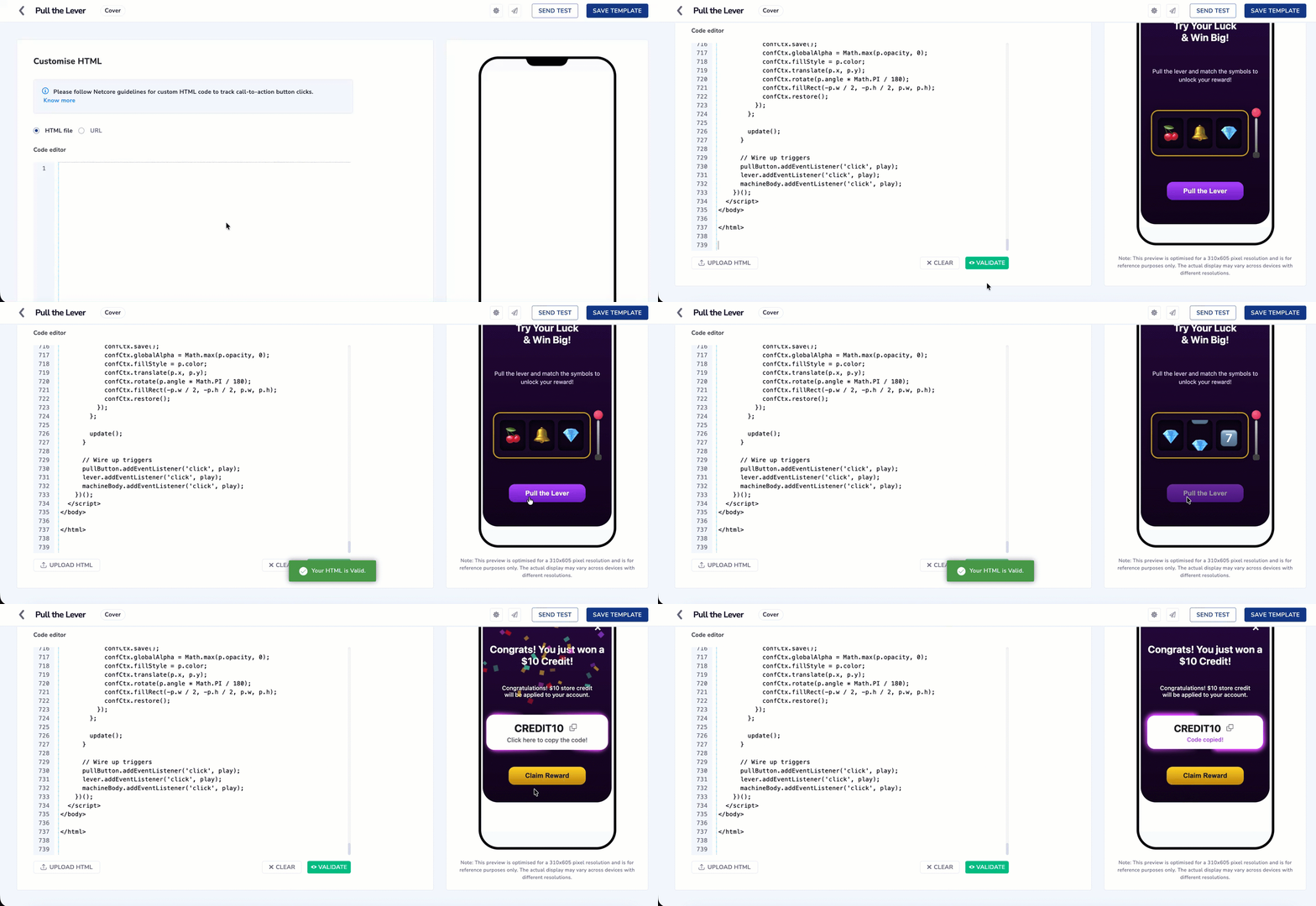
Configure Pull the Lever using Custom HTML Code
This Is a Code Template, Not a Product Feature
- Pull the Lever is not a widget you enable in the Netcore dashboard, and it will not appear in any menu. It is a block of HTML that you copy from this page and paste into the Code of HTML Editor
- Netcore does not host, version, or update this template on your behalf.
You are copying code out of this page and pasting it into a html code editor for campaign. Follow these steps in order.
-
Create an in-app template. See Custom HTML for the full template creation flow.
-
Copy the entire code block from the Sample HTML Code section on this page, from the first line to the last. Partial copies will not work.
-
Paste it into the Code Editor and select Validate.
-
Edit only the CONFIG block at the top of the code. This is where your symbols, rewards, colors, copy, and deeplink go. See Editable and Non Editable Section in Custom HTML Code before you change anything.
-
Replace the placeholder deeplink. The template ships with
netcore://your-deeplink-here, which does nothing. SetclaimButton.urlto a real deeplink registered in your app. -
Preview the message in the right pane, then schedule and publish.
Set Up the Underlying Offer SeparatelyThis template displays a reward code and copies it to the user's clipboard. It does not create coupons, apply discounts, or deduct inventory. Create the actual offer in your commerce platform or in Coupon
Every Pull Wins, and All Three Reels Always MatchThe template picks one reward from your weighted
rewardslist, then lands all three reels on that reward's symbol. There is no losing combination and no near-miss. Every user who pulls the lever gets three matching symbols and a reward.Write your copy accordingly. Do not promise a jackpot the machine cannot fail to deliver, and do not imply the user might walk away with nothing.
Sample HTML Code
<!DOCTYPE html>
<html lang="en">
<head>
<!-- CUSTOMIZE ZONE - Configurable Settings -->
<!-- Everything inside CONFIG is safe to edit. -->
<script>
const CONFIG = {
// Show the X close button (true = show, false = hide)
includeDismissButton: true,
// Background gradient of the card
background: "linear-gradient(180deg, #2A0845 0%, #10041C 100%)",
// Fire confetti when the reels stop on a win
enableConfettiOnWin: true,
// How long the reels spin (in seconds)
spinDurationSeconds: 2.2,
// The symbols that fly past while the reels spin.
// Emoji are written as Unicode escapes so the file stays
// ASCII-only and passes btoa() in the Netcore SDK.
// Cherry=\uD83C\uDF52, Bell=\uD83D\uDD14, Diamond=\uD83D\uDC8E
// Lemon=\uD83C\uDF4B, Star=\u2B50, Seven=\u0037\uFE0F\u20E3
fillerSymbols: [
"\uD83C\uDF52",
"\uD83D\uDD14",
"\uD83D\uDC8E",
"\uD83C\uDF4B",
"\u2B50",
"\u0037\uFE0F\u20E3"
],
// Pull button
pullButton: {
enabled: true,
text: "Pull the Lever",
background: "linear-gradient(180deg, #B54BFF 0%, #7A1FCC 100%)",
color: "#ffffff",
},
// Claim button (shown after the win)
claimButton: {
enabled: true,
text: "Claim Reward",
background: "linear-gradient(180deg, #FFD724 0%, #C68D07 100%)",
color: "#1d1d1d",
// Netcore deeplink fired on claim. Replace with your app deeplink.
url: "netcore://your-deeplink-here",
// OPTIONAL extra data sent to the app alongside the click.
payload: { campaign: "pull_the_lever" },
},
// Main headline (supports HTML like <br>)
mainTitle: {
text: "Try Your Luck <br>& Win Big!",
fontSize: "24px",
color: "#ffffff",
},
// Subtitle / description
subtitle: {
text: "Pull the lever and match the symbols to unlock your reward!",
fontSize: "14px",
color: "#e8d5ff",
},
// Copy-instruction text colors
copyInstruction: {
color: "#606060",
copiedColor: "#B54BFF",
},
// Possible rewards.
// symbol uses the same Unicode escape form as fillerSymbols above.
// Cherry = "\uD83C\uDF52"
// Bell = "\uD83D\uDD14"
// Diamond = "\uD83D\uDC8E"
// Seven = "\u0037\uFE0F\u20E3"
rewards: [
{
symbol: "\uD83C\uDF52",
title: "Congrats! You just won 10% OFF!",
value: "DISCOUNT10",
subtitle: "Use DISCOUNT10 at checkout to get 10% off your order. Valid through April 30.",
probability: 0.4,
},
{
symbol: "\uD83D\uDD14",
title: "Congrats! You just won Free Shipping!",
value: "FREESHIP",
subtitle: "Use FREESHIP at checkout to enjoy free shipping on your order. Valid through April 30.",
probability: 0.3,
},
{
symbol: "\uD83D\uDC8E",
title: "Congrats! You just won a $10 Credit!",
value: "CREDIT10",
subtitle: "Congratulations! $10 store credit will be applied to your account.",
probability: 0.2,
},
{
symbol: "\u0037\uFE0F\u20E3",
title: "JACKPOT! You just won a Gift Card!",
value: "GIFT100",
subtitle: "You will receive your $100 gift card via email. Valid through April 30.",
probability: 0.1,
},
],
};
</script>
<!-- END CUSTOMIZE ZONE -->
<meta charset="UTF-8" />
<meta name="viewport" content="width=device-width, initial-scale=1.0" />
<title>Pull the Lever - Win Big!</title>
<!-- DO NOT MODIFY - Netcore Smartech In-App SDK wiring -->
<!-- Order matters: jQuery then Smartech App SDK then init(). -->
<script src="https://code.jquery.com/jquery-3.4.1.min.js"
integrity="sha256-CSXorXvZcTkaix6Yvo6HppcZGetbYMGWSFlBw8HfCJo=" crossorigin="anonymous"></script>
<script src="https://cdnt.netcoresmartech.com/smartech-app-sdk/scripts/prod/smartech-app-sdk.js?v=1.0.1"></script>
<script>
SmartechAppSDK.init();
</script>
<!-- END SDK wiring -->
<style>
:root {
--shimmer-hue-1: 280deg;
--shimmer-hue-2: 300deg;
}
@property --mask {
syntax: "<angle>";
inherits: false;
initial-value: 33deg;
}
@keyframes spin {
0% { --mask: 0deg; }
100% { --mask: 360deg; }
}
html,
body {
height: 100%;
width: 100%;
margin: 0;
display: flex;
align-items: center;
justify-content: space-evenly;
font-family: -apple-system, BlinkMacSystemFont, "Segoe UI", Roboto,
Oxygen, Ubuntu, Cantarell, "Open Sans", "Helvetica Neue", sans-serif;
}
.modal {
display: flex;
flex-direction: column;
align-items: center;
height: 100%;
max-height: 580px;
max-width: 320px;
padding: 0 5%;
justify-content: space-evenly;
width: 100%;
color: #ffffff;
text-align: center;
background: linear-gradient(180deg, #2A0845 0%, #10041C 100%);
border-radius: 36px;
position: relative;
box-sizing: border-box;
overflow: hidden;
}
.modal.reward { max-height: 455px; }
.reward-title { font-size: 24px; font-weight: 700; }
.title, .reward-title { margin-top: 30px; }
.close-btn {
position: absolute;
top: 18px;
right: 18px;
appearance: none;
border: 0;
background: none;
color: #ffffff;
font-size: 32px;
line-height: 1;
cursor: pointer;
z-index: 20;
}
h1 { margin: 0; font-size: 24px; font-weight: 700; }
p { margin: 0; font-size: 14px; line-height: 1.45; }
/* Slot machine */
.machine {
display: flex;
align-items: center;
gap: 10px;
}
.machine-body {
display: flex;
gap: 8px;
padding: 16px 14px;
border-radius: 18px;
background: #1C0B2E;
border: 3px solid #C9A227;
box-shadow: inset 0 0 18px rgba(0, 0, 0, 0.6), 0 4px 20px rgba(0, 0, 0, 0.4);
}
.reel-window {
width: 62px;
height: 74px;
overflow: hidden;
border-radius: 10px;
background: #0E0618;
position: relative;
box-shadow: inset 0 6px 10px rgba(0, 0, 0, .55), inset 0 -6px 10px rgba(0, 0, 0, .55);
}
.reel-strip {
display: flex;
flex-direction: column;
transform: translateY(0);
}
.reel-strip .cell {
height: 74px;
display: flex;
align-items: center;
justify-content: center;
font-size: 40px;
line-height: 1;
flex: none;
}
.lever {
width: 16px;
height: 120px;
position: relative;
flex: none;
cursor: pointer;
}
.lever .stick {
position: absolute;
left: 50%;
bottom: 12px;
transform: translateX(-50%);
width: 6px;
height: 84px;
background: linear-gradient(180deg, #cfcfcf, #7c7c7c);
border-radius: 3px;
transform-origin: bottom center;
transition: transform .25s ease-in;
}
.lever .knob {
position: absolute;
left: 50%;
top: 0;
transform: translateX(-50%);
width: 22px;
height: 22px;
border-radius: 50%;
background: radial-gradient(circle at 35% 30%, #ff7a9c, #d3114b);
box-shadow: 0 2px 6px rgba(0, 0, 0, .5);
transition: top .25s ease-in;
}
.lever .base {
position: absolute;
left: 50%;
bottom: 0;
transform: translateX(-50%);
width: 16px;
height: 14px;
border-radius: 4px;
background: #4a4a4a;
}
.lever.pulled .stick { transform: translateX(-50%) scaleY(0.35); }
.lever.pulled .knob { top: 56px; }
.reward-wrapper {
display: none;
width: 100%;
position: relative;
border-radius: 18px;
overflow: visible;
}
.reward-wrapper.visible { display: block; }
.reward-box {
display: flex;
flex-direction: column;
align-items: center;
gap: 6px;
padding: 16px 0;
background: #ffffff;
color: #1d1d1d;
border-radius: 18px;
width: 100%;
box-sizing: border-box;
cursor: pointer;
}
.reward-main { font-size: 24px; font-weight: 700; }
.reward-subtext { padding: 0 20px; font-size: 14px; font-weight: 500; }
.copy-instruction {
font-family: 'Proxima Nova', -apple-system, BlinkMacSystemFont, "Segoe UI", Roboto,
Oxygen, Ubuntu, Cantarell, "Open Sans", "Helvetica Neue", sans-serif;
font-weight: 500;
font-size: 14px;
line-height: 100%;
text-align: center;
}
.copy-btn {
display: inline;
appearance: none;
border: none;
background: none;
cursor: pointer;
font-size: 24px;
line-height: 1;
color: #1d1d1d;
transition: transform 0.1s ease-in-out;
}
.copy-btn:active { transform: scale(0.9); }
.action-btn {
width: fit-content;
padding: 12.5px 40px;
border: none;
border-radius: 14px;
background: #ffffff;
color: #1d1d1d;
font-size: 16px;
font-weight: 700;
cursor: pointer;
}
.action-btn:disabled { opacity: 0.6; cursor: default; }
@keyframes pulsate {
0% { transform: scale(1); }
50% { transform: scale(1.05); }
100% { transform: scale(1); }
}
.pulsate-animation { animation: pulsate 1.5s 3; }
.shimmer {
position: absolute;
inset: -40px;
border-radius: inherit;
mix-blend-mode: plus-lighter;
pointer-events: none;
mask-image: conic-gradient(from var(--mask, 0deg),
transparent 0%, transparent 10%, black 36%, black 45%,
transparent 50%, transparent 60%, black 85%, black 95%, transparent 100%);
mask-size: cover;
animation: spin 3s linear infinite both -0.5s;
z-index: 10;
}
.shimmer::before, .shimmer::after {
content: "";
border-radius: inherit;
position: absolute;
inset: 40px;
opacity: 1;
}
.shimmer::before {
box-shadow: 0 0 2px 1px hsl(var(--shimmer-hue-1) 90% 58%),
0 0 9px 6px hsl(var(--shimmer-hue-2) 70% 60%);
z-index: -1;
}
.reward-wrapper.visible .shimmer { opacity: 1; visibility: visible; }
.reward-wrapper.shimmer-active .shimmer { animation: spin 2s linear infinite; }
</style>
</head>
<body>
<!-- Play screen -->
<div class="modal" id="playModal">
<!-- data-smt-action="SMTInAppClose" lets the Netcore SDK close
the message and record the close event automatically. -->
<button class="close-btn" aria-label="Close" data-smt-action="SMTInAppClose">×</button>
<h1 class="title" id="mainTitle"></h1>
<p id="subtitle"></p>
<div class="machine">
<div class="machine-body" id="machineBody">
<div class="reel-window"><div class="reel-strip" id="reel0"></div></div>
<div class="reel-window"><div class="reel-strip" id="reel1"></div></div>
<div class="reel-window"><div class="reel-strip" id="reel2"></div></div>
</div>
<div class="lever" id="lever">
<div class="stick"></div>
<div class="knob"></div>
<div class="base"></div>
</div>
</div>
<button class="action-btn" id="pullButton">Pull the Lever</button>
</div>
<!-- Reward screen -->
<div class="modal reward" id="rewardModal" style="display: none;">
<button class="close-btn" aria-label="Close" data-smt-action="SMTInAppClose">×</button>
<h1 class="reward-title" id="rewardTitle"></h1>
<div id="rewardSubtext" class="reward-subtext"></div>
<div class="reward-wrapper" id="rewardWrapper">
<span class="shimmer"></span>
<div class="reward-box ticket" id="rewardBox">
<div class="reward-main">
<span id="rewardText"></span>
<button id="copyBtn" class="copy-btn" title="Copy to clipboard">
<svg width="20" height="21" viewBox="0 0 20 21" fill="none" xmlns="http://www.w3.org/2000/svg">
<path fill-rule="evenodd" clip-rule="evenodd"
d="M13 13.8444V17.8444C13 18.4444 12.6 18.8444 12 18.8444H3C2.4 18.8444 2 18.4444 2 17.8444V8.84442C2 8.24442 2.4 7.84442 3 7.84442H7V3.84442C7 3.24442 7.4 2.84442 8 2.84442H17C17.6 2.84442 18 3.24442 18 3.84442V12.8444C18 13.4444 17.6 13.8444 17 13.8444H13ZM12 13.8444H8C7.4 13.8444 7 13.4444 7 12.8444V8.84442H3V17.8444H12V13.8444ZM17 3.84442H8V12.8444H17V3.84442Z"
fill="#4A4C4C" />
</svg>
</button>
</div>
<div class="copy-instruction">Click here to copy the code!</div>
</div>
</div>
<button class="action-btn" id="claimButton">Claim Reward</button>
</div>
<script>
(function () {
var playModal = document.getElementById('playModal');
var rewardModal = document.getElementById('rewardModal');
var mainTitleEl = document.getElementById('mainTitle');
var subtitleEl = document.getElementById('subtitle');
var machineBody = document.getElementById('machineBody');
var lever = document.getElementById('lever');
var pullButton = document.getElementById('pullButton');
var claimButton = document.getElementById('claimButton');
var rewardWrapper = document.getElementById('rewardWrapper');
var rewardBox = document.getElementById('rewardBox');
var rewardTitleEl = document.getElementById('rewardTitle');
var rewardTextEl = document.getElementById('rewardText');
var rewardSubtextEl = document.getElementById('rewardSubtext');
var copyBtn = document.getElementById('copyBtn');
var copyInstructionEl = document.querySelector('.copy-instruction');
var closeButtons = document.querySelectorAll('.close-btn');
var reels = [
document.getElementById('reel0'),
document.getElementById('reel1'),
document.getElementById('reel2'),
];
var isPlaying = false;
var CELL = 74;
// DO NOT MODIFY - Netcore SDK interaction helper
function netcoreTrackClick(deeplink, payload) {
try {
if (window.SmartechAppSDK && typeof SmartechAppSDK.trackInAppClick === 'function') {
SmartechAppSDK.trackInAppClick(deeplink, payload || null);
return;
}
} catch (e) {}
if (deeplink) window.location.href = deeplink;
}
// END SDK helper
// Apply Config
if (CONFIG.background) playModal.style.background = CONFIG.background;
if (CONFIG.background) rewardModal.style.background = CONFIG.background;
if (!CONFIG.includeDismissButton && closeButtons.length > 0) {
closeButtons.forEach(function(btn) { btn.style.display = 'none'; });
}
mainTitleEl.innerHTML = CONFIG.mainTitle.text;
mainTitleEl.style.fontSize = CONFIG.mainTitle.fontSize;
mainTitleEl.style.color = CONFIG.mainTitle.color;
subtitleEl.textContent = CONFIG.subtitle.text;
subtitleEl.style.fontSize = CONFIG.subtitle.fontSize;
subtitleEl.style.color = CONFIG.subtitle.color;
if (copyInstructionEl && CONFIG.copyInstruction.color) {
copyInstructionEl.style.color = CONFIG.copyInstruction.color;
}
pullButton.textContent = CONFIG.pullButton.text;
pullButton.style.background = CONFIG.pullButton.background;
pullButton.style.color = CONFIG.pullButton.color;
if (!CONFIG.pullButton.enabled) pullButton.style.display = 'none';
var rewards = CONFIG.rewards;
// Reward selection
function chooseReward() {
var total = rewards.reduce(function(acc, r) { return acc + r.probability; }, 0);
var rand = Math.random() * total;
for (var i = 0; i < rewards.length; i++) {
if (rand < rewards[i].probability) return rewards[i];
rand -= rewards[i].probability;
}
return rewards[rewards.length - 1];
}
// Build reels
function buildReel(reelEl, finalSymbol, loops) {
reelEl.innerHTML = '';
reelEl.style.transition = 'none';
reelEl.style.transform = 'translateY(0)';
var symbols = [];
for (var l = 0; l < loops; l++) {
symbols = symbols.concat(CONFIG.fillerSymbols);
}
symbols.push(finalSymbol);
symbols.forEach(function(s) {
var cell = document.createElement('div');
cell.className = 'cell';
cell.textContent = s;
reelEl.appendChild(cell);
});
return symbols.length;
}
// Idle state
reels.forEach(function(reelEl, i) {
var idle = CONFIG.fillerSymbols[i % CONFIG.fillerSymbols.length];
buildReel(reelEl, idle, 0);
});
// Play logic
function play() {
if (isPlaying) return;
isPlaying = true;
pullButton.disabled = true;
lever.classList.add('pulled');
setTimeout(function() { lever.classList.remove('pulled'); }, 450);
var selectedReward = chooseReward();
var duration = CONFIG.spinDurationSeconds || 2.2;
var stagger = 0.35;
var finished = 0;
reels.forEach(function(reelEl, i) {
var loops = 4 + i * 2;
var cellCount = buildReel(reelEl, selectedReward.symbol, loops);
var distance = (cellCount - 1) * CELL;
void reelEl.offsetHeight;
var reelDuration = duration + i * stagger;
reelEl.style.transition = 'transform ' + reelDuration + 's cubic-bezier(0.12, 0.6, 0.15, 1)';
reelEl.style.transform = 'translateY(-' + distance + 'px)';
reelEl.addEventListener('transitionend', function onEnd() {
reelEl.removeEventListener('transitionend', onEnd);
finished++;
if (finished === reels.length) {
isPlaying = false;
showReward(selectedReward);
}
});
});
}
function showReward(reward) {
setTimeout(function() {
rewardTitleEl.textContent = reward.title;
rewardTextEl.textContent = reward.value;
rewardSubtextEl.textContent = reward.subtitle;
rewardWrapper.classList.add('visible');
rewardWrapper.classList.add('shimmer-active');
rewardBox.classList.add('pulsate-animation');
var shimmerElement = rewardWrapper.querySelector('.shimmer');
if (shimmerElement) {
shimmerElement.style.animation = 'none';
shimmerElement.offsetHeight;
shimmerElement.style.animation = 'spin 2s linear infinite';
}
playModal.style.display = 'none';
rewardModal.style.display = 'flex';
if (CONFIG.claimButton.enabled) {
claimButton.textContent = CONFIG.claimButton.text;
claimButton.style.background = CONFIG.claimButton.background;
claimButton.style.color = CONFIG.claimButton.color;
claimButton.addEventListener('click', function() {
netcoreTrackClick(CONFIG.claimButton.url, CONFIG.claimButton.payload);
}, { once: true });
} else {
claimButton.style.display = 'none';
}
if (CONFIG.enableConfettiOnWin) fireConfetti();
}, 700);
}
// Copy to clipboard
function copyToClipboard() {
var text = rewardTextEl.textContent;
if (!text) return;
if (navigator.clipboard && navigator.clipboard.writeText) {
navigator.clipboard.writeText(text).then(showCopySuccess).catch(function() { fallbackCopy(text); });
} else {
fallbackCopy(text);
}
}
function copyRewardText(e) {
if (e && e.target === copyBtn || (e.target.closest && e.target.closest('#copyBtn'))) return;
copyToClipboard();
}
copyBtn.addEventListener('click', function(e) {
e.stopPropagation();
copyToClipboard();
});
rewardWrapper.addEventListener('click', copyRewardText);
function showCopySuccess() {
copyInstructionEl.textContent = "Code copied!";
copyInstructionEl.style.color = CONFIG.copyInstruction.copiedColor;
}
function fallbackCopy(text) {
var input = document.createElement('input');
input.setAttribute('readonly', '');
input.setAttribute('value', text);
input.style.position = 'absolute';
input.style.left = '-9999px';
document.body.appendChild(input);
input.select();
document.execCommand('copy');
document.body.removeChild(input);
showCopySuccess();
}
// Confetti
function fireConfetti() {
var colors = ["#FFC700", "#FF0000", "#B54BFF", "#41F4BC", "#FFD724", "#FF61E6"];
var particleCount = 120;
var gravity = 0.3;
var confettiCanvas = document.createElement('canvas');
confettiCanvas.style.position = 'fixed';
confettiCanvas.style.top = '0';
confettiCanvas.style.left = '0';
confettiCanvas.style.width = '100%';
confettiCanvas.style.height = '100%';
confettiCanvas.style.pointerEvents = 'none';
confettiCanvas.style.zIndex = '9999';
document.body.appendChild(confettiCanvas);
var confCtx = confettiCanvas.getContext('2d');
confettiCanvas.width = window.innerWidth;
confettiCanvas.height = window.innerHeight;
var particles = [];
var randomRange = function(min, max) { return Math.random() * (max - min) + min; };
for (var i = 0; i < particleCount; i++) {
particles.push({
x: confettiCanvas.width / 2,
y: confettiCanvas.height * 0.6,
w: randomRange(6, 12),
h: randomRange(8, 16),
angle: randomRange(0, 360),
tiltAngleSpeed: randomRange(0.05, 0.12),
color: colors[Math.floor(Math.random() * colors.length)],
velocityX: randomRange(-9, 9),
velocityY: randomRange(-16, -8),
opacity: 1,
decay: randomRange(0.0075, 0.015),
});
}
var update = function() {
confCtx.clearRect(0, 0, confettiCanvas.width, confettiCanvas.height);
particles.forEach(function(p, idx) {
p.x += p.velocityX;
p.y += p.velocityY;
p.velocityY += gravity;
p.opacity -= p.decay;
p.angle += p.tiltAngleSpeed * 180 / Math.PI;
if (p.opacity <= 0 || p.y > confettiCanvas.height + 20) particles.splice(idx, 1);
});
draw();
if (particles.length) requestAnimationFrame(update);
else confettiCanvas.remove();
};
var draw = function() {
particles.forEach(function(p) {
confCtx.save();
confCtx.globalAlpha = Math.max(p.opacity, 0);
confCtx.fillStyle = p.color;
confCtx.translate(p.x, p.y);
confCtx.rotate(p.angle * Math.PI / 180);
confCtx.fillRect(-p.w / 2, -p.h / 2, p.w, p.h);
confCtx.restore();
});
};
update();
}
// Wire up triggers
pullButton.addEventListener('click', play);
lever.addEventListener('click', play);
machineBody.addEventListener('click', play);
})();
</script>
</body>
</html>
Editable and Non Editable Section in Custom HTML Code
The template is one HTML file with three parts. Only the first one is yours to change.
| Part | Think of it as | Do you edit it? |
|---|---|---|
| The Settings Block | The control panel: colors, text, symbols, prizes, links. | Yes. This is the only part you edit. |
| The Netcore Connection | The plug that connects the game to the Netcore platform. | No. Never. |
| The Game Engine | The machinery that builds the reels, spins them, and picks a winner. | No. Developers only. |
If you are editing anything outside the Settings Block to run a campaign, stop. What you need is already inside it.
What the Game Engine Does
You never edit this, but it helps to know what it is doing. The engine reads your settings, picks the winning reward from your weighted odds, builds each reel as a strip of filler symbols ending on the winning symbol, animates the lever, slides all three strips upward, stops them one after another, then swaps to the reward screen and shows the coupon with a copy button.
Each reel is built longer than the one before it, so the first stops soonest and the third stops last. That stagger is what makes the machine feel like a machine rather than three things moving at once.
Important Point to RememberRemember Changing Values Is Safe, Changing Key Names Is Not!
- Inside the CONFIG block, edit the values on the right of each colon. Do not rename the settings themselves. Changing
spinDurationSeconds: 2.2tospinDurationSeconds: 3is fine. Renaming it tospinDuration: 3means the template can no longer find it.- Keep the punctuation intact too. A missing comma or quotation mark stops the whole message from rendering.
- The code below the CONFIG block is what makes the reels build, spin, and report back to Netcore, which is why DO NOT EDIT it.
Keep the File ASCII-onlyDo not paste emoji, smart quotes, en or em dashes, or currency symbols directly into this file. The creative is base64-encoded before delivery and the encoder fails on characters outside Latin-1.
Every symbol in this template is already written as a unicode escape, such as
\uD83C\uDF52for the cherry. Follow that pattern for any symbol you add.
Components You Must Not Remove
Four parts of the locked zone are worth knowing by name, because removing them is the most common way a campaign breaks.
| Component | Why it's required |
|---|---|
SDK wiring block (<head>) | Loads jQuery and the Netcore Smartech App SDK in the required order. |
| data-smt-action="SMTInAppClose" | Allows the SDK to close the message and record the dismissal event. |
| netcoreTrackClick() | Tracks the CTA click and opens the configured deeplink. |
| The 74px reel cell height | The reel window, each symbol cell, and the engine's scroll distance all use the same 74px value. Changing one and not the others leaves symbols stopping half in and half out of the window. |
If any of these are missing, the message can still render in the preview pane while failing to close, failing to report, or failing to open your deeplink on a real device.
It is identical in every template, for every customer, on purpose. It is the contract with the platform, not campaign content, so there is nothing campaign-specific in it and no reason to touch it.
Quick Answers
| You want to | Do this |
|---|---|
| Change prizes, odds, or reward codes | Edit the rewards list. Nothing else. |
| Change the symbols that blur past | Edit fillerSymbols. |
| Send winners to a different app screen | Edit claimButton.url. |
| Make one prize far more likely | Raise that prize's probability and lower the others toward zero. |
| Make the reels spin longer | Raise spinDurationSeconds. |
| Change how the reels build or stop | Do not. Raise it with the product team so every template gets the fix. |
Update Custom HTML Code for Pull the Lever
You can customize the following five sections to configure the Pull the Lever widget for your In-app message campaign. All of them live inside the CONFIG block.
Layout: Configure the overall appearance and behavior of the widget.
| Setting | Description | Example |
|---|---|---|
includeDismissButton | Show or hide the close (×) button. | true |
background | Background color or CSS gradient. Applies to both screens. | "linear-gradient(180deg, #2A0845 0%, #10041C 100%)" |
enableConfettiOnWin | Show confetti when the reels stop. | true |
spinDurationSeconds | How long the first reel spins. | 2.2 |
The Second and Third Reels Take Longer
spinDurationSecondssets the time for the first reel only. The second stops roughly a third of a second later, and the third later again. A value of2.2means the machine finishes at about three seconds, not 2.2.
Reel Symbols: Choose the symbols that blur past while the reels spin.
| Setting | Description |
|---|---|
fillerSymbols | The list of symbols that scroll past during the spin. Six work well. |
Each symbol is written as a unicode escape rather than a pasted character. The shipped set is:
| Symbol | Escape |
|---|---|
| Cherry | \uD83C\uDF52 |
| Bell | \uD83D\uDD14 |
| Diamond | \uD83D\uDC8E |
| Lemon | \uD83C\uDF4B |
| Star | \u2B50 |
| Seven | \u0037\uFE0F\u20E3 |
Include Your Winning Symbols in the Filler SetA reward's symbol does not have to appear in
fillerSymbols, but if it does not, it arrives out of nowhere when the reel stops. Keeping every winning symbol in the filler list makes the spin read as a real machine.
Before the First PullThe three reels sit showing the first three symbols in your
fillerSymbolslist, in order. If you reorder the list, you change what the machine looks like at rest.
Text & Typography: Customize the content shown on both screens.
Play Screen
| Setting | Description |
|---|---|
mainTitle.text | Main heading. Supports basic HTML like <br>. |
mainTitle.fontSize | Heading size. |
mainTitle.color | Heading color. |
subtitle.text | Supporting text below the heading. |
subtitle.fontSize | Subtitle size. |
subtitle.color | Subtitle color. |
Reward Screen
| Setting | Description |
|---|---|
copyInstruction.color | Instruction text color before copying. |
copyInstruction.copiedColor | Color shown after the coupon is copied. |
Buttons: Customize the primary actions shown on each screen.
Pull Button
| Setting | Description |
|---|---|
pullButton.enabled | Show or hide the Pull button. Users can still tap the lever or the machine itself. |
pullButton.text | Button label. |
pullButton.background | Background color or CSS gradient. |
pullButton.color | Text color. |
Claim Button
| Setting | Description |
|---|---|
claimButton.enabled | Show or hide the Claim button. |
claimButton.text | Button label. |
claimButton.background | Background color or CSS gradient. |
claimButton.color | Text color. |
claimButton.url | Deep link opened after the reward is claimed. |
claimButton.payload | Optional payload passed to your app. Use null if not required. |
Three Ways to Start the GameThe Pull button, the lever, and the machine body all start the spin. Hiding the Pull button does not make the game unplayable, because the lever still works.
Rewards: Each object in the rewards array is one possible outcome.
| Field | Description |
|---|---|
symbol | The symbol all three reels land on for this reward. |
title | Heading displayed after the reels stop. |
value | Coupon or reward code copied to the clipboard. |
subtitle | Supporting message, such as expiry or terms. |
probability | Relative chance of winning this reward. |
Give Each Reward Its Own SymbolNothing stops two rewards sharing a symbol, but the user has no way to tell them apart on the reels. A distinct symbol per reward makes the result feel earned rather than arbitrary.
Probability Workflow
The values are relative weights, not percentages. For example, you have set the rewards section as:
| Reward | Probability |
|---|---|
| 10% OFF | 2 |
| Free Shipping | 1 |
| Gift Card | 1 |
The first reward is twice as likely to be selected as the other two. Setting a value to zero keeps the reward in the list but makes it impossible to win.
Troubleshoot and FAQs
Q. Why do all three reels always show the same symbol?
A. That is how the template works. It picks one reward first, then lands every reel on that reward's symbol. There is no losing combination.
Q. Why do the symbols show as empty boxes or question marks?
A. The device may not support that symbol. Test every symbol you add on both Android and iOS before publishing, and replace any that do not render.
Q. Why does a symbol stop half in and half out of the reel window?
A. The reel cell height was changed in the styles but not in the engine, or the other way around. Both must stay at 74px.
Q. Why does the machine take longer than my spinDurationSeconds value?
A. That value sets the first reel only. The second and third stop after it, one after another, so the full sequence takes about a second longer than the value you set.
Q. Why can't the user play a second time?
A. The Pull button is disabled once the reels start, and the message moves to the reward screen when they stop. Each user gets one pull per message.
Q. Why doesn't anything happen when I click Claim Reward?
A. Verify that claimButton.url has been replaced with a valid deeplink and that the deeplink is registered in your app.
Q. Why doesn't the message close when I click the close button?
A. The data-smt-action="SMTInAppClose" attribute may have been removed from the close button. Restore the attribute to enable the SDK to close the message correctly.
Q. Why doesn't the reward code copy on some devices?
A. Some app webviews restrict clipboard access. If copying is unavailable, users can still view and manually enter the reward code.
Q. Why does the message render as garbled text?
A. A non-ASCII character may have been pasted into the file. Replace emoji, smart quotes, dashes, and currency symbols with unicode escapes.
Q. Why doesn't the template render at all?
A. The SDK block may have been modified or reordered, or the Netcore Smartech SDK may not be integrated into your app correctly. Ensure the SDK block remains unchanged and is loaded in the required order.
Updated about 1 hour ago