
Scratch Card
A custom HTML template for Scratch Card in-app messages. Copy the code, edit the code, and publish.
Scratch Card is the lowest-friction game in the library. The user drags a finger across a silver foil panel, the foil erases under the touch, and once enough of it is gone, the reward appears underneath with a code they can copy. It is best suited for promotional campaigns such as cart recovery, post-purchase offers, flash sales, and re-engagement pushes where a quick reveal drives completion without asking much of the user.
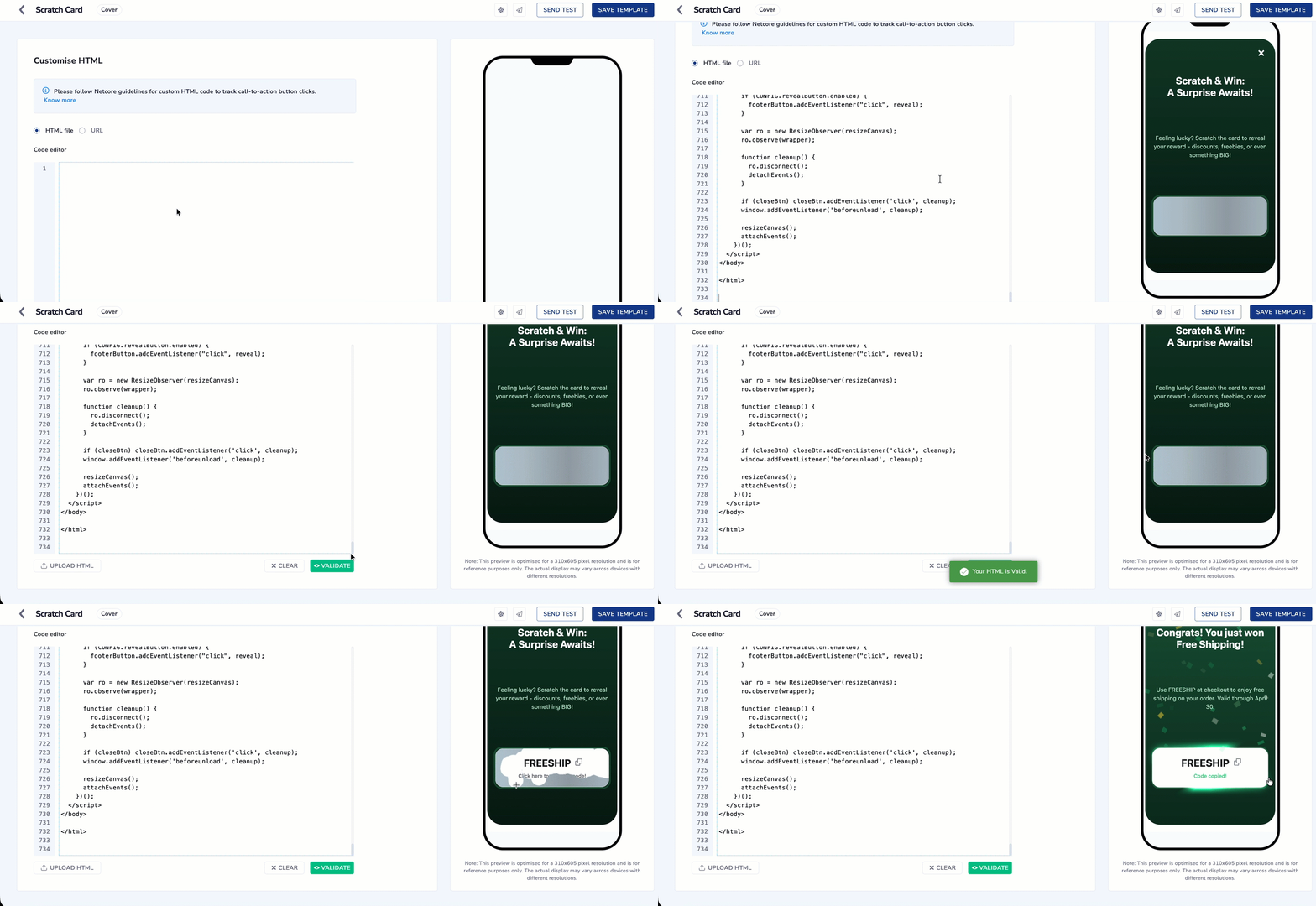
Configure Scratch Card using Custom HTML Code
This Is a Code Template, Not a Product Feature
- Scratch Card is not a widget you enable in the Netcore dashboard, and it will not appear in any menu. It is a block of HTML that you copy from this page and paste into the Code of HTML Editor
- Netcore does not host, version, or update this template on your behalf.
You are copying code out of this page and pasting it into a html code editor for campaign. Follow these steps in order.
-
Create an in-app template. See Custom HTML for the full template creation flow.
-
Copy the entire code block from the Sample HTML Code section on this page, from the first line to the last. Partial copies will not work.
-
Paste it into the Code Editor and select Validate.
-
Edit only the CONFIG block at the top of the code. This is where your rewards, colors, copy, and deeplink go. See Editable and Non Editable Section in Custom HTML Code before you change anything.
-
Replace the placeholder deeplink. The template ships with
netcore://your-deeplink-here, which does nothing. SetclaimButton.urlto a real deeplink registered in your app. -
Preview the message in the right pane, then schedule and publish.
Set Up the Underlying Offer SeparatelyThis template displays a reward code and copies it to the user's clipboard. It does not create coupons, apply discounts, or deduct inventory. Create the actual offer in your commerce platform or in Coupon
Enable the Reveal Button for AccessibilityThe foil panel responds only to touch and pointer gestures, so there is no keyboard path to reveal the reward. Set
revealButton.enabledtotrueso users relying on assistive technology have a tappable alternative.
Sample HTML Code
<!DOCTYPE html>
<html lang="en">
<head>
<!-- CUSTOMIZE ZONE - Configurable Settings -->
<!-- Everything inside CONFIG is safe to edit. This is the ONLY -->
<!-- part a marketer/non-developer needs to touch. -->
<script>
const CONFIG = {
// Image shown above the title (leave "" for no image)
imageUrl: "",
// Show the X close button (true = show, false = hide)
includeDismissButton: true,
// Background gradient of the card
background: "linear-gradient(180deg, #41F4BC 0%, #35ABFF 37.98%, #0060A5 100%)",
// Background after the reward is revealed
revealedBackground: "linear-gradient(180deg, #41F4BC 0%, #35ABFF 100%)",
// Fire confetti when the reward is revealed
enableConfettiOnReveal: true,
// How much of the foil must be scratched (in %) to auto-reveal
revealAtPercent: 50,
// Reveal button (lets the user skip scratching by tapping instead)
// Disabled for this campaign - the reward should only unlock by
// physically scratching the foil, never by tapping a shortcut.
// Flip to true if a future campaign wants the skip option back.
revealButton: {
enabled: false,
text: "Reveal My Prize",
background: "#ffffff",
color: "#1d1d1d",
},
// Claim button (the Reveal button would transform into this)
// Disabled for this campaign - there is no CTA/deeplink step here.
// The user just copies the reward code (see copyInstruction below)
// and uses it themselves, e.g. at checkout. Flip to true + set a
// real url below if a future campaign needs a claim step.
claimButton: {
enabled: false,
text: "Claim",
background: "linear-gradient(180deg, #A4FFE4 -0.8%, #41F2BE 99.2%)",
color: "#000000",
// Netcore deeplink fired on claim. Replace with your app's
// deeplink / URL scheme (e.g. "myapp://offers/scratch-win").
url: "netcore://your-deeplink-here",
// OPTIONAL extra data sent to the app alongside the click.
// Set to null if not needed.
payload: { campaign: "scratch_card" },
},
// Main headline (supports HTML like <br>)
mainTitle: {
text: "Scratch & Win: <br>A Surprise Awaits!",
fontSize: "24px",
color: "#ffffff",
},
// Subtitle / description
subtitle: {
text: "Feeling lucky? Scratch the card to reveal your reward - discounts, freebies, or even something BIG!",
fontSize: "14px",
color: "#e8f5ff",
},
// Copy-instruction text colors
copyInstruction: {
color: "#606060",
copiedColor: "#40f3bd",
},
// Possible rewards (one is picked at random by weighting)
// title - headline shown after the reveal
// value - coupon / code copied on click
// subtext - small description shown after the reveal
// probability - weighting (does NOT need to sum to 1)
rewards: [
{
title: "Congrats! You just won a Promo Code!",
value: "DISCOUNT10",
subtext: "Use DISCOUNT10 at checkout to get 10% off your order. Valid through April 30.",
probability: 0.45,
},
{
title: "Congrats! You just won a Discount!",
value: "SPRING20",
subtext: "Use SPRING20 at checkout to get 20% off your order. Valid through April 30.",
probability: 0.25,
},
{
title: "Congrats! You just won Free Shipping!",
value: "FREESHIP",
subtext: "Use FREESHIP at checkout to enjoy free shipping on your order. Valid through April 30.",
probability: 0.2,
},
{
title: "Congrats! You just won a Gift Card!",
value: "GIFT100",
subtext: "Congratulations! You will receive your $100 gift card via email. Valid through April 30.",
probability: 0.1,
},
],
};
</script>
<!-- END CUSTOMIZE ZONE -->
<meta charset="UTF-8" />
<meta name="viewport" content="width=device-width, initial-scale=1.0" />
<title>Scratch and Win - Surprise Awaits!</title>
<!-- DO NOT MODIFY - Netcore Smartech In-App SDK wiring -->
<!-- Order matters: jQuery -> Smartech App SDK -> init(). -->
<!-- This is what makes the message trackable and interactive on the -->
<!-- Netcore platform. Removing/reordering this breaks the message. -->
<script src="https://code.jquery.com/jquery-3.4.1.min.js"
integrity="sha256-CSXorXvZcTkaix6Yvo6HppcZGetbYMGWSFlBw8HfCJo=" crossorigin="anonymous"></script>
<script src="https://cdnt.netcoresmartech.com/smartech-app-sdk/scripts/prod/smartech-app-sdk.js?v=1.0.1"></script>
<script>
SmartechAppSDK.init();
</script>
<!-- END SDK wiring -->
<style>
:root {
--shimmer-hue-1: 213deg;
--shimmer-hue-2: 248deg;
}
@property --mask {
syntax: "<angle>";
inherits: false;
initial-value: 33deg;
}
@keyframes spin {
0% { --mask: 0deg; }
100% { --mask: 360deg; }
}
html,
body {
height: 100%;
width: 100%;
margin: 0;
display: flex;
align-items: center;
justify-content: space-evenly;
font-family: -apple-system, BlinkMacSystemFont, "Segoe UI", Roboto,
Oxygen, Ubuntu, Cantarell, "Open Sans", "Helvetica Neue", sans-serif;
}
.modal {
display: flex;
flex-direction: column;
align-items: center;
height: 100%;
max-height: 560px;
max-width: 320px;
padding: 0 5%;
justify-content: space-evenly;
width: 100%;
color: #ffffff;
text-align: center;
background: linear-gradient(180deg, #41F4BC 0%, #35ABFF 37.98%, #0060A5 100%);
border-radius: 36px;
position: relative;
box-sizing: border-box;
overflow: hidden;
}
/* Close button */
.close-btn {
position: absolute;
top: 18px;
right: 18px;
appearance: none;
border: 0;
background: none;
color: #ffffff;
font-size: 32px;
line-height: 1;
cursor: pointer;
z-index: 20;
}
/* Optional image above the title */
.treasure-img {
width: 150px;
display: block;
}
h1 {
margin: 0;
font-size: 24px;
font-weight: 700;
height: 56px;
display: flex;
align-items: center;
justify-content: center;
text-align: center;
}
p { margin: 0; font-size: 14px; line-height: 1.45; color: #e8f5ff; }
.subtitle-container {
height: 60px;
display: flex;
align-items: center;
justify-content: center;
text-align: center;
}
/* Scratch-card container */
.scratch-wrapper {
box-sizing: border-box;
width: 100%;
height: 100px;
position: relative;
border-radius: 18px;
border: 4px solid #4A4C4C33;
overflow: visible;
cursor: pointer;
}
.reward {
position: absolute;
inset: 0;
display: flex;
flex-direction: column;
align-items: center;
justify-content: center;
background: #ffffff;
color: #1d1d1d;
font-size: 24px;
font-weight: 700;
gap: 8px;
padding: 0 10px;
border-radius: 18px;
cursor: pointer;
}
canvas.scratcher {
position: absolute;
inset: 0;
cursor: crosshair;
border-radius: 18px;
}
/* Reveal / Claim button */
.reveal-btn {
width: fit-content;
padding: 12.5px 40px;
border: none;
border-radius: 14px;
background: #ffffff;
color: #1d1d1d;
font-size: 16px;
font-weight: 700;
cursor: pointer;
}
.reveal-btn:disabled { opacity: 0.6; cursor: default; }
.copy-btn {
display: inline;
min-width: 20px;
max-width: 20px;
appearance: none;
border: none;
background: none;
cursor: pointer;
font-size: 24px;
line-height: 1;
color: #1d1d1d;
transition: transform 0.1s ease-in-out;
}
.copy-btn:active { transform: scale(0.9); }
.reward-main { display: flex; align-items: center; gap: 3px; }
.reward .subtext {
font-weight: 400;
font-size: 12px;
line-height: 100%;
text-align: center;
color: #4A4C4C;
}
.copy-instruction {
font-family: 'Proxima Nova', -apple-system, BlinkMacSystemFont, "Segoe UI", Roboto,
Oxygen, Ubuntu, Cantarell, "Open Sans", "Helvetica Neue", sans-serif;
font-weight: 500;
font-size: 12px;
line-height: 100%;
text-align: center;
color: #606060;
margin-top: 4px;
}
/* Pulsating animation for the reward */
@keyframes pulsate {
0% { transform: scale(1); }
50% { transform: scale(1.05); }
100% { transform: scale(1); }
}
.pulsate-animation { animation: pulsate 1.5s 3; }
/* Shimmer effect */
.shimmer {
position: absolute;
inset: -40px;
border-radius: inherit;
mix-blend-mode: plus-lighter;
pointer-events: none;
opacity: 0;
visibility: hidden;
mask-image: conic-gradient(from var(--mask, 0deg),
transparent 0%, transparent 10%, black 36%, black 45%,
transparent 50%, transparent 60%, black 85%, black 95%, transparent 100%);
mask-size: cover;
animation: spin 3s linear infinite both -0.5s;
z-index: 10;
transition: opacity 0.3s ease-in-out;
}
.shimmer::before, .shimmer::after {
content: "";
border-radius: inherit;
position: absolute;
inset: 40px;
opacity: 1;
}
.shimmer::before {
box-shadow: 0 0 2px 1px hsl(var(--shimmer-hue-1) 60% 95%),
0 0 5px 3px hsl(var(--shimmer-hue-1) 60% 80%),
0 0 9px 6px hsl(var(--shimmer-hue-2) 70% 60%),
0 0 14px 7px hsl(var(--shimmer-hue-2) 50% 40%);
z-index: -1;
}
.scratch-wrapper.shimmer-active .shimmer {
opacity: 1;
visibility: visible;
animation: spin 2s linear infinite;
}
</style>
</head>
<body>
<div class="modal" id="modal">
<!-- data-smt-action="SMTInAppClose" lets the Netcore SDK close -->
<!-- the message AND record the close event automatically. -->
<button class="close-btn" aria-label="Close" data-smt-action="SMTInAppClose">×</button>
<img class="treasure-img" height="120" alt="" style="display:none;" />
<h1 class="title" id="mainTitle"></h1>
<div class="subtitle-container">
<p id="subtitle"></p>
</div>
<div class="scratch-wrapper" id="scratchCard">
<span class="shimmer"></span>
<div class="reward" id="reward">
<div class="reward-main">
<span id="rewardText"></span>
<button id="copyBtn" class="copy-btn" title="Copy to clipboard">
<svg width="20" height="21" viewBox="0 0 20 21" fill="none" xmlns="http://www.w3.org/2000/svg">
<path fill-rule="evenodd" clip-rule="evenodd"
d="M13 13.8444V17.8444C13 18.4444 12.6 18.8444 12 18.8444H3C2.4 18.8444 2 18.4444 2 17.8444V8.84442C2 8.24442 2.4 7.84442 3 7.84442H7V3.84442C7 3.24442 7.4 2.84442 8 2.84442H17C17.6 2.84442 18 3.24442 18 3.84442V12.8444C18 13.4444 17.6 13.8444 17 13.8444H13ZM12 13.8444H8C7.4 13.8444 7 13.4444 7 12.8444V8.84442H3V17.8444H12V13.8444ZM17 3.84442H8V12.8444H17V3.84442Z"
fill="#4A4C4C" />
</svg>
</button>
</div>
<div class="copy-instruction">Click here to copy the code!</div>
</div>
<canvas class="scratcher" role="button" tabindex="0" aria-label="Scratch the card"></canvas>
</div>
<button class="reveal-btn" id="revealButton">Reveal My Prize</button>
</div>
<script>
(function () {
// Element refs
var modal = document.getElementById("modal");
var wrapper = document.getElementById("scratchCard");
var canvas = wrapper.querySelector("canvas");
var ctx = canvas.getContext("2d");
var footerButton = document.getElementById("revealButton");
var copyBtn = document.getElementById("copyBtn");
var closeBtn = modal.querySelector('.close-btn');
var rewardEl = document.getElementById('reward');
var mainTitleEl = document.getElementById('mainTitle');
var subtitleEl = document.getElementById('subtitle');
var copyInstructionEl = document.querySelector('.copy-instruction');
var isDrawing = false;
var revealed = false;
// DO NOT MODIFY - Netcore SDK interaction helper
// Fire a tracked In-App CLICK to the app (deeplink + optional data).
// Uses the SDK when present; falls back to a plain redirect so the
// template still works in a bare browser preview.
function netcoreTrackClick(deeplink, payload) {
try {
if (window.SmartechAppSDK && typeof SmartechAppSDK.trackInAppClick === 'function') {
SmartechAppSDK.trackInAppClick(deeplink, payload || null);
return;
}
} catch (e) {}
if (deeplink) window.location.href = deeplink;
}
// END SDK helper
// Apply Config
if (CONFIG.background) modal.style.background = CONFIG.background;
if (!CONFIG.includeDismissButton && closeBtn) {
closeBtn.style.display = 'none';
}
var imgEl = document.querySelector('.treasure-img');
if (CONFIG.imageUrl) {
imgEl.src = CONFIG.imageUrl;
imgEl.style.display = 'block';
}
mainTitleEl.innerHTML = CONFIG.mainTitle.text;
mainTitleEl.style.fontSize = CONFIG.mainTitle.fontSize;
mainTitleEl.style.color = CONFIG.mainTitle.color;
subtitleEl.textContent = CONFIG.subtitle.text;
subtitleEl.style.fontSize = CONFIG.subtitle.fontSize;
subtitleEl.style.color = CONFIG.subtitle.color;
if (copyInstructionEl && CONFIG.copyInstruction.color) {
copyInstructionEl.style.color = CONFIG.copyInstruction.color;
}
if (!CONFIG.revealButton.enabled) {
footerButton.style.display = 'none';
} else {
footerButton.textContent = CONFIG.revealButton.text;
footerButton.style.background = CONFIG.revealButton.background;
footerButton.style.color = CONFIG.revealButton.color;
}
var rewards = CONFIG.rewards;
// Reward selection
function chooseReward() {
var total = rewards.reduce(function(acc, r) { return acc + r.probability; }, 0);
var rand = Math.random() * total;
for (var i = 0; i < rewards.length; i++) {
if (rand < rewards[i].probability) return rewards[i];
rand -= rewards[i].probability;
}
return rewards[rewards.length - 1];
}
var selectedReward = chooseReward();
document.getElementById("rewardText").textContent = selectedReward.value;
// Scratch foil
function resizeCanvas() {
canvas.width = wrapper.clientWidth;
canvas.height = wrapper.clientHeight;
generateOverlay();
}
function generateOverlay() {
var gradient = ctx.createLinearGradient(0, 0, canvas.width, 0);
gradient.addColorStop(0, "#B6C8D4");
gradient.addColorStop(0.2452, "#B4C2CB");
gradient.addColorStop(0.6442, "#99A3AB");
gradient.addColorStop(1, "#AFBCC6");
ctx.globalCompositeOperation = "source-over";
ctx.fillStyle = gradient;
ctx.fillRect(0, 0, canvas.width, canvas.height);
ctx.globalCompositeOperation = "destination-out";
}
function positionFromEvent(e) {
var rect = canvas.getBoundingClientRect();
var clientX = e.touches ? e.touches[0].clientX : e.clientX;
var clientY = e.touches ? e.touches[0].clientY : e.clientY;
return { x: clientX - rect.left, y: clientY - rect.top };
}
function scratchStart(e) {
isDrawing = true;
scratchDraw(e);
}
function scratchEnd() {
if (!isDrawing) return;
isDrawing = false;
checkProgress();
}
// FIX: renamed from "draw" to "scratchDraw" to avoid collision
// with the confetti "draw" function defined later in the same scope.
// The original code had both named "draw" -- on some JS engines the
// confetti draw() overwrote the scratch draw(), breaking scratching
// after confetti fired.
function scratchDraw(e) {
if (!isDrawing) return;
e.preventDefault();
var pos = positionFromEvent(e);
ctx.beginPath();
ctx.arc(pos.x, pos.y, 18, 0, Math.PI * 2);
ctx.fill();
}
function checkProgress() {
var pixels = ctx.getImageData(0, 0, canvas.width, canvas.height).data;
var transparent = 0;
for (var i = 3; i < pixels.length; i += 4) {
if (pixels[i] === 0) transparent++;
}
var percent = (transparent / (pixels.length / 4)) * 100;
if (percent > (CONFIG.revealAtPercent || 50)) reveal();
}
// Reveal
function reveal() {
if (revealed) return;
revealed = true;
canvas.style.transition = "opacity 0.4s";
canvas.style.opacity = 0;
canvas.style.pointerEvents = 'none';
detachEvents();
if (CONFIG.revealedBackground) {
modal.style.background = CONFIG.revealedBackground;
}
wrapper.classList.add('shimmer-active');
rewardEl.classList.add('pulsate-animation');
mainTitleEl.innerHTML = selectedReward.title;
subtitleEl.textContent = selectedReward.subtext;
if (CONFIG.enableConfettiOnReveal) fireConfetti();
if (CONFIG.claimButton.enabled) {
footerButton.style.display = 'block';
footerButton.textContent = CONFIG.claimButton.text;
footerButton.style.background = CONFIG.claimButton.background;
footerButton.style.color = CONFIG.claimButton.color;
footerButton.removeEventListener('click', reveal);
footerButton.addEventListener('click', function() {
cleanup();
netcoreTrackClick(CONFIG.claimButton.url, CONFIG.claimButton.payload);
}, { once: true });
} else {
footerButton.style.opacity = 0;
}
}
// Copy to clipboard
function copyToClipboard() {
var text = selectedReward.value;
if (!text) return;
if (navigator.clipboard && navigator.clipboard.writeText) {
navigator.clipboard.writeText(text).then(showCopySuccess).catch(function() { fallbackCopy(text); });
} else {
fallbackCopy(text);
}
}
copyBtn.addEventListener("click", function(e) {
e.stopPropagation();
copyToClipboard();
});
wrapper.addEventListener('click', function(e) {
if (!revealed) return;
if (e && e.target === copyBtn || (e.target.closest && e.target.closest('#copyBtn'))) return;
copyToClipboard();
});
function showCopySuccess() {
copyInstructionEl.textContent = "Code copied!";
copyInstructionEl.style.color = CONFIG.copyInstruction.copiedColor;
setTimeout(function() {
copyInstructionEl.textContent = "Click here to copy the code!";
copyInstructionEl.style.color = CONFIG.copyInstruction.color;
}, 1500);
}
function fallbackCopy(text) {
var input = document.createElement('input');
input.setAttribute('readonly', '');
input.setAttribute('value', text);
input.style.position = 'absolute';
input.style.left = '-9999px';
document.body.appendChild(input);
input.select();
document.execCommand('copy');
document.body.removeChild(input);
showCopySuccess();
}
// Confetti - internal functions renamed to confettiUpdate / confettiDraw
// to avoid the name collision with scratchDraw described above.
function fireConfetti() {
var colors = ["#FFC700", "#FF0000", "#2E3192", "#41F4BC", "#943DFF", "#FF61E6"];
var particleCount = 120;
var gravity = 0.3;
var confettiCanvas = document.createElement('canvas');
confettiCanvas.style.position = 'fixed';
confettiCanvas.style.top = '0';
confettiCanvas.style.left = '0';
confettiCanvas.style.width = '100%';
confettiCanvas.style.height = '100%';
confettiCanvas.style.pointerEvents = 'none';
confettiCanvas.style.zIndex = '9999';
document.body.appendChild(confettiCanvas);
var confCtx = confettiCanvas.getContext('2d');
confettiCanvas.width = window.innerWidth;
confettiCanvas.height = window.innerHeight;
var particles = [];
var randomRange = function(min, max) { return Math.random() * (max - min) + min; };
for (var i = 0; i < particleCount; i++) {
particles.push({
x: confettiCanvas.width / 2,
y: confettiCanvas.height * 0.6,
w: randomRange(6, 12),
h: randomRange(8, 16),
angle: randomRange(0, 360),
tiltAngleSpeed: randomRange(0.05, 0.12),
color: colors[Math.floor(Math.random() * colors.length)],
velocityX: randomRange(-9, 9),
velocityY: randomRange(-16, -8),
opacity: 1,
decay: randomRange(0.0075, 0.015),
});
}
// FIX: renamed from "draw" and "update" to "confettiDraw" and
// "confettiUpdate" to prevent scope collision with scratchDraw.
var confettiDraw = function() {
particles.forEach(function(p) {
confCtx.save();
confCtx.globalAlpha = Math.max(p.opacity, 0);
confCtx.fillStyle = p.color;
confCtx.translate(p.x, p.y);
confCtx.rotate(p.angle * Math.PI / 180);
confCtx.fillRect(-p.w / 2, -p.h / 2, p.w, p.h);
confCtx.restore();
});
};
var confettiUpdate = function() {
confCtx.clearRect(0, 0, confettiCanvas.width, confettiCanvas.height);
particles.forEach(function(p, idx) {
p.x += p.velocityX;
p.y += p.velocityY;
p.velocityY += gravity;
p.opacity -= p.decay;
p.angle += p.tiltAngleSpeed * 180 / Math.PI;
if (p.opacity <= 0 || p.y > confettiCanvas.height + 20) particles.splice(idx, 1);
});
confettiDraw();
if (particles.length) requestAnimationFrame(confettiUpdate);
else confettiCanvas.remove();
};
confettiUpdate();
}
// Scratch events
function attachEvents() {
canvas.addEventListener("mousedown", scratchStart);
canvas.addEventListener("mousemove", scratchDraw);
canvas.addEventListener("mouseup", scratchEnd);
canvas.addEventListener("mouseleave", scratchEnd);
canvas.addEventListener("touchstart", scratchStart, { passive: false });
canvas.addEventListener("touchmove", scratchDraw, { passive: false });
canvas.addEventListener("touchend", scratchEnd);
}
function detachEvents() {
canvas.removeEventListener("mousedown", scratchStart);
canvas.removeEventListener("mousemove", scratchDraw);
canvas.removeEventListener("mouseup", scratchEnd);
canvas.removeEventListener("mouseleave", scratchEnd);
canvas.removeEventListener("touchstart", scratchStart);
canvas.removeEventListener("touchmove", scratchDraw);
canvas.removeEventListener("touchend", scratchEnd);
}
if (CONFIG.revealButton.enabled) {
footerButton.addEventListener("click", reveal);
}
var ro = new ResizeObserver(resizeCanvas);
ro.observe(wrapper);
function cleanup() {
ro.disconnect();
detachEvents();
}
if (closeBtn) closeBtn.addEventListener('click', cleanup);
window.addEventListener('beforeunload', cleanup);
resizeCanvas();
attachEvents();
})();
</script>
</body>
</html>
Editable and Non Editable Section in Custom HTML Code
The template is split into two zones. Everything you are meant to change sits in the first one.
Important Point to RememberRemember Changing Values Is Safe, Changing Key Names Is Not!
- Inside the CONFIG block, edit the values on the right of each colon. Do not rename the settings themselves. Changing
revealAtPercent: 50torevealAtPercent: 60is fine. Renaming it torevealPercent: 60means the template can no longer find it.
- Keep the punctuation intact too. A missing comma or quotation mark stops the whole message from rendering.
- The code below the CONFIG block is what makes the foil scratch, reveal, and report back to Netcore, which is why DO NOT EDIT it.
Components You Must Not Remove
Four parts of the locked zone are worth knowing by name, because removing them is the most common way a campaign breaks.
| Component | Why it's required |
|---|---|
SDK wiring block (<head>) | Loads jQuery and the Netcore Smartech App SDK in the required order. |
| data-smt-action="SMTInAppClose" | Allows the SDK to close the message and record the dismissal event. |
| netcoreTrackClick() | Tracks the CTA click and opens the configured deeplink. |
| scratchDraw() function name | Renamed from draw to avoid a collision with the confetti code. Renaming it back stops scratching from working after confetti fires. |
If any of these are missing, the message can still render in the preview pane while failing to close, failing to report, or failing to open your deeplink on a real device.
Update Custom HTML Code for Scratch Card
You can customize the following four sections to configure the Scratch Card widget for your In-app message campaign. All of them live inside the CONFIG block.
Layout: Configure the overall appearance and behavior of the widget.
| Setting | Description | Example |
|---|---|---|
imageUrl | Optional image above the heading. Leave as "" to hide it. | "https://cdn.example.com/gift.png" |
includeDismissButton | Show or hide the close (×) button. | true |
background | Background color or CSS gradient before the reveal. | "linear-gradient(180deg, #41F4BC 0%, #0060A5 100%)" |
revealedBackground | Background color or CSS gradient after the reveal. | "linear-gradient(180deg, #41F4BC 0%, #35ABFF 100%)" |
enableConfettiOnReveal | Show confetti when the reward is uncovered. | true |
revealAtPercent | Percentage of foil scratched before the reward auto-reveals. | 50 |
Recommended Reveal ThresholdProgress is checked when the user lifts their finger, not continuously while scratching. Values between 40 and 60 feel natural. Above 70 the game starts to feel like work.
Text & Typography: Customize the content shown before and after the reveal.
Before the Reveal
| Setting | Description |
|---|---|
mainTitle.text | Main heading. Supports basic HTML like <br>. |
mainTitle.fontSize | Heading size. |
mainTitle.color | Heading color. |
subtitle.text | Supporting text below the heading. |
subtitle.fontSize | Subtitle size. |
subtitle.color | Subtitle color. |
After the Reveal
| Setting | Description |
|---|---|
copyInstruction.color | Instruction text color before copying. |
copyInstruction.copiedColor | Color shown after the coupon is copied. |
The Heading Changes After the RevealOnce the foil is cleared,
mainTitleis replaced by the winning reward'stitle, andsubtitleis replaced by itssubtext. You are writing two sets of copy: the teaser, and the payoff inside each reward.
Buttons: Customize the single action button shown at the bottom of the card.
Reveal Button
| Setting | Description |
|---|---|
revealButton.enabled | Show a button that reveals the reward without scratching. |
revealButton.text | Button label. |
revealButton.background | Background color. |
revealButton.color | Text color. |
Claim Button
| Setting | Description |
|---|---|
claimButton.enabled | Show or hide the Claim button after the reveal. |
claimButton.text | Button label. |
claimButton.background | Background color. |
claimButton.color | Text color. |
claimButton.url | Deep link opened after the reward is claimed. |
claimButton.payload | Optional payload passed to your app. Use null if not required. |
Both Buttons Share One SlotThere is a single button at the bottom of the card. Before the reveal it acts as the Reveal button; after the reveal it becomes the Claim button. Both are disabled by default, and the template works without them because the user simply copies the code.
Rewards: Each object in the rewards array is one possible outcome.
| Field | Description |
|---|---|
title | Heading displayed after the reveal. |
value | Coupon or reward code copied to the clipboard. |
subtext | Supporting message, such as expiry or terms. |
probability | Relative chance of winning this reward. |
The Reward Is Chosen When the Message OpensThe winning reward is selected before the user touches anything. Scratching reveals a result that already exists, it does not generate one. How the user scratches cannot influence the outcome.
Probability Workflow
The values are relative weights, not percentages. For example, you have set the rewards section as:
| Reward | Probability |
|---|---|
| 10% OFF | 2 |
| Free Shipping | 1 |
| Gift Card | 1 |
The first reward is twice as likely to be selected as the other two. Setting a value to zero keeps the reward in the list but makes it impossible to win.
Troubleshoot and FAQs
Q. Why does the foil not erase under my finger?
A. Another element may be capturing the touch, or the message position may be too short to render the panel correctly. Switch the placement to Interstitial or Cover.
Q. Why does the reward reveal on the very first tap?
A. The revealAtPercent value is set too low. Increase it to require more scratching.
Q. Why does the reward never reveal, however much is scratched?
A. The revealAtPercent value may be set too high, or the user may be scratching without lifting their finger. Progress is only checked when the finger is released.
Q. Why doesn't anything happen when I click the claim button?
A. Verify that claimButton.url has been replaced with a valid deeplink and that the deeplink is registered in your app.
Q. Why is the area under the foil blank?
A. One of the reward entries may be missing its value field. Check that every reward has a code.
Q. Why doesn't the message close when I click the close button?
A. The data-smt-action="SMTInAppClose" attribute may have been removed from the close button. Restore the attribute to enable the SDK to close the message correctly.
Q. Why doesn't the reward code copy on some devices?
A. Some app webviews restrict clipboard access. If copying is unavailable, users can still view and manually enter the reward code.
Q. Why doesn't the template render at all?
A. The SDK block may have been modified or reordered, or the Netcore Smartech SDK may not be integrated into your app correctly. Ensure the SDK block remains unchanged and is loaded in the required order.
Updated about 1 hour ago