
Spin The Wheel
A custom HTML template for Spin the wheel in-app messages. Copy the code, edit the code, and publish.
Spin the Wheel turns an offer into a moment of anticipation. The user taps once, the wheel spins, and a reward is revealed with a code they can copy straight to their clipboard. It is best suited for promotional campaigns such as first-purchase incentives, cart recovery, loyalty rewards, and seasonal sales where a chance-based reward creates excitement and encourages participation.
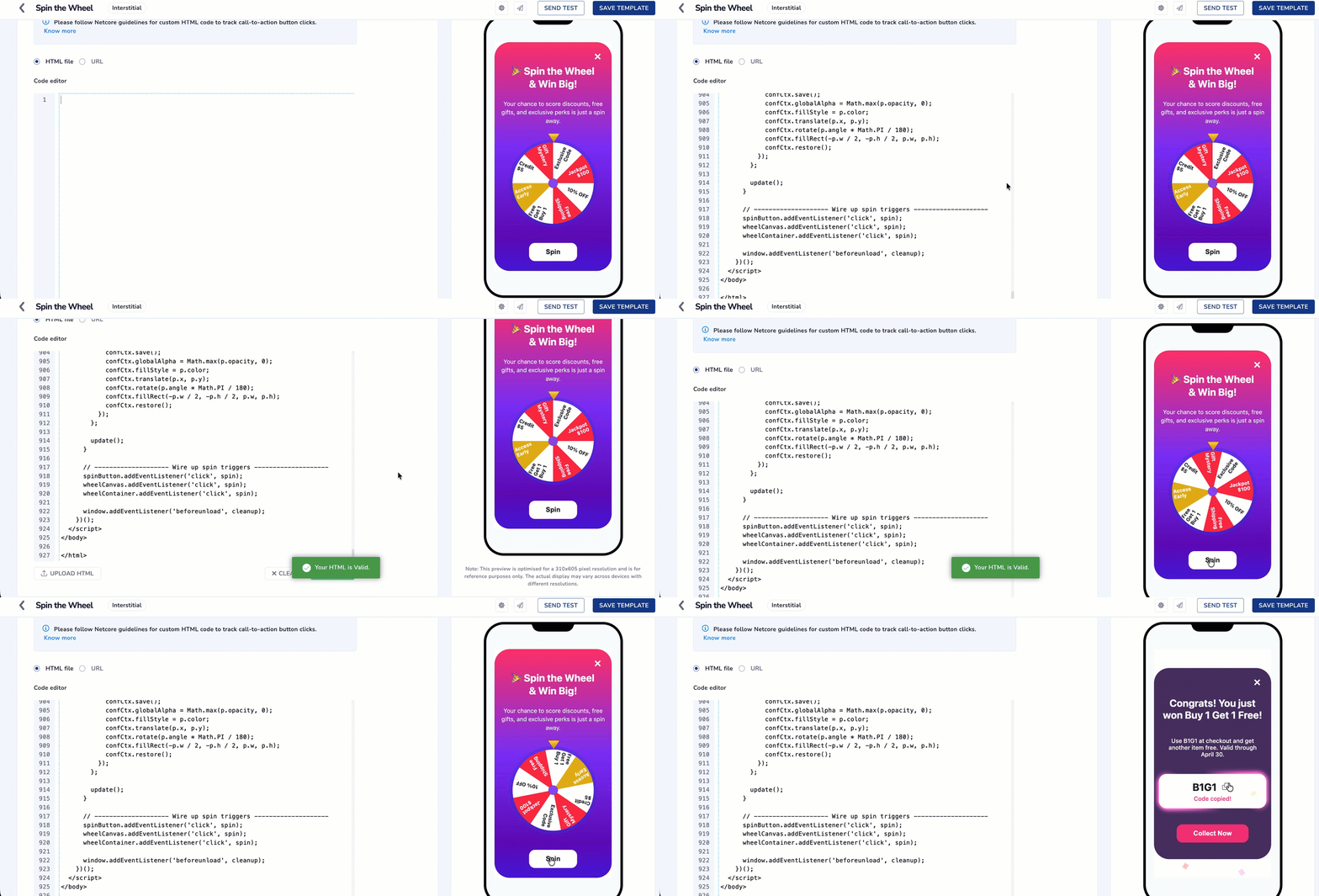
Configure Spin the Wheel using Custom HTML Code
This Is a Code Template, Not a Product Feature
- Spin the Wheel is not a widget you enable in the Netcore dashboard, and it will not appear in any menu. It is a block of HTML that you copy from this page and paste into the Code of HTML Editor
- Netcore does not host, version, or update this template on your behalf.
You are copying code out of this page and pasting it into a html code editor for campaign. Follow these steps in order.
-
Create an in-app template. See Custom HTML for the full template creation flow.
-
Copy the entire code block from the Sample HTML Code section on this page, from the first line to the last. Partial copies will not work.
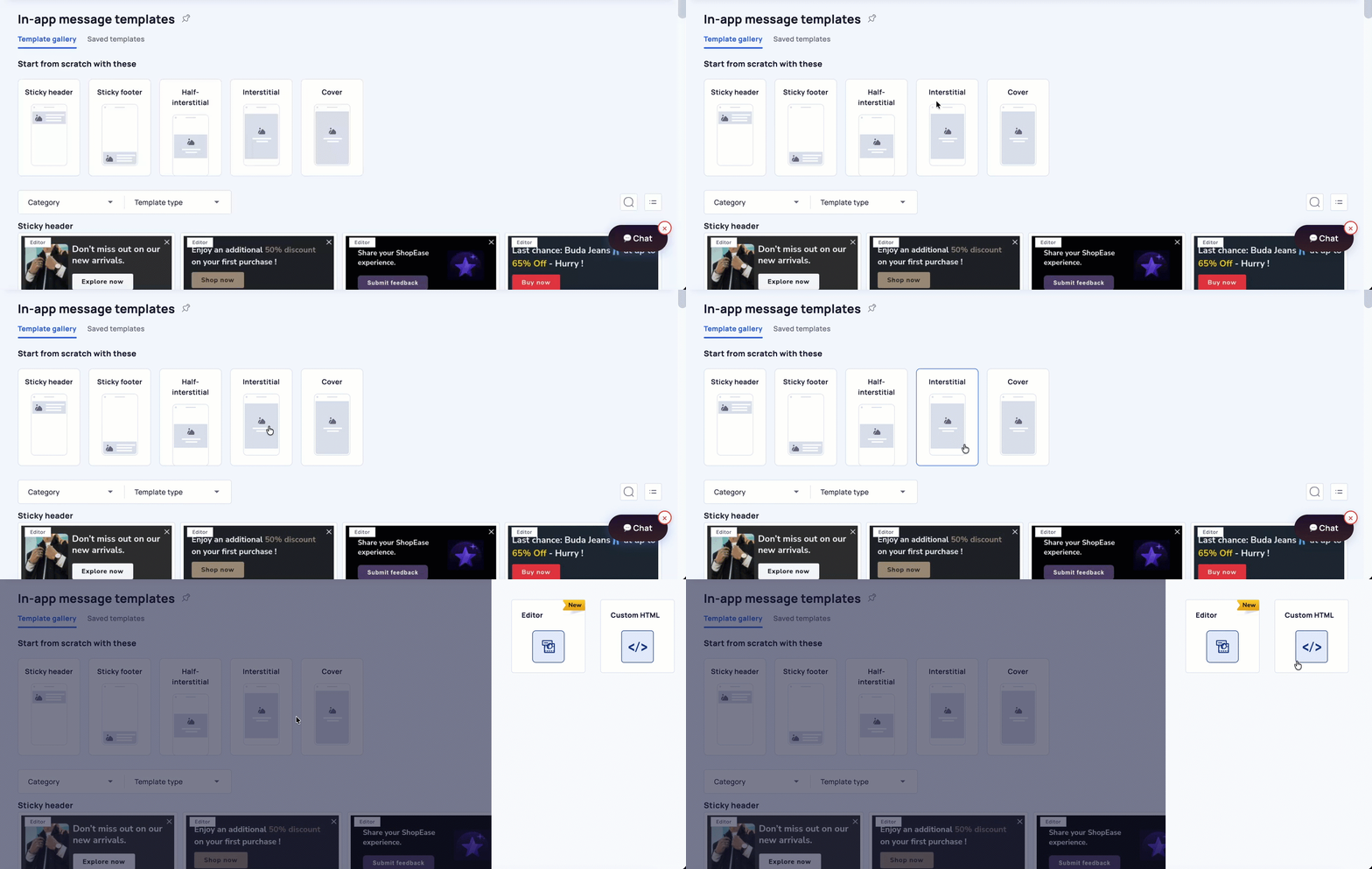
Creating a new template using Custom HTML Editor
-
Paste it into the Code Editor and select Validate.
-
Edit only the CONFIG block at the top of the code. This is where your rewards, colors, copy, and deeplink go. See Editable and Non Editable Section in Custom HTML Code before you change anything.
-
Replace the placeholder deeplink. The template ships with
netcore://your-deeplink-here, which does nothing. SetclaimButton.urlto a real deeplink registered in your app. -
Preview the message in the right pane, then schedule and publish.
Set Up the Underlying Offer SeparatelyThis template displays a reward code and copies it to the user's clipboard. It does not create coupons, apply discounts, or deduct inventory. Create the actual offer in your commerce platform or in Coupon
Sample HTML Code
<!DOCTYPE html>
<html lang="en">
<head>
<!-- ============================================================= -->
<!-- CUSTOMIZE ZONE - Configurable Settings -->
<!-- Everything inside CONFIG is safe to edit. This is the ONLY -->
<!-- part a marketer/non-developer needs to touch. -->
<!-- ============================================================= -->
<script>
const CONFIG = {
// Show the X close button (true = show, false = hide)
includeDismissButton: true,
// Background gradient of the spin card
background: "linear-gradient(180deg, #FF3672 0%, #8332F9 46.63%, #6708BC 84.62%, #4E15DD 100%)",
// Webhook tracking (Webhook.site during testing)
// NOTE: this value looks like a Webhook.site EMAIL address
// ([email protected]), not an HTTPS endpoint. fetch() can only
// POST to an http(s) URL, so tracking will silently no-op until
// this is replaced with your real "https://webhook.site/<token>"
// URL (or your production analytics endpoint).
tracking: {
enabled: true,
webhookUrl: "https://webhook.site/35bf28a2-5c33-4299-ba7c-cb84d969e87e",
campaignId: "spin_wheel_apr",
// User identity. Drop in the Netcore personalization macro that
// resolves to your user identifier at send time. Leave "" to
// rely on the SDK/parent app to attach identity instead.
userId: "",
},
// Fire confetti when the wheel stops
enableConfettiOnWin: true,
// Spin duration in seconds
spinDurationSeconds: 2,
// Spin button
spinButton: {
enabled: true,
text: "Spin ",
background: "#ffffff",
color: "#1d1d1d",
},
// Claim button (shown after the spin)
claimButton: {
enabled: true,
text: "Collect Now",
background: "#F4357D",
color: "#ffffff",
// Netcore deeplink fired on claim. Replace with your app's
// deeplink / URL scheme (e.g. "myapp://offers/spin-win").
url: "netcore://your-deeplink-here",
// OPTIONAL extra data sent to the app alongside the click.
// Set to null if not needed.
payload: { campaign: "spin_the_wheel" },
},
// Main headline (supports HTML like <br>)
mainTitle: {
text: "\uD83C\uDF89 Spin the Wheel <br>& Win Big!",
fontSize: "24px",
color: "#ffffff",
},
// Subtitle / description
subtitle: {
text: "Your chance to score discounts, free gifts, and exclusive perks is just a spin away.",
fontSize: "14px",
color: "#e8f5ff",
},
// Copy-instruction text colors
copyInstruction: {
color: "#606060",
copiedColor: "#F4357D",
},
// Center knob of the wheel
centerCircle: {
color: "#914DFF",
borderColor: "#2B2B2B33",
borderWidth: 2,
radius: 15,
},
// Rewards on the wheel
// - title - headline shown on the reward screen
// - text - label painted inside the wheel sector
// - value - coupon / code copied on click
// - subtitle - small description on the reward screen
// - probability - weighting (does NOT need to sum to 1)
// - colour - sector background colour
rewards: [
{
title: "Congrats! You just won a Promo Code!",
text: "10% OFF",
value: "DISCOUNT10",
subtitle: "Use DISCOUNT10 at checkout to get 10% off your order. Valid through April 30.",
probability: 0.15,
colour: "#ffffff",
},
{
title: "Congrats! You just won Free Shipping!",
text: "Free Shipping",
value: "FREESHIP",
subtitle: "Use FREESHIP at checkout to enjoy free shipping on your order. Valid through April 30.",
probability: 0.15,
colour: "#fc2b46",
},
{
title: "Congrats! You just won Buy 1 Get 1 Free!",
text: "Buy 1 Get 1 Free",
value: "B1G1",
subtitle: "Use B1G1 at checkout and get another item free. Valid through April 30.",
probability: 0.15,
colour: "#ffffff",
},
{
title: "Congrats! You just won Early Access!",
text: "Early Access",
value: "EARLY",
subtitle: "Enjoy early access to new arrivals.",
probability: 0.15,
colour: "#E3B316",
},
{
title: "Congrats! You just won a $5 Credit!",
text: "$5 Credit",
value: "CREDIT5",
subtitle: "Congratulations! $5 store credit will be applied to your account.",
probability: 0.15,
colour: "#ffffff",
},
{
title: "Congrats! You just won a Mystery Gift!",
text: "Mystery Gift",
value: "MYSTERY",
subtitle: "A surprise gift will be sent with your next purchase!",
probability: 0.15,
colour: "#fc2b46",
},
{
title: "Congrats! You just won an Exclusive Code!",
text: "Exclusive Code",
value: "EXCLUSIVE",
subtitle: "Use EXCLUSIVE at checkout for a special offer.",
probability: 0.05,
colour: "#ffffff",
},
{
title: "Congrats! You just won the Jackpot!",
text: "Jackpot $100",
value: "JACKPOT",
subtitle: "You just won $100. We'll email you the details!",
probability: 0.05,
colour: "#fc2b46",
},
],
};
</script>
<!-- ============================================================= -->
<!-- END CUSTOMIZE ZONE -->
<!-- ============================================================= -->
<meta charset="UTF-8" />
<meta name="viewport" content="width=device-width, initial-scale=1.0" />
<title>Spin the Wheel - Win Big!</title>
<!-- ============================================================= -->
<!-- DO NOT MODIFY - Netcore Smartech In-App SDK wiring -->
<!-- Order matters: jQuery -> Smartech App SDK -> init(). -->
<!-- This is what makes the message trackable & interactive on the -->
<!-- Netcore platform. Removing/reordering this breaks the message.-->
<!-- ============================================================= -->
<script src="https://code.jquery.com/jquery-3.4.1.min.js"
integrity="sha256-CSXorXvZcTkaix6Yvo6HppcZGetbYMGWSFlBw8HfCJo=" crossorigin="anonymous"></script>
<script src="https://cdnt.netcoresmartech.com/smartech-app-sdk/scripts/prod/smartech-app-sdk.js?v=1.0.1"></script>
<script>
SmartechAppSDK.init();
</script>
<!-- ============================================================= -->
<!-- END SDK wiring -->
<!-- ============================================================= -->
<style>
:root {
--spin-duration: 1;
--shimmer-hue-1: 337deg;
--shimmer-hue-2: 337deg;
}
@property --mask {
syntax: "<angle>";
inherits: false;
initial-value: 33deg;
}
@keyframes spin {
0% { --mask: 0deg; }
100% { --mask: 360deg; }
}
html,
body {
height: 100%;
width: 100%;
margin: 0;
display: flex;
align-items: center;
justify-content: space-evenly;
font-family: -apple-system, BlinkMacSystemFont, "Segoe UI", Roboto,
Oxygen, Ubuntu, Cantarell, "Open Sans", "Helvetica Neue", sans-serif;
}
.modal {
display: flex;
flex-direction: column;
align-items: center;
height: 100%;
max-height: 580px;
max-width: 320px;
padding: 0 5%;
justify-content: space-evenly;
width: 100%;
color: #ffffff;
text-align: center;
background: linear-gradient(180deg, #FF4ECD 0%, #8E2DE2 100%);
border-radius: 36px;
position: relative;
box-sizing: border-box;
overflow: hidden;
}
.modal.reward {
background: #50346A;
max-height: 455px;
}
.reward-title { font-size: 24px; font-weight: 700; }
.title, .reward-title { margin-top: 30px; }
/* Close button */
.close-btn {
position: absolute;
top: 18px;
right: 18px;
appearance: none;
border: 0;
background: none;
color: #ffffff;
font-size: 32px;
line-height: 1;
cursor: pointer;
z-index: 20;
}
h1 { margin: 0; font-size: 24px; font-weight: 700; }
p { margin: 0; font-size: 14px; line-height: 1.45; color: #e8f5ff; }
/* Wheel container */
.wheel-container {
position: relative;
width: clamp(200px, min(260px, 45vh, 80vw), 260px);
height: clamp(200px, min(260px, 45vh, 80vw), 260px);
max-width: 260px;
max-height: 260px;
aspect-ratio: 1;
margin: 10px auto 0;
}
canvas#wheelCanvas {
width: 100%;
height: 100%;
border-radius: 50%;
border: 8px solid #1E3DD84D;
transform: rotate(0deg);
transition: transform calc(var(--spin-duration) * 1s) cubic-bezier(0.01, 0.05, 0.05, 1);
box-sizing: border-box;
}
/* Pointer arrow */
.pointer {
position: absolute;
top: -14px;
left: 50%;
transform: translateX(-100%);
width: 24px;
height: 18px;
z-index: 2;
}
.pointer::before {
content: '';
position: absolute;
width: 100%;
height: 100%;
background: linear-gradient(0deg, #C68D07 0%, #FFD724 100%);
border: 2px solid #2B2B2B0D;
clip-path: polygon(50% 100%, 0% 0%, 100% 0%);
filter: drop-shadow(0 0 6px rgba(0, 0, 0, 0.2));
}
/* Reward display */
.reward-wrapper {
display: none;
width: 100%;
position: relative;
border-radius: 18px;
overflow: visible;
}
.reward-wrapper.visible { display: block; }
.reward-box {
display: flex;
flex-direction: column;
align-items: center;
gap: 6px;
padding: 16px 0;
background: #ffffff;
color: #1d1d1d;
border-radius: 18px;
width: 100%;
box-sizing: border-box;
cursor: pointer;
}
.reward-main { font-size: 24px; font-weight: 700; }
.reward-subtext { padding: 0 20px; font-size: 14px; font-weight: 500; }
.copy-instruction {
font-family: 'Proxima Nova', -apple-system, BlinkMacSystemFont, "Segoe UI", Roboto, Oxygen, Ubuntu, Cantarell, "Open Sans", "Helvetica Neue", sans-serif;
font-weight: 500;
font-size: 14px;
line-height: 100%;
text-align: center;
}
.copy-btn {
display: inline;
appearance: none;
border: none;
background: none;
cursor: pointer;
font-size: 24px;
line-height: 1;
color: #1d1d1d;
transition: transform 0.1s ease-in-out;
}
.copy-btn:active { transform: scale(0.9); }
/* Spin / Claim button */
.action-btn {
width: fit-content;
padding: 12.5px 40px;
border: none;
border-radius: 14px;
background: #ffffff;
color: #1d1d1d;
font-size: 16px;
font-weight: 700;
cursor: pointer;
}
.action-btn:disabled { opacity: 0.6; cursor: default; }
/* Pulsating reward ticket */
@keyframes pulsate {
0% { transform: scale(1); }
50% { transform: scale(1.05); }
100% { transform: scale(1); }
}
.pulsate-animation { animation: pulsate 1.5s 3; }
/* Shimmer effect */
.shimmer {
position: absolute;
inset: -40px;
border-radius: inherit;
mix-blend-mode: plus-lighter;
pointer-events: none;
mask-image: conic-gradient(from var(--mask, 0deg),
transparent 0%, transparent 10%, black 36%, black 45%,
transparent 50%, transparent 60%, black 85%, black 95%, transparent 100%);
mask-size: cover;
animation: spin 3s linear infinite both -0.5s;
z-index: 10;
}
.shimmer::before, .shimmer::after {
content: "";
border-radius: inherit;
position: absolute;
inset: 40px;
opacity: 1;
}
.shimmer::before {
box-shadow: 0 0 2px 1px hsl(var(--shimmer-hue-1) 90% 58%),
0 0 9px 6px hsl(var(--shimmer-hue-2) 70% 60%);
z-index: -1;
}
.reward-wrapper.visible .shimmer { opacity: 1; visibility: visible; }
.reward-wrapper.shimmer-active .shimmer { animation: spin 2s linear infinite; }
</style>
</head>
<body>
<!-- ---------------- Spin screen ---------------- -->
<div class="modal" id="spinModal">
<!-- data-smt-action="SMTInAppClose" lets the Netcore SDK close
the message AND record the close event automatically. -->
<button class="close-btn" aria-label="Close" data-smt-action="SMTInAppClose">×</button>
<h1 class="title" id="mainTitle"></h1>
<p id="subtitle"></p>
<div class="wheel-container">
<div class="pointer"></div>
<canvas id="wheelCanvas" role="button" tabindex="0" aria-label="Spin the Wheel"></canvas>
</div>
<button class="action-btn" id="actionButton">Spin Now</button>
</div>
<!-- ---------------- Reward screen ---------------- -->
<div class="modal reward" id="rewardModal" style="display: none;">
<button class="close-btn" aria-label="Close" data-smt-action="SMTInAppClose">×</button>
<h1 class="reward-title" id="rewardTitle"></h1>
<div id="rewardSubtext" class="reward-subtext"></div>
<div class="reward-wrapper" id="rewardWrapper">
<span class="shimmer"></span>
<div class="reward-box ticket" id="rewardBox">
<div class="reward-main">
<span id="rewardText"></span>
<button id="copyBtn" class="copy-btn" title="Copy to clipboard">
<svg width="20" height="21" viewBox="0 0 20 21" fill="none" xmlns="http://www.w3.org/2000/svg">
<path fill-rule="evenodd" clip-rule="evenodd"
d="M13 13.8444V17.8444C13 18.4444 12.6 18.8444 12 18.8444H3C2.4 18.8444 2 18.4444 2 17.8444V8.84442C2 8.24442 2.4 7.84442 3 7.84442H7V3.84442C7 3.24442 7.4 2.84442 8 2.84442H17C17.6 2.84442 18 3.24442 18 3.84442V12.8444C18 13.4444 17.6 13.8444 17 13.8444H13ZM12 13.8444H8C7.4 13.8444 7 13.4444 7 12.8444V8.84442H3V17.8444H12V13.8444ZM17 3.84442H8V12.8444H17V3.84442Z"
fill="#4A4C4C" />
</svg>
</button>
</div>
<div class="copy-instruction">Click here to copy the code!</div>
</div>
</div>
<button class="action-btn" id="claimButton">Collect Now</button>
</div>
<script>
(function () {
// -------------------- Element refs --------------------
const spinModal = document.getElementById('spinModal');
const rewardModal = document.getElementById('rewardModal');
const mainTitleEl = document.getElementById('mainTitle');
const subtitleEl = document.getElementById('subtitle');
const wheelCanvas = document.getElementById('wheelCanvas');
const wheelContainer = document.querySelector('.wheel-container');
const ctx = wheelCanvas.getContext('2d');
const spinButton = document.getElementById('actionButton');
const claimButton = document.getElementById('claimButton');
const rewardWrapper = document.getElementById('rewardWrapper');
const rewardBox = document.getElementById('rewardBox');
const rewardTextEl = document.getElementById('rewardText');
const rewardSubtextEl = document.getElementById('rewardSubtext');
const copyBtn = document.getElementById('copyBtn');
const closeButtons = document.querySelectorAll('.close-btn');
const rewardTitleEl = document.getElementById('rewardTitle');
const copyInstructionEl = document.querySelector('.copy-instruction');
let isSpinning = false;
let currentRotation = 0;
// ==========================================================
// DO NOT MODIFY - Netcore SDK interaction helpers
// ==========================================================
// Fire a tracked In-App CLICK to the app (deeplink + optional data).
// Uses the SDK when present; falls back to a plain redirect so the
// template still "does something" in a bare browser preview.
function netcoreTrackClick (deeplink, payload) {
try {
if (window.SmartechAppSDK && typeof SmartechAppSDK.trackInAppClick === 'function') {
SmartechAppSDK.trackInAppClick(deeplink, payload || null);
return;
}
} catch (e) { /* swallow - fall through to fallback */ }
if (deeplink) window.location.href = deeplink;
}
// ==========================================================
// END SDK helpers
// ==========================================================
// -------------------- Analytics (webhook tracking) --------------------
// Sends a JSON event to CONFIG.tracking.webhookUrl whenever tracking
// is enabled. Wrapped defensively: a bad/unreachable endpoint must
// never break the spin-to-win flow for the user.
function trackEvent (eventName, data) {
if (!CONFIG.tracking || !CONFIG.tracking.enabled || !CONFIG.tracking.webhookUrl) return;
try {
const body = JSON.stringify(Object.assign({
event: eventName,
campaignId: CONFIG.tracking.campaignId || '',
userId: CONFIG.tracking.userId || '',
timestamp: new Date().toISOString(),
}, data || {}));
fetch(CONFIG.tracking.webhookUrl, {
method: 'POST',
headers: { 'Content-Type': 'application/json' },
body: body,
mode: 'no-cors',
}).catch(function () { /* network errors must never break the UI */ });
} catch (e) { /* swallow - tracking must never throw */ }
}
// -------------------- Apply Config --------------------
// Modal background
if (CONFIG.background) spinModal.style.background = CONFIG.background;
// Dismiss button: hide if disabled. When enabled, the SDK handles
// close+tracking via data-smt-action; we only run cleanup here.
if (!CONFIG.includeDismissButton && closeButtons.length > 0) {
closeButtons.forEach(btn => { btn.style.display = 'none'; });
} else {
closeButtons.forEach(btn => {
btn.addEventListener('click', () => {
trackEvent('modal_dismissed', {});
cleanup();
});
});
}
// Spin duration
const spinDuration = CONFIG.spinDurationSeconds || 1;
document.documentElement.style.setProperty('--spin-duration', spinDuration);
// Main Title & Subtitle
mainTitleEl.innerHTML = CONFIG.mainTitle.text;
mainTitleEl.style.fontSize = CONFIG.mainTitle.fontSize;
mainTitleEl.style.color = CONFIG.mainTitle.color;
subtitleEl.textContent = CONFIG.subtitle.text;
subtitleEl.style.fontSize = CONFIG.subtitle.fontSize;
subtitleEl.style.color = CONFIG.subtitle.color;
// Copy instruction color
if (copyInstructionEl && CONFIG.copyInstruction.color) {
copyInstructionEl.style.color = CONFIG.copyInstruction.color;
}
// Action button initial (Spin)
spinButton.textContent = CONFIG.spinButton.text;
spinButton.style.background = CONFIG.spinButton.background;
spinButton.style.color = CONFIG.spinButton.color;
if (!CONFIG.spinButton.enabled) spinButton.style.display = 'none';
// Rewards
const rewards = CONFIG.rewards;
// -------------------- Canvas Setup & Sizing --------------------
let resizeObserver;
let resizeTimeout;
function setupCanvas () {
const containerRect = wheelContainer.getBoundingClientRect();
const dpr = window.devicePixelRatio || 1;
const computedStyle = window.getComputedStyle(wheelCanvas);
const borderWidth = parseInt(computedStyle.borderWidth) || 0;
const availableWidth = containerRect.width - (borderWidth * 2);
const availableHeight = containerRect.height - (borderWidth * 2);
let size = Math.min(availableWidth, availableHeight);
if (size <= 0 || !isFinite(size)) {
const viewportSize = Math.min(window.innerWidth, window.innerHeight);
const maxSize = Math.min(260, viewportSize * 0.8);
size = Math.max(200, maxSize - (borderWidth * 2));
}
size = Math.max(size, 150);
wheelCanvas.style.width = size + 'px';
wheelCanvas.style.height = size + 'px';
wheelCanvas.width = size * dpr;
wheelCanvas.height = size * dpr;
ctx.scale(dpr, dpr);
}
function handleResize () {
if (resizeTimeout) clearTimeout(resizeTimeout);
resizeTimeout = setTimeout(() => {
setupCanvas();
drawWheel();
}, 16);
}
function initializeCanvas () {
if (window.ResizeObserver) {
resizeObserver = new ResizeObserver(handleResize);
resizeObserver.observe(wheelContainer);
} else {
window.addEventListener('resize', handleResize);
}
setupCanvas();
drawWheel();
}
function cleanup () {
if (resizeObserver) resizeObserver.disconnect();
else window.removeEventListener('resize', handleResize);
if (resizeTimeout) clearTimeout(resizeTimeout);
}
if (document.readyState === 'loading') {
document.addEventListener('DOMContentLoaded', initializeCanvas);
} else {
setTimeout(initializeCanvas, 0);
}
// -------------------- Reward selection --------------------
function chooseReward () {
const total = rewards.reduce((acc, r) => acc + r.probability, 0);
let rand = Math.random() * total;
for (const reward of rewards) {
if (rand < reward.probability) return reward;
rand -= reward.probability;
}
return rewards[rewards.length - 1];
}
// -------------------- Draw wheel --------------------
function drawWheel (rotation = 0) {
const cssWidth = parseInt(wheelCanvas.style.width) || wheelCanvas.width;
const cssHeight = parseInt(wheelCanvas.style.height) || wheelCanvas.height;
const centreX = cssWidth / 2;
const centreY = cssHeight / 2;
const outerRadius = Math.min(cssWidth, cssHeight) / 2;
const segmentAngle = (Math.PI * 2) / rewards.length;
ctx.clearRect(0, 0, cssWidth, cssHeight);
ctx.save();
ctx.translate(centreX, centreY);
ctx.rotate(rotation);
rewards.forEach((reward, index) => {
ctx.beginPath();
ctx.moveTo(0, 0);
ctx.arc(0, 0, outerRadius, index * segmentAngle, (index + 1) * segmentAngle);
ctx.closePath();
ctx.fillStyle = reward.colour;
ctx.fill();
ctx.save();
ctx.fillStyle = reward.colour.toLowerCase() === '#ffffff' ? '#1d1d1d' : '#ffffff';
const midAngle = index * segmentAngle + segmentAngle / 2;
ctx.rotate(midAngle);
// Segments whose mid-angle falls in the left half of the wheel
// would otherwise render mirrored/upside-down (the local
// +x axis points away from "screen up" there). Flip those
// labels 180deg in place so every label reads upright.
const normalizedAngle = ((midAngle % (Math.PI * 2)) + Math.PI * 2) % (Math.PI * 2);
const isUpsideDown = normalizedAngle > Math.PI / 2 && normalizedAngle < (Math.PI * 3) / 2;
const labelX = outerRadius - (outerRadius * 0.04);
if (isUpsideDown) {
ctx.translate(labelX, 0);
ctx.rotate(Math.PI);
ctx.textAlign = 'left';
} else {
ctx.textAlign = 'right';
}
const fontSize = Math.max(13, cssWidth * 0.05);
ctx.font = `bold ${fontSize}px -apple-system, BlinkMacSystemFont, "Segoe UI", Roboto, Oxygen, Ubuntu, Cantarell, "Open Sans", "Helvetica Neue", sans-serif`;
const maxWidth = outerRadius * 0.6;
const words = reward.text.split(' ');
let line = '';
let lines = [];
for (let i = 0; i < words.length; i++) {
const testLine = line + words[i] + ' ';
const metrics = ctx.measureText(testLine);
if (metrics.width > maxWidth && i > 0) {
lines.push(line);
line = words[i] + ' ';
} else {
line = testLine;
}
}
lines.push(line);
const lineHeight = fontSize * 1.1;
const totalHeight = (lines.length - 1) * lineHeight;
lines.forEach((ln, lineIndex) => {
const yPos = 4 + lineIndex * lineHeight - totalHeight / 2;
const x = isUpsideDown ? 0 : labelX;
const y = isUpsideDown ? -yPos : yPos;
ctx.fillText(ln, x, y);
});
ctx.restore();
});
// Centre knob
const centerRadius = (CONFIG.centerCircle.radius / 260) * outerRadius * 2;
ctx.beginPath();
ctx.arc(0, 0, centerRadius, 0, Math.PI * 2);
ctx.fillStyle = CONFIG.centerCircle.color;
ctx.fill();
if (CONFIG.centerCircle.borderWidth > 0) {
ctx.strokeStyle = CONFIG.centerCircle.borderColor;
ctx.lineWidth = (CONFIG.centerCircle.borderWidth / 260) * outerRadius * 2;
ctx.stroke();
}
ctx.restore();
}
// -------------------- Spin logic --------------------
function spin () {
if (isSpinning) return;
isSpinning = true;
trackEvent('spin_button_clicked', {});
rewardWrapper.classList.remove('visible');
const selectedReward = chooseReward();
const selectedIndex = rewards.indexOf(selectedReward);
const anglePerSegmentDeg = 360 / rewards.length;
const spins = Math.floor(Math.random() * 3) + 4; // 4-6 full spins
const pointerOffsetDeg = 270; // pointer sits at top pointing down
const randomSpaceWithinSegment = anglePerSegmentDeg * Math.random();
const finalDeg = spins * 360 + (360 - (selectedIndex * anglePerSegmentDeg) - randomSpaceWithinSegment + pointerOffsetDeg);
currentRotation = finalDeg;
wheelCanvas.style.transform = `rotate(${currentRotation}deg)`;
const onTransitionEnd = () => {
wheelCanvas.removeEventListener('transitionend', onTransitionEnd);
isSpinning = false;
showReward(selectedReward);
};
wheelCanvas.addEventListener('transitionend', onTransitionEnd);
}
function showReward (reward) {
setTimeout(() => {
if (wheelContainer) wheelContainer.style.display = 'none';
rewardTitleEl.textContent = reward.title;
rewardTextEl.textContent = reward.value;
rewardSubtextEl.textContent = reward.subtitle;
rewardWrapper.classList.add('visible');
rewardWrapper.classList.add('shimmer-active');
rewardBox.classList.add('pulsate-animation');
trackEvent('reward_shown', {
reward_value: reward.value,
reward_text: reward.text,
reward_title: reward.title,
});
const shimmerElement = rewardWrapper.querySelector('.shimmer');
if (shimmerElement) {
shimmerElement.style.animation = 'none';
shimmerElement.offsetHeight; // reflow
shimmerElement.style.animation = 'spin 2s linear infinite';
}
spinModal.style.display = 'none';
rewardModal.style.display = 'flex';
// Claim button - fires a tracked Netcore In-App click
if (CONFIG.claimButton.enabled) {
claimButton.textContent = CONFIG.claimButton.text;
claimButton.style.background = CONFIG.claimButton.background;
claimButton.style.color = CONFIG.claimButton.color;
claimButton.addEventListener('click', () => {
trackEvent('claim_button_clicked', {
reward_value: reward.value,
reward_text: reward.text,
reward_title: reward.title,
});
cleanup();
netcoreTrackClick(CONFIG.claimButton.url, CONFIG.claimButton.payload);
}, { once: true });
} else {
claimButton.style.display = 'none';
}
if (CONFIG.enableConfettiOnWin) fireConfetti();
}, 1000);
}
// -------------------- Copy to clipboard --------------------
function copyToClipboard () {
const text = rewardTextEl.textContent;
if (!text) return;
if (navigator.clipboard && navigator.clipboard.writeText) {
navigator.clipboard.writeText(text).then(showCopySuccess).catch(() => fallbackCopy(text));
} else {
fallbackCopy(text);
}
}
function copyRewardText (e) {
if (e && e.target === copyBtn || (e.target.closest && e.target.closest('#copyBtn'))) return;
copyToClipboard();
}
copyBtn.addEventListener('click', (e) => {
e.stopPropagation();
copyToClipboard();
});
rewardWrapper.addEventListener('click', copyRewardText);
function showCopySuccess () {
copyInstructionEl.textContent = "Code copied!";
copyInstructionEl.style.color = CONFIG.copyInstruction.copiedColor;
}
function fallbackCopy (text) {
const input = document.createElement('input');
input.setAttribute('readonly', '');
input.setAttribute('value', text);
input.style.position = 'absolute';
input.style.left = '-9999px';
document.body.appendChild(input);
input.select();
document.execCommand('copy');
document.body.removeChild(input);
showCopySuccess();
}
// -------------------- Confetti (self-contained, no library) ----
function fireConfetti () {
const colors = ["#FFC700", "#FF0000", "#2E3192", "#41F4BC", "#943DFF", "#FF61E6"];
const particleCount = 120;
const gravity = 0.3;
const confettiCanvas = document.createElement('canvas');
confettiCanvas.style.position = 'fixed';
confettiCanvas.style.top = '0';
confettiCanvas.style.left = '0';
confettiCanvas.style.width = '100%';
confettiCanvas.style.height = '100%';
confettiCanvas.style.pointerEvents = 'none';
confettiCanvas.style.zIndex = '9999';
document.body.appendChild(confettiCanvas);
const confCtx = confettiCanvas.getContext('2d');
confettiCanvas.width = window.innerWidth;
confettiCanvas.height = window.innerHeight;
const particles = [];
const randomRange = (min, max) => Math.random() * (max - min) + min;
for (let i = 0; i < particleCount; i++) {
particles.push({
x: confettiCanvas.width / 2,
y: confettiCanvas.height * 0.6,
w: randomRange(6, 12),
h: randomRange(8, 16),
angle: randomRange(0, 360),
tiltAngleSpeed: randomRange(0.05, 0.12),
color: colors[Math.floor(Math.random() * colors.length)],
velocityX: randomRange(-9, 9),
velocityY: randomRange(-16, -8),
opacity: 1,
decay: randomRange(0.0075, 0.015),
});
}
const update = () => {
confCtx.clearRect(0, 0, confettiCanvas.width, confettiCanvas.height);
particles.forEach((p, idx) => {
p.x += p.velocityX;
p.y += p.velocityY;
p.velocityY += gravity;
p.opacity -= p.decay;
p.angle += p.tiltAngleSpeed * 180 / Math.PI;
if (p.opacity <= 0 || p.y > confettiCanvas.height + 20) particles.splice(idx, 1);
});
draw();
if (particles.length) requestAnimationFrame(update);
else confettiCanvas.remove();
};
const draw = () => {
particles.forEach((p) => {
confCtx.save();
confCtx.globalAlpha = Math.max(p.opacity, 0);
confCtx.fillStyle = p.color;
confCtx.translate(p.x, p.y);
confCtx.rotate(p.angle * Math.PI / 180);
confCtx.fillRect(-p.w / 2, -p.h / 2, p.w, p.h);
confCtx.restore();
});
};
update();
}
// -------------------- Wire up spin triggers --------------------
spinButton.addEventListener('click', spin);
wheelCanvas.addEventListener('click', spin);
wheelContainer.addEventListener('click', spin);
window.addEventListener('beforeunload', cleanup);
})();
</script>
</body>
</html>
Editable and Non Editable Section in Custom HTML Code
The template is one HTML file with three parts. Only the first one is yours to change.
| Part | Think of it as | Do you edit it? |
|---|---|---|
| The Settings Block | The control panel: colors, text, prizes, links, tracking. | Yes. This is the only part you edit. |
| The Netcore Connection | The plug that connects the game to the Netcore platform. | No. Never. |
| The Game Engine | The machinery that draws the wheel, spins it, and picks a winner. | No. Developers only. |
If you are editing anything outside the Settings Block to run a campaign, stop. What you need is already inside it.
What the Game Engine Does
You never edit this, but it helps to know what it is doing. The engine reads your settings, paints the wheel with your prizes and colors, spins when tapped, lands on the pre-chosen winner, swaps to the reward screen, shows the coupon with a copy button, fires the confetti, and sends tracking events along the way.
It also handles screen sizes automatically, keeps labels readable on every slice, and makes sure a broken tracking URL can never break the game itself. The user always gets their spin.
Important Point to RememberRemember Changing Values Is Safe, Changing Key Names Is Not!
- Inside the CONFIG block, edit the values on the right of each colon. Do not rename the settings themselves. Changing
spinDurationSeconds: 2tospinDurationSeconds: 4is fine. Renaming it tospinDuration: 4means the template can no longer find it.- Keep the punctuation intact too. A missing comma or quotation mark stops the whole message from rendering.
- The code below the CONFIG block is what makes the wheel render, spin, and report back to Netcore, which is why DO NOT EDIT it.
"But the Deeplink Is in There, Why Can't I Change It?"You can, just not there. The Netcore Connection block contains the machine that fires clicks. The deeplink address itself lives in the Settings Block, as
claimButton.url.Change the address, never the machine. That is the whole rule.
Components You Must Not Remove
Three parts of the locked zone are worth knowing by name, because removing them is the most common way a campaign breaks. Each one connects the template to the Netcore Smartech SDK.
| Component | Why it's required |
|---|---|
SDK wiring block (<head>) | Loads jQuery and the Netcore Smartech App SDK in the required order. |
| data-smt-action="SMTInAppClose" | Allows the SDK to close the message and record the dismissal event. |
| netcoreTrackClick() | Tracks the CTA click and opens the configured deeplink. |
If any of these are missing, the message can still render in the preview pane while failing to close, failing to report, or failing to open your deeplink on a real device.
It is identical in every template, for every customer, on purpose. It is the contract with the platform, not campaign content, so there is nothing campaign-specific in it and no reason to touch it.
Use Case Based Answers
| You want to | Do this |
|---|---|
| Change prizes, odds, or colors | Edit the rewards list. Nothing else. |
| Send winners to a different app screen | Edit claimButton.url. |
| Make one prize far more likely | Raise that prize's probability and lower the others toward zero. |
| Know which user won which coupon | Fill tracking.userId with a personalization macro. |
| Fix tracking that is not arriving | Check that tracking.enabled is true and webhookUrl starts with https://. |
| Change how the wheel spins or draws | Do not. Raise it with the product team so every template gets the fix. |
The Winner Is Chosen Before the Wheel SpinsThe template picks the winning prize from your
probabilityweightings the moment the user taps. The spinning animation is presentation, not selection. This is why changing aprobabilityvalue is the only lever you need to make a prize rare or near-certain.
Update Custom HTML Code for Spin the Wheel
You can customize the following five sections to configure the Spin the Wheel widget for your In-app message campaign. All of them live inside the CONFIG block.
Layout: Configure the overall appearance and behavior of the widget.
| Setting | Description | Example |
|---|---|---|
includeDismissButton | Show or hide the close (×) button. | true |
background | Background color or CSS gradient for the widget. | "linear-gradient(180deg, #FF3672 0%, #4E15DD 100%)" |
enableConfettiOnWin | Show confetti after a winning spin. | true |
spinDurationSeconds | Duration of the wheel animation. | 2 |
Recommended Spin DurationKeep the animation between two-three seconds. Longer spins feel like loading screens and increase drop-offs.
Text & Typography: Customize the content shown on both screens.
Spin Screen
| Setting | Description |
|---|---|
mainTitle.text | Main heading. Supports basic HTML like <br>. |
mainTitle.fontSize | Heading size. |
mainTitle.color | Heading color. |
subtitle.text | Supporting text below the heading. |
subtitle.fontSize | Subtitle size. |
subtitle.color | Subtitle color. |
Reward Screen
| Setting | Description |
|---|---|
copyInstruction.color | Instruction text color before copying. |
copyInstruction.copiedColor | Color shown after the coupon is copied. |
Buttons: Customize the primary actions shown on each screen.
Spin Button
| Setting | Description |
|---|---|
spinButton.enabled | Show or hide the Spin button. Users can still tap the wheel directly. |
spinButton.text | Button label. |
spinButton.background | Background color. |
spinButton.color | Text color. |
Claim Button
| Setting | Description |
|---|---|
claimButton.enabled | Show or hide the Claim button. |
claimButton.text | Button label. |
claimButton.background | Background color. |
claimButton.color | Text color. |
claimButton.url | Deep link opened after the reward is claimed. |
claimButton.payload | Optional payload passed to your app. Use null if not required. |
Wheel Appearance: Customize the center hub of the wheel.
| Setting | Description |
|---|---|
centerCircle.color | Fill color. |
centerCircle.borderColor | Border color. |
centerCircle.borderWidth | Border thickness (px). |
centerCircle.radius | Center circle size. |
Rewards: Each object in the rewards array becomes one segment on the wheel.
| Field | Description |
|---|---|
text | Label shown inside the wheel. Keep it short (2–3 words). |
title | Heading displayed after the user wins. |
value | Coupon or reward code copied to the clipboard. |
subtitle | Supporting message, such as expiry or terms. |
probability | Relative chance of winning this reward. |
colour | Segment background color. |
Troubleshoot and FAQs
Q. Why does the wheel not appear in my template?
A. The message may be using a Sticky Header or Sticky Footer position. Switch the placement to Interstitial or Cover.
Q. Why does the wheel appear cropped?
A. The selected message position does not provide enough vertical space. Use a taller placement, such as Interstitial or Cover.
Q. Why do the segment labels overlap or look cramped?
A. The segment labels may be too long, or the wheel may have too many segments. Shorten the text values or reduce the number of segments.
Q. Why doesn't anything happen when I click Collect Now?
A. Verify that claimButton.url has been replaced with a valid deeplink and that the deeplink is registered in your app.
Q. Why doesn't the message close when I click the close button?
A. The data-smt-action="SMTInAppClose" attribute may have been removed from the close button. Restore the attribute to enable the SDK to close the message correctly.
Q. Why doesn't the reward code copy on some devices?
A. Some app webviews restrict clipboard access. If copying is unavailable, users can still view and manually enter the reward code.
Q. Why doesn't the template render at all?
A. The SDK block may have been modified or reordered, or the Netcore Smartech SDK may not be integrated into your app correctly. Ensure the SDK block remains unchanged and is loaded in the required order.
Updated about 1 hour ago